

A barbershop website has one job: turn browsers into booked clients. The right Wix template makes that easy by showing off your cuts, listing your services clearly, and getting visitors to tap "Book Now" without hunting around.
Whether your shop leans modern and bold or classic and traditional, Wix has barbershop templates built around that goal. With a professional template, you can display fades, beard trims, and grooming packages, showcase your portfolio, and let clients book straight from your site.
Below are the 3 top Wix barbershop website templates: what they look like, what they do well, who each fits best, and the specific customizations that will make your site stand out.
* read the rest of the post and open up an offer
What Makes a Good Wix Barbershop Website?
Before picking a template, know what your site actually needs to do. A barbershop website should answer three questions the moment someone lands on it: What services do you offer? Where are you located? How does someone book an appointment?
The best Wix barbershop websites include:
- A photo gallery: clients want to see your work before they commit. Before-and-after shots of fades, tapers, and beard trims build trust fast. Wix's built-in Photo Gallery widget lets you organize photos by service type so clients can filter straight to the style they want.
- A service menu with pricing: no one wants to call just to find out how much a haircut costs. List every service with its price and duration. "Skin fade (30 min, $35)" performs better than just "Fade" because it sets expectations and filters out price-shoppers before they book.
- Online booking through Wix Bookings: the native scheduling app lets clients book appointments 24/7. You can add individual barber profiles so clients pick their preferred stylist, set buffer time between appointments, and send automatic confirmation and reminder emails.
- Your location and hours on every page: visible in the header or as a sticky footer bar, not buried on a Contact page three clicks deep. Barbershops lose walk-in traffic to competitors who make their address obvious.
- Client reviews and testimonials: a testimonials section builds trust with new visitors who don't know your work yet. Wix Reviews integrates natively so each review can show a star rating, name, and a verified purchase tag.
Gentlemen's Barbershop (Hair & There)
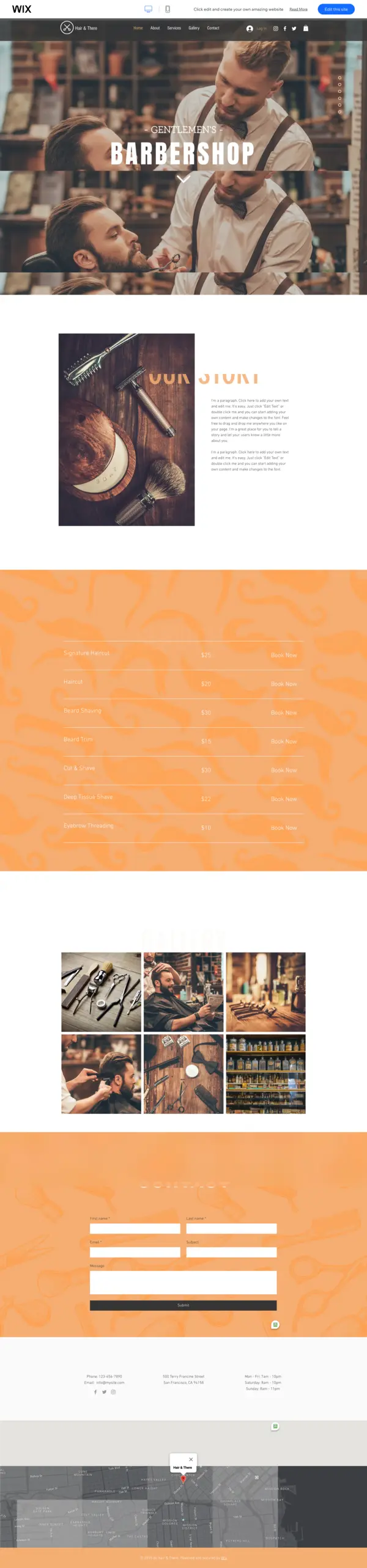
Hair and There is built for shops that want to make an immediate visual impact. The template uses a dark color palette with heavy sans-serif typography to create a look that feels more like a brand than a local service business. Bold grid layouts keep your best cut photos front and center, and the contrast between dark backgrounds and sharp white typography puts the focus exactly where it belongs: your work.
This template is specifically designed around the booking experience. The "Book Now" call-to-action appears in the navigation and in multiple sections down the page, so visitors never have to hunt for it. The mobile version maintains the same visual weight as the desktop design, which matters because most barbershop clients book from their phones.
Who Hair and There Works Best For
- Urban shops in competitive markets: the bold design immediately differentiates you from generic template sites. In a neighborhood with 5 barbershops, this look stands out.
- Fade and precision cut specialists: the high-contrast photo sections are built to show technical work. A clean fade against a dark background reads particularly well in this template.
- Shops with a loyal social media following: if you post cut photos regularly, this template turns your Instagram aesthetic into a full website without requiring a designer.
- Multi-barber shops that want a polished team page: you can add individual barber profiles with photos, specialties, and booking buttons for each stylist.
Hair and There Barbershop Highlights
- Bold, urban design with dark tones and high-contrast typography that puts photos first
- Multiple booking CTAs placed throughout the page so clients can book from any scroll position
- Integrated client testimonials section to showcase real customer feedback
- Navigation stays clean and accessible even on small mobile screens
- Service menu layout supports individual barber profiles and specialty descriptions
- Built-in booking system connects directly to Wix Bookings calendar management
Best customization tip: Replace the default placeholder photos immediately. Hair and There's dark template amplifies the quality of your actual cut photos. Even 5-6 strong before-and-after images on the hero section will outperform any stock imagery.
Not ideal for: shops that want a warm, welcoming, community-oriented feel. The dark aesthetic works best when your brand is polished and urban, not neighborhood-casual.
Best for: modern city shops, barbers focused on fades and urban grooming styles, high-volume shops with a strong visual identity.
Clean Shave
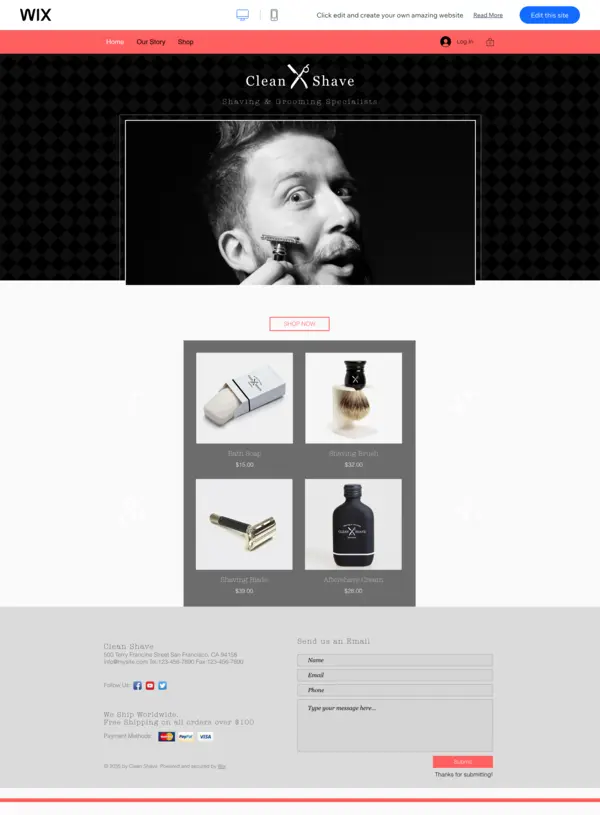
Clean Shave takes the opposite approach to Hair and There. Instead of bold and dark, this template uses white space, minimal framing, and restrained typography to communicate premium quality. Think of it as the barbershop equivalent of a luxury product site: the design gets out of the way and lets your work speak.
The service sections display cuts and grooming packages in a clean grid with pricing clearly visible. The "Book Now" buttons are placed in prominent positions without feeling aggressive, which suits clients who want to browse before committing. If your shop charges premium prices, Clean Shave's design signals that those prices are justified before a client reads a single word.
Who Clean Shave Works Best For
- High-end men's grooming studios: this template positions you as a destination, not just a convenience. Clients who pay $60 or more for a cut expect a website that looks the part.
- Shops that offer premium services: hot towel shaves, beard sculpting, scalp treatments. Clean Shave's layout gives space to describe each service in detail without feeling cluttered.
- New shops building a premium reputation: the template itself communicates quality even before you have a full portfolio. It gives you a credible starting point.
- Barbershops in affluent neighborhoods or business districts: the aesthetic matches the clientele who expects a polished digital presence.
Clean Shave Highlights
- Minimal, white-space-heavy design that communicates premium positioning without being loud
- Clear service sections for cuts, beard trims, and grooming packages with individual pricing
- High-quality photo areas where your portfolio work gets room to breathe
- Prominent "Book Now" buttons positioned for conversion without feeling pushy
- Works well on all screen sizes, including tablets where grooming clients often browse
- Simple navigation structure reduces the number of clicks to booking
Best customization tip: Add your actual price list early in the page. Clean Shave's layout supports detailed service menus, and transparent pricing on a premium site builds confidence rather than concern.
Not ideal for: shops where content is sparse or photography is limited. Clean Shave needs strong imagery to work well. White space with mediocre photos feels empty rather than premium.
Best for: upscale barbershops, men's grooming studios, shops with a premium service range and professional photography.
Beckette
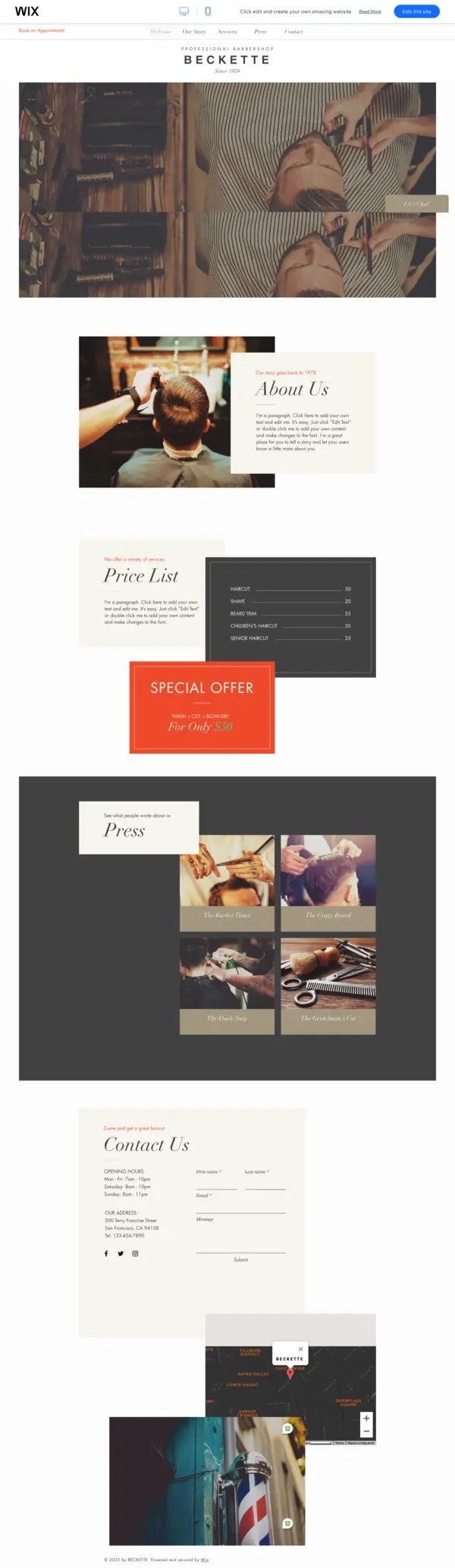
Beckette is designed for barbershops where history and character matter as much as the haircut. Warm earth tones, serif and display fonts, and a layout that feels hand-crafted rather than corporate give this template the feel of a classic neighborhood barber that has been there for decades. If your shop has regulars who have been coming for years, Beckette speaks their language.
Beyond the aesthetics, Beckette is practically well-structured. It includes a dedicated testimonials section (important for shops that rely on word-of-mouth), clear service and pricing sections, and gallery areas that work well for warm-toned, candid photos rather than high-contrast studio shots. The booking tools integrate cleanly without disrupting the vintage visual identity.
Who Beckette Works Best For
- Neighborhood barbershops with long-term regulars: Beckette's warm aesthetic matches the relationship-driven atmosphere where clients have been coming for 10 years and know every barber by name.
- Shops with a storytelling angle: if your barbershop has a history, a community connection, or a personal story behind it, Beckette's layout gives you space to tell it.
- Vintage or traditional styling specialists: straight razor shaves, classic tapers, pompadour fades. Beckette signals that you take traditional barbering seriously.
- Small-town or suburban shops: the community-oriented feel translates well outside of urban markets where a polished city aesthetic might feel out of place.
Beckette Highlights
- Vintage-inspired design with warm tones and classic fonts that signal tradition and craft
- Image galleries optimized for before-and-after cuts and lifestyle grooming shots
- Dedicated sections for services, pricing, and client testimonials
- Special offers section for promotions, loyalty deals, or seasonal pricing
- Built-in booking tools that maintain the classic aesthetic without feeling out of place
- Testimonials layout that works well for text-heavy reviews from long-term clients
Best customization tip: Add an "Our Story" section early in the page. Beckette's layout is built for it, and neighborhood shops that share their history build client loyalty faster than shops that just list services.
Not ideal for: shops aiming for a modern, tech-forward brand. The vintage aesthetic is a strong signal, and if you're trying to attract younger clients who want a contemporary experience, Hair and There or Clean Shave will serve you better.
Best for: traditional neighborhood barbershops, classic men's grooming shops, shops with a community identity and loyal long-term clientele.
Why Wix Barbershop Templates Beat Starting From Scratch
Custom-built barbershop websites from scratch look appealing in theory: a designer creates something unique, every element is tailored, and nothing looks off-the-shelf. In practice, most barbershops get a mediocre custom site that takes 6-8 weeks and costs $2,000-5,000, while a Wix template built well takes a weekend and performs just as well in search results.
Here's what a Wix template gives you that most custom builders won't mention:
- Mobile performance out of the box: All three templates are optimized for Core Web Vitals. A custom site built on a bloated theme often underperforms on mobile speed, which directly affects local search rankings. For a barbershop, over 70% of booking traffic comes from mobile.
- Wix Bookings pre-integrated: The scheduling system is native, not bolted on via a third-party plugin. That means no sync errors between your booking calendar and your website calendar - a common failure point with custom-built sites using external scheduling tools.
- Template updates are non-destructive: Wix's infrastructure handles security patches and rendering updates. With a self-hosted custom site, you're responsible for updates, and a missed update can break booking forms or cause site downtime during your busiest hours.
- SEO settings are visible and editable: Each page has direct access to meta titles, descriptions, and alt text without needing a developer. Most barbershop owners can update their own SEO settings in under 5 minutes on Wix.
The real trade-off with templates isn't quality - it's the first impression of originality. If your competitor uses the same template and never customizes it, your sites will look similar. The fix is customization: swap the default fonts, use your actual cut photos instead of stock images, and update the color palette to match your shop's brand. Twenty minutes of customization turns a recognizable template into a site that looks built for your business specifically.
How to Choose the Right Wix Barbershop Template
The three templates above cover different aesthetics, but a few practical questions will narrow it down fast:
- What's your shop's vibe? Bold and modern: Hair and There. Clean and premium: Clean Shave. Classic and traditional: Beckette.
- Do you need testimonials prominently? Beckette and Hair and There both include dedicated testimonial sections. Clean Shave focuses more on portfolio visuals.
- How strong is your photo portfolio? If your work is your biggest selling point, all three support galleries. Hair and There makes high-contrast work pop the most. Clean Shave needs premium photography to shine. Beckette works well with warmer, candid-style images.
- Are you starting from scratch? Any Wix template can be customized beyond its default look. Pick the one that requires the fewest changes to match your shop's existing brand.
- Do you have multiple barbers? Hair and There handles team profiles best. Beckette and Clean Shave can be adapted, but Hair and There's layout was designed with staff pages in mind.
Setting Up Wix Bookings for Your Barbershop
All three templates support Wix Bookings, the native scheduling tool that lets clients book appointments directly from your site. Here's how to set it up for a barbershop specifically:
- Add Wix Bookings from the App Market: go to your Wix dashboard, open the App Market, search "Wix Bookings," and click "Add to Site."
- Create your service menu: add each service (haircut, skin fade, beard trim, kids' cut, hot towel shave) with individual durations, prices, and brief descriptions. Specific durations prevent overbooking and help clients understand what they're getting.
- Add individual barber profiles: under the Staff section, create a profile for each barber with their photo, name, specialty, and availability. Clients who prefer a specific barber can book directly with them.
- Set buffer time between appointments: add 5-10 minutes between slots for cleanup and preparation. This prevents the schedule from running late by midday.
- Set up a walk-in waitlist: create a "Walk-In" service type so clients can add themselves to the same-day queue from their phone rather than calling ahead. Most barbershop booking guides skip this step, but it reduces no-shows and eliminates last-minute call interruptions during busy periods.
- Enable automated reminders: turn on 24-hour and 2-hour reminder emails. Barbershops typically see no-show rates drop by 30-50% when reminders are active.
What Every Wix Barbershop Website Needs
Beyond the homepage, a barbershop site that ranks and converts needs a few specific pages:
Services Page
List every service with price, duration, and a short description. Organize by category: Haircuts, Beard Services, Kids' Cuts, Add-Ons. Include whether appointments are required or walk-ins are welcome for each service. This reduces phone calls from people asking "do you do beard trims?" and makes the booking decision easier before visitors even reach the booking form.
Gallery Page
Organize before-and-after photos by service type. A filter system for "Fades," "Classic Cuts," "Beard Trims," and "Kids' Cuts" helps visitors find their style quickly. Update monthly. Fresh gallery content tells Google the site is actively maintained, which supports local search rankings.
About Page With Staff Bios
Introduce each barber with a short bio, their specialty, years of experience, and their availability. Clients want to know who they're booking with, especially for a first visit. A photo of each barber at work is more effective than a posed headshot because it shows them in their element.
Contact and Location Page
Include an embedded Google Map, your full address, parking notes, and any public transit directions. Add your phone number as a clickable link so mobile visitors can call with one tap. Include your walk-in policy clearly. Barbershops lose walk-in clients to nearby competitors who make their location information immediately obvious.
Local SEO Tips for Your Wix Barbershop Site
All three templates support Wix's built-in SEO tools. Barbershops need specific steps to rank in local searches for "barber near me" or "barbershop in ":
- Add your city and neighborhood to your meta title: "Barbershop in Williamsburg, Brooklyn" outperforms just your shop name for local searches. Update this in Wix's SEO Settings panel.
- Set up a Google Business Profile: link your Wix site as your website URL. For most barbershops, Google Business drives more local bookings than the website itself. Keep your hours, photos, and contact info updated consistently.
- Use location-specific headings: include your neighborhood or city in at least one H2 heading on your homepage. This gives Google a clear signal about your service area.
- Get listed on Yelp, StyleSeat, and Booksy: these platforms link back to your Wix site and add local authority. Google treats links from established local directories as a positive ranking signal.
- Collect and respond to reviews regularly: both on Google Business and through Wix Reviews on your site. Shops with consistent fresh reviews outperform those with a handful of old ones in local map pack results.
Wix Plan Pricing for Barbershops
The template itself is free on all Wix plans, but you'll need a paid plan to remove Wix branding and use Wix Bookings for client scheduling:
- Light ($17/month): removes Wix branding, connects a custom domain, but no booking functionality. Only suitable if you plan to use a third-party booking tool alongside your Wix site.
- Core ($29/month): includes Wix Bookings with up to 100 bookings per month. This covers most single-chair or small shops with room to spare.
- Business ($36/month): unlimited bookings, full Wix Stores integration, and advanced marketing tools. Best for busy multi-barber shops or those selling products alongside services.
For most barbershops, the Core plan covers everything needed to run a fully functional booking-enabled website.
How to Handle No-Shows and Deposits on Wix Bookings
Most barbershop website guides cover how to set up a booking calendar and never mention what happens when clients don't show up. For barbershops specifically, no-shows are a bigger problem than most service businesses face. When booking is free and takes 30 seconds online, some clients will book three shops and cancel two of them at the last minute, or not cancel at all. Deposits fix this.
Enabling Deposit Requirements in Wix Bookings
To require payment at the time of booking, go to your Wix dashboard, open Bookings, select the service you want to protect, and go to Settings, then Booking Policy. Under payment options, toggle on "Require payment at booking." From there you can choose between two deposit types:
- Full prepayment: the client pays the entire service fee at booking. This works for premium services like a full grooming package or hot towel shave where a no-show costs you more than a standard appointment slot.
- Partial deposit: you collect a fixed dollar amount (such as $10) or a percentage of the service fee. A $10 holding deposit on a $35 haircut is enough friction to deter casual ghost-cancellations without scaring off legitimate clients who are booking for the first time.
Setting Your Cancellation and Refund Policy
Once deposits are enabled, you need a clear cancellation window. In Wix Bookings, you can set a free cancellation period, such as "cancellations made more than 24 hours before the appointment receive a full refund." Cancellations inside that window either forfeit the deposit or incur a late cancellation fee, which you configure in the same Booking Policy settings.
The 24-hour window is the most common choice for barbershops because it gives you enough time to fill the slot. If you run a high-demand shop where slots fill quickly, a 48-hour window gives you even more runway to rebook.
Why Deposits Work Specifically for Barbershops
When clients called ahead to book, there was a natural social friction that reduced no-shows. Speaking to a person and confirming a time creates commitment. Online booking removes that friction entirely, which is great for conversion rates but creates a no-show problem that phone-only shops rarely experienced. A small deposit restores that commitment without requiring a phone call.
A practical starting point for most shops: enable a $10 holding deposit on all new client bookings. Regular clients who have a track record with you can be exempt by offering them a booking link that bypasses the deposit requirement. Wix lets you create service variants with different pricing and payment rules, so this is achievable without a complex setup.
The Full Walkthrough: From Zero to Deposit-Protected Bookings
- Go to Wix Bookings in your dashboard and select the service you want to protect.
- Open Settings, then Booking Policy.
- Under "Payment," select "Require payment at booking" and choose partial deposit.
- Set the deposit amount (a flat $10 works for most standard haircut services).
- Set your cancellation window: "Free cancellation up to 24 hours before appointment."
- Define what happens to the deposit on late cancellation: forfeit or partial refund. State this clearly in your booking confirmation email.
- Enable Wix Payments or connect a Stripe account if you haven't already. Deposits require a live payment processor.
Once this is live, your confirmation emails automatically include the deposit policy details. Clients know exactly what they agreed to, which also reduces disputes.
Barbershop Website Content That Actually Builds Trust
Getting visitors to your site is one problem. Getting them to book on their first visit is a different one. First-time barbershop clients have specific hesitations that your website content needs to address before they reach the booking form. Most barbershop sites ignore these entirely.
Before-and-After Photos: Quality Over Quantity, but You Need Both
A gallery with 3 or 4 photos signals that the shop either doesn't do much interesting work or doesn't take its website seriously. Aim for at least 8 to 10 high-quality before-and-after shots per barber on your site, not just for the shop as a whole. When a client is deciding whether to book with a specific barber, they want to see that barber's actual range of work, not a general gallery that might represent anyone on the team.
Shoot in good natural light or with a ring light. Before shots matter as much as after shots because they show the transformation. A clean fade on someone who started with a messy overgrown cut is more convincing than the same fade on someone who was already close.
A "First Visit" FAQ That Addresses Real Fears
First-time clients worry about specific things they won't admit on the phone. A short FAQ section on your site that addresses these directly can be the difference between a booking and a bounce:
- "Do I need to know the name of a specific cut?" Many people don't know what a "skin fade" or "taper" means and feel embarrassed asking. Tell them they can bring a photo and you'll handle the rest.
- "What if I don't like the result?" Address this honestly. Most shops will fix it on the spot. Saying so publicly builds far more trust than leaving the question unanswered.
- "How long will it take?" Include this in your service descriptions, but repeat it in the FAQ. A client who has 45 minutes before a meeting needs to know whether a haircut takes 20 minutes or an hour.
- "Is parking available?" This is practical but often missing. One sentence about street parking or a nearby lot removes a real booking barrier.
A Short "About the Barber" Video Converts Better Than Text
A 30 to 60 second video of the head barber talking to camera on the About page outperforms a written bio in almost every case. It doesn't need to be produced. A phone video with decent light where the barber introduces themselves, mentions how long they've been cutting, and says something genuine about the shop is enough. Clients are about to let this person cut their hair. A face and a voice reduces the stranger-anxiety that stops first-time visitors from booking.
Reviews: Where to Display Them and Which Type
Wix Reviews and Google reviews serve different purposes on a barbershop site. Wix Reviews (collected natively through Wix Bookings) appear directly on your site and are tied to verified appointments, which gives them credibility. Use these in your testimonials section. Google reviews carry more weight for new visitors who don't trust the site yet, because Google reviews can't be faked by the business. Embed a Google reviews widget on your Contact or About page so skeptical visitors can see your rating without leaving your site.
Don't treat reviews as a set-it-and-forget-it element. A page of 4-star reviews from 3 years ago is less convincing than 15 reviews from the last 6 months. Build a habit of texting clients a review link after their appointment.
Walk-In vs. Appointment Policy: Put It on the Homepage
This is the single most common piece of information missing from barbershop websites. Visitors who are considering walking in will not scroll to your FAQ page to find out if that's allowed. State your walk-in policy clearly on the homepage, in the hero section or directly below it. Something as simple as "Walk-ins welcome when barbers are available. Appointments get priority." tells the visitor everything they need to decide whether to come in or book ahead.
Holiday Hours Build More Trust Than You Expect
Listing your regular hours is a minimum. Listing your holiday hours specifically, even months in advance, signals that the shop is actively maintained and that someone is paying attention. A client who shows up on a holiday because your site said "Mon-Sat 9am-7pm" and found the door locked will not come back. Shops that update their hours for Christmas, New Year's, Thanksgiving, and local holidays avoid this entirely. Add a "Holiday Hours" section to your Contact page and update it at the start of each month.
Sanitation Practices: The Trust Signal Most Shops Miss
A meaningful number of clients think about hygiene when choosing a barbershop, particularly for services involving skin contact like straight razor shaves or beard trims. A single short paragraph describing your sterilization process, whether that's autoclave-sterilized tools, single-use blade policies, or EPA-approved disinfectants between clients, can move a hesitant first-timer to book. No competitor is putting this on their homepage. Most shops do follow proper sanitation protocols but never mention them, leaving clients to guess.
Barbershop Template Comparison
Feature |
Gentlemen's Barbershop |
Clean Shave |
Beckette |
Modern, Clean Design |
✅ |
✅ |
❌ |
Vintage, Classic Vibe |
✅ |
❌ |
✅ |
Bold Header Image |
✅ |
✅ |
✅ |
Service/Price List |
✅ |
❌ |
✅ |
Photo Gallery |
✅ |
✅ |
✅ |
Client Testimonials |
✅ |
❌ |
✅ |
Special Offers Section |
❌ |
❌ |
✅ |
Booking Tools |
✅ (Integrated Booking) |
✅ (Contact Form) |
✅ (Simple Booking) |
No matter which you pick, these templates make it easy to book appointments and show off the craft that sets your barbershop apart. If you work in adjacent beauty niches, see our guides on hair braiding salon templates and lash extension templates for similar options.
Once your template is set up, create a matching logo with Wix Logo Maker to complete your barbershop brand identity across your site, signage, and social profiles.
* read the rest of the post and open up an offer