

Madre is our top pick for a Mexican restaurant website template thanks to its bold food photography, built-in reservation buttons, and warm color palette that captures Mexican hospitality. But it is not the only strong option on Wix.
Your restaurant website is more than a digital address. It is where customers check your menu, make reservations, place online orders, and get a feel for your food and atmosphere before they walk through the door. A strong Mexican restaurant website design should reflect your culture, highlight your dishes, and make it dead simple for hungry visitors to take action.
Below, we break down the five best Mexican restaurant website templates on Wix, what makes each one stand out, and how to choose the right fit for your taqueria, cantina, or family restaurant. Before you commit to a template, our Wix for Restaurants review covers the full feature set, including online ordering, reservation management, and pricing. If you are also exploring other cuisines, check out our roundup of the best restaurant website templates on Wix.
* read the rest of the post and open up an offer
4 Best Mexican Restaurant Website Templates on Wix
Madre

Madre is the strongest all-around Mexican restaurant website template on Wix for family-owned sit-down restaurants. Large, mouthwatering food images take center stage, with warm yellows and deep reds that instantly signal Mexican warmth and hospitality. The homepage is structured around three priorities: your story, your menu, and your catering services, which makes it ideal for restaurants that do both dine-in and catering events.
The built-in "Reserve a Table" and "Order Online" buttons are prominent above the fold, so first-time visitors know exactly what to do. The color palette leans heavily into terra cotta and gold tones, which are the classic visual cues of Mexican restaurant design. If your brand emphasizes family tradition, regional recipes, or community gatherings, Madre fits that identity better than any other template on this list.
One limitation: Madre's layout is not optimized for fast-casual or counter-service models. There is no sticky ordering button, and the homepage flow assumes a dine-in customer rather than someone placing a delivery order. For delivery-first operations, Burrito Bar is a stronger fit.
Madre Highlights
- Eye-catching food imagery with warm terra cotta, gold, and deep red colors.
- Built-in buttons for reservations and online orders above the fold.
- Dedicated sections for your story and catering services.
- Fully mobile-friendly and customizable in the Wix Editor.
- Best for: family restaurants, catering-focused Mexican restaurants.
Muchachos
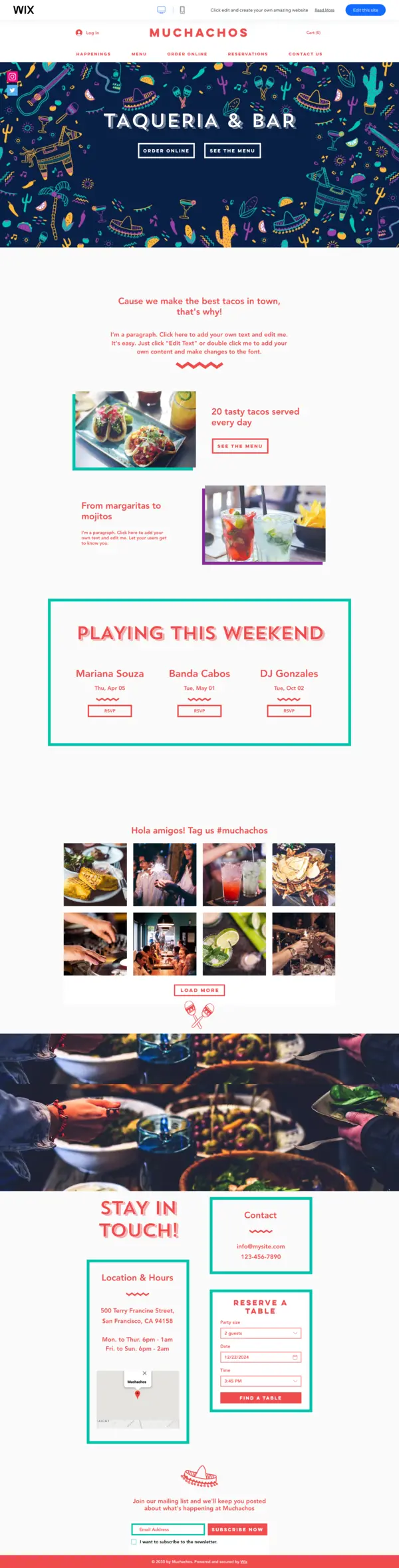
Muchachos is the liveliest Mexican restaurant website template in this lineup. Where Madre leans into warmth and tradition, Muchachos brings energy through vibrant illustrated visuals and a playful layout that suits taco bars, taquerias, and casual street-food-style spots. The homepage is designed to keep regulars engaged, with sections to promote weekly events, highlight daily specials like taco Tuesdays, and push margarita deals.
The social media integration here is genuinely useful, not just decorative. Customers can tag your restaurant, share photos of their meals, and help generate user-created content that builds your presence on Instagram and TikTok. The "Stay in Touch" section works well for collecting contact details so you can notify your audience about new menu items and seasonal promotions.
The trade-off with Muchachos is that the illustrated style, while fun, may feel too casual for a restaurant positioning itself as upscale or fine-dining. If your brand personality is "neighborhood taqueria that everyone loves," this is the right template. If you are targeting corporate lunch crowds or date-night diners, La Cantina is a better fit.
Muchachos Highlights
- Bright and playful Mexican restaurant website design with bold illustrated visuals.
- Sections to promote events, daily specials, and recurring deals.
- Built-in social media integration for customer-generated content.
- Easy-to-use reservation system and email capture included.
- Best for: taquerias, taco bars, casual neighborhood Mexican spots.
La Cantina
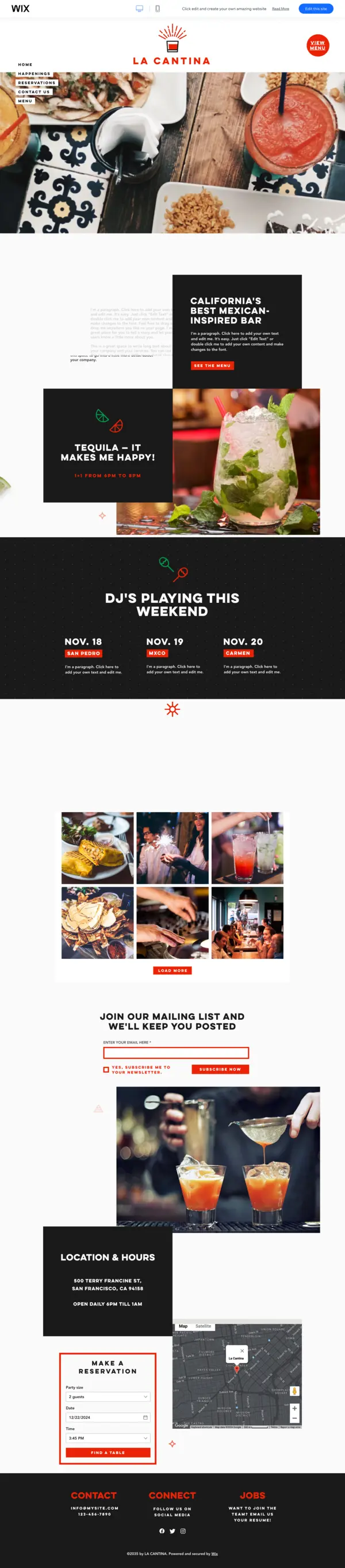
La Cantina is the upscale option in this set of Mexican restaurant website templates. It is built for cocktail-forward cantinas, dinner restaurants, and venues that host live music or DJ nights. The design pairs bold typography with clean, well-spaced content blocks, giving it a more polished look than Muchachos without feeling stiff or corporate.
What sets La Cantina apart for event-driven restaurants is the dedicated promotions area. You can spotlight happy hours, themed nights, and special seasonal events directly on the homepage. The mailing list section lets you build a subscriber base for announcements, which is valuable for restaurants that run recurring promotions. The menu and reservation sections are clean and easy to navigate.
La Cantina works particularly well if your Mexican restaurant has a strong cocktail program or nightlife element. The visual identity of the template signals "drinks and good times" more than "family dinner," so use it when that framing matches your actual brand. It is less suited for family-focused or traditional cooking concepts, where Madre would feel more authentic.
La Cantina Highlights
- Stylish Mexican restaurant website design with bold typography and clean sections.
- Dedicated areas for events, happy hours, and nightly promotions.
- Mailing list subscription section to keep customers coming back.
- Easy-to-use menu and reservation system.
- Best for: upscale cantinas, cocktail bars, event-driven Mexican restaurants.
Burrito Bar
Burrito Bar is a fast-casual Mexican restaurant website template built specifically for counter-service spots, burrito chains, and delivery-first operations. The layout puts your menu front and center with large, tappable food category blocks so customers can browse and order without hunting around the page.
The standout feature is the sticky "Order Now" button that stays visible as visitors scroll through the page. On mobile, this is a significant advantage: a customer searching for a quick lunch or planning a delivery order can tap to order from any point on the page without scrolling back to the top. The street-food-inspired typography and high-contrast color scheme also give it strong visual presence on small screens.
The limitation here is that Burrito Bar is not built for dine-in experiences. There is no storytelling section, no reservations flow, and no gallery to show off your space. If your restaurant is 100% focused on pickup and delivery, those omissions are fine. But if you want to build a brand that attracts sit-down diners alongside takeout customers, you will need to supplement the template with additional sections.
Burrito Bar Highlights
- Menu-first layout with large, tappable food categories.
- Sticky "Order Now" button for mobile visitors throughout the page.
- Street-food styling with high-contrast colors built for quick browsing.
- Optimized for pickup and delivery-focused Mexican restaurants.
- Best for: fast-casual spots, burrito chains, delivery-first operations.
What Makes a Great Mexican Restaurant Website Design?
A good Mexican restaurant website design does more than look attractive. It signals authenticity, makes ordering easy, and connects with the local customers who are most likely to visit or order from you. Here is what separates the best designs from average ones.
Color Palette
Mexican restaurant website design has a strong visual vocabulary. Terra cotta, deep red, gold, and warm orange are the dominant tones in most successful designs. These colors trigger familiarity and appetite cues that work in your favor. Cool-toned or neutral designs can work, but they require strong photography to compensate. If your food photos are not professional-grade, lean into the warm palette to carry the visual weight.
Food Photography Placement
The single biggest driver of conversions on a restaurant website is food photography, and placement matters as much as quality. Your best dish photo should appear within the first screen of the homepage, without requiring any scrolling. Templates like Madre are structured with this in mind. If you are customizing any of these templates, resist the urge to lead with a hero banner of your dining room. Lead with food.
Menu Design
An online menu should be scannable on a phone in under 60 seconds. Group items by category (appetizers, tacos, entrees, drinks), include prices, and add photos for your top sellers. Avoid uploading your menu as a PDF: PDF menus cannot be indexed by Google, are hard to read on mobile, and cannot be linked to an ordering system. Build your menu inside Wix Restaurants using the native menu manager so it stays editable and connected to your ordering flow.
Google Business Integration for Local SEO
Most people who search for a Mexican restaurant are looking for one near them. That means local SEO is critical. Beyond your website, make sure your Google Business Profile is fully filled out with accurate hours, photos, and a link back to your site. Embed a Google Maps widget directly on your contact or location page. Use your city or neighborhood name in your page titles and headings (for example, "Mexican Restaurant in Austin" or "Best Tacos in Denver"). These signals help Google match your site to "Mexican restaurant near me" searches.
Spanish-Language Page Options
If a significant portion of your customer base is Spanish-speaking, adding a Spanish-language version of your key pages can improve the experience for those visitors and give you an edge in local searches. Wix supports multilingual sites through its Wix Multilingual feature, which lets you translate your menu, reservation page, and contact information. Even translating just your menu page can make a meaningful difference for Spanish-speaking customers who feel more comfortable ordering in their first language.
Setting Up Online Ordering on Your Mexican Restaurant Website
Every template on this list supports online ordering, but setting it up correctly takes a few deliberate steps. Here is how to get it working on your Wix Mexican restaurant website.
Step 1: Enable Wix Restaurants
From your Wix dashboard, go to Add Apps and search for "Wix Restaurants." This activates the Wix Orders and Wix Menus apps, which are the core tools for managing your online ordering system. You will need a paid Wix plan to accept payments: the Core plan at $29/month is the most practical starting point for most restaurants.
Step 2: Build Your Menu in Wix Restaurants
Open the Wix Restaurants Manager and create your menu sections: appetizers, tacos, burritos, drinks, and any other categories that match your actual menu. Add item names, descriptions, prices, and photos. The photos you upload here will appear both on your menu page and inside the ordering flow, so use your best food images.
Step 3: Set Up Delivery and Pickup Zones
In the Restaurants Manager, configure your delivery radius and minimum order amounts. If you only do pickup, you can disable delivery and focus on the "Order for Pickup" flow. Set your operating hours here too, so the ordering system automatically shows as open or closed based on your actual schedule.
Step 4: Connect a Payment Processor
Wix supports Wix Payments, PayPal, and a number of third-party processors depending on your country. Wix Payments is the most integrated option: it allows you to manage transactions, refunds, and payouts directly from your Wix dashboard without a separate account. Note that Wix charges a transaction fee on orders through some plans; check the current pricing before committing.
Step 5: Add the Order Button to Your Template
Once your menu and payment setup are complete, add or confirm the "Order Online" button on your homepage. In templates like Burrito Bar and Madre, this button is already in place and connected to the Wix Restaurants ordering flow. In other templates, you may need to add a button element and link it to your ordering page. Make the button prominent: use a contrasting color that stands out from the rest of your design.
Third-Party Integrations
If you already use a third-party ordering platform like DoorDash, Uber Eats, or Toast, you can still link to those platforms from your Wix site. Many restaurants use Wix for the main website and branding, then direct customers to their DoorDash storefront for delivery. This works fine, but keep in mind that orders placed through third-party apps come with higher commission fees than orders placed directly through your Wix site.
Must-Have Features for a Mexican Restaurant Website
No matter which Mexican restaurant website template you pick, make sure your site includes these features. They are what turn a good-looking page into one that actually brings in customers.
- Online menu with photos: Customers want to see what they are ordering. Include high-quality images of your signature dishes alongside descriptions and prices.
- Online ordering or delivery integration: If you offer takeout or delivery, an "Order Online" button should be one of the first things visitors see. Many Wix restaurant templates come with built-in ordering through Wix Restaurants.
- Reservation system: A simple booking widget lets customers reserve a table without calling. Wix integrates with tools like OpenTable, or you can use its built-in booking system.
- Mobile-friendly design: Over half of restaurant website visits come from phones. Your template must look and work great on small screens, especially the menu and ordering buttons.
- Photo gallery: Show off your food, your space, and your team. Authentic photos of your actual restaurant build trust far more than stock images.
- Location and hours: Put your address, hours, and a Google Maps embed where visitors can find them quickly. Many people are searching right before they plan to eat.
- Social media links: Connect your Instagram, Facebook, and TikTok so visitors can follow you and see your latest posts and specials.
How to Choose the Right Mexican Restaurant Website Template
Picking the right template comes down to matching the design to your restaurant type and your top business goals. Here is a quick guide:
- Family sit-down restaurant with catering? Go with Madre. It is built for warmth and storytelling.
- Casual taqueria or taco bar? Muchachos has the energy and playfulness to match a casual, fun brand.
- Upscale cantina or cocktail bar? La Cantina balances style with nightlife and event promotion features.
- Fast-casual or delivery-first spot? Burrito Bar puts online ordering front and center where it matters most.
- Traditional regional Mexican kitchen? Madre is the most authentic-feeling design in this group and suits owner-operated restaurants that lead with story.
Also think about what you will need six months from now. If you plan to add catering, events, or a loyalty program later, choose a template with room to grow. All five of these Wix Mexican restaurant templates are fully customizable in the Wix Editor, so you can adjust colors, fonts, and sections as your brand develops.
Looking at other restaurant niches too? Check out our guides to Italian restaurant website templates, seafood restaurant website templates, and fast food website templates.
Pick Your Mexican Restaurant Website Template
Your restaurant's online presence is an extension of its personality. These five Mexican restaurant website templates cover every style: from family-friendly warmth to fast-casual efficiency to upscale nightlife. Each one is designed to help you show off your food, fill your tables, and grow your online orders.
A well-built Mexican restaurant website design is not just about looking good. It is about making it effortless for hungry customers to find your menu, book a table, or place an order. Pick the template that fits your brand, customize it with your own photos and branding, and get your restaurant online.
Fusion restaurant owners who blend Mexican and Japanese flavors might also want to explore our Japanese restaurant website templates for additional inspiration.
* read the rest of the post and open up an offer