

The best Wix photography template depends on what you shoot. Travel photographers need clean gallery layouts that keep visitors exploring. Food photographers need multiple image collections with blog integration. Portrait photographers need booking tools and client testimonials. The seven templates below cover all of these niches, with honest notes on what each one does well and who it is best suited for.
Starting your site with the right Wix photography template matters more than most photographers realize. Wix offers user-friendly, free templates built with the latest standard in website design, built for photographers and their specific niches. This post covers 7 of the best Wix templates for photographers, handpicked to give your portfolio the professional presence it needs.
* read the rest of the post and open up an offer
7 Best Photography Wix Templates
Here are 7 of the best Wix photography templates carefully selected to present your visual artistry online. Each one is built for a different photography style, giving you a focused platform where your images do the talking and visitors can connect with your work.
Jake Johnson Template
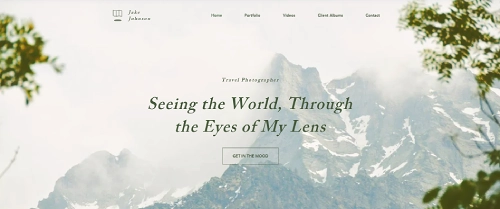
The Jake Johnson template is built for travel photographers who want their images to carry the full weight of the page. Its layout is clean and uncluttered, putting large photographs front and center without distracting sidebars or heavy text blocks. The design stays out of the way so visitors focus on the journey your photos represent.
Navigation is simple and intuitive, which works well for photographers who update their portfolio regularly after trips. If you are deciding how to display your images, our guide on how to set up Wix Pro Gallery explains every layout option including Grid, Masonry, and Collage, so you can match the gallery style to the type of photography you shoot. You can organize destinations or projects into separate gallery sections, letting returning visitors find new work without sorting through everything at once.
The template also handles portrait-orientation shots well, which travel photographers often have more of than studio or landscape shooters. Whether you cover remote hiking trails or city markets, the Jake Johnson template gives those images room to breathe and tell their own story.
Jake Johnson Template Highlights
- Built for travel photography with a clean, distraction-free layout.
- Supports multiple destination or project galleries for organized portfolios.
- Handles both landscape and portrait image orientations effectively.
The Art of Food Template
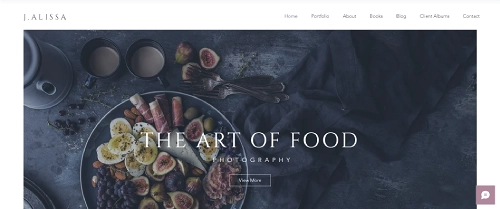
The Art of Food template was designed specifically with food photographers in mind. Its layout uses rich, full-width image displays that make dishes look as good online as they do in print. The color palette and typography choices complement food photography without competing with it, giving your shots the visual context they need to land.
Multiple gallery sections let you separate work by cuisine type, client, or project, which is useful if you shoot for restaurants, cookbooks, and brands at the same time. Each collection can stand on its own, so a restaurant client viewing their gallery does not wade through unrelated work.
The template also includes a blog section that integrates naturally with the portfolio. Food photographers who want to write about techniques, share recipe inspiration, or document shoots will find this layout supports editorial content without making it feel bolted on. It is a practical choice for photographers who want both a portfolio and an ongoing web presence.
The Art of Food Template Highlights
- Designed to keep audiences updated on the latest work.
- Features multiple image galleries to showcase diverse cuisine.
- Includes engaging blog posts and featured photo collections.
Explore Forum Template
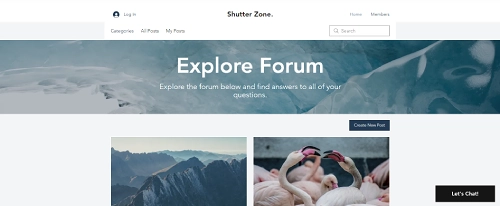
The Explore Forum template is the most community-oriented option in this list. Rather than a solo portfolio, it is designed as an online forum where photographers and creatives can share work, start discussions, and collaborate on projects. If you want to build an audience rather than just display a personal portfolio, this template gives you the structure to do it.
The layout keeps discussions and image posts readable and well-organized. You can set up separate forum categories for different photography genres, equipment discussions, or critique threads, which helps a growing community stay focused instead of becoming a single messy feed.
Social integration tools let members share posts to their own channels, which can bring new visitors into the community organically. For photographers who run workshops, teach online, or want to build a following around a specific niche, the Explore Forum template offers more than a standard portfolio can. It is a platform, not just a page.
Explore Forum Template Highlights
- Ideal for sharing ideas and projects on various topics.
- Customizable forums to cater to specific photography genres or topics.
- Integrated social media tools for wider community reach and interaction.
Charley Knox Template
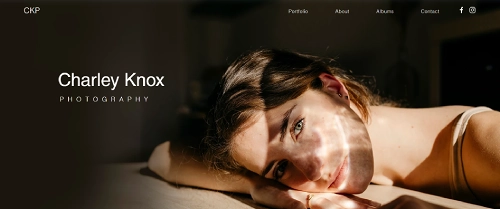
The Charley Knox template is a strong choice for photographers who want a polished, minimal portfolio that lets their images lead every page. The design is elegant without being cold, using white space deliberately to frame each photo rather than fill every corner of the screen with text or decoration.
Gallery organization is one of this template's strongest features. You can create separate portfolio sections for different subjects or clients, each with its own clean presentation. This is particularly useful for photographers who work across multiple genres and need to show different bodies of work to different audiences without confusing them.
For portrait and wedding photographers, the Charley Knox layout works especially well. The editorial styling suits the kind of imagery that tells a story across a set of shots, rather than a single standout photo. You can also add Wix Bookings to a dedicated contact or services page, giving potential clients a direct path from admiring your work to booking a session.
Charley Knox Template Highlights
- Designed to help photographers get noticed and gain followers.
- Unique galleries to organize images effectively.
- Customizable portfolio to reflect your artistic vision.
Johan Cage Template
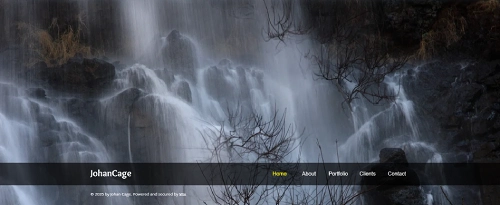
The Johan Cage template is built around a full-image background that fills the entire browser window on load. There are no competing design elements on that first screen, just the photograph itself. For photographers and artists whose work makes an immediate visual impact, this approach is one of the most effective ways to hold a visitor's attention from the first second.
The minimal layout extends throughout the rest of the site. Navigation elements are understated, keeping the focus on the images rather than the interface. This restraint suits photographers who work in fine art, conceptual photography, or any style where the image is meant to be experienced rather than quickly scanned.
Gallery pages are easy to populate and reorder, which makes updating the portfolio between projects straightforward. The customization options in the Wix editor let you adjust fonts, spacing, and color accents to fit your personal brand without disrupting the minimal aesthetic that makes this template work. It is a good fit for photographers who want their site to feel like an exhibition rather than a directory.
Johan Cage Template Highlights
- Full-image background for a striking first impression.
- Minimal layout perfect for photographers and creative types.
- Easy-to-update gallery to showcase projects as your work evolves.
Connor Kane Template

The Connor Kane template is designed for photographers who want each project to feel like its own story rather than just another entry in a gallery grid. Large hero images give individual shoots room to make an impression, and the layout includes space for detailed project descriptions so you can provide context behind each body of work.
This structure works particularly well for photographers whose clients want to see more than just finished images. A bio section, project descriptions, and process notes make it easier to show potential clients how you think and work, not only what you produce. That depth can be the difference between an inquiry and a scroll-past for editorial and commercial clients.
The Connor Kane template also pairs well with Wix Bookings and Wix Pro Gallery's password-protected client proofing features. Wedding and event photographers will find it easy to add a booking page for session inquiries and set up private galleries for delivering client work. The template gives you both the front-facing portfolio and the practical tools behind it in one cohesive design.
Connor Kane Template Highlights
- Large, impressive hero images to draw in potential clients.
- Space for a bio and project details for deeper insight into your work.
- Works well with Wix Bookings and password-protected client galleries.
Amanda Willman Template
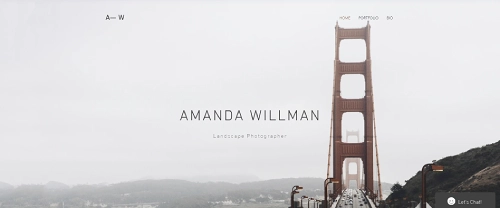
The Amanda Willman template is built for landscape and nature photographers who want their wide-format images to fill the screen properly. Horizontal compositions display at their best here, with the layout designed to accommodate the scale and detail that landscape photography depends on. Your panoramas and wide shots will not get cropped into awkward thumbnails.
Beyond the gallery, the template includes space for detailed image descriptions. Landscape photographers who want to share the story behind a shot, including location, conditions, or technical approach, can add that context without it feeling out of place. This combination of high-quality image display and written narrative gives the site more depth than a pure portfolio layout.
The integrated contact form makes it straightforward for potential clients, print buyers, or publication editors to reach out directly from the site. Whether you are just starting to put your landscape work online or looking to replace a basic portfolio with something more polished, the Amanda Willman template gives you the tools to present your work to a wider audience without overcomplicating the process.
Amanda Willman Template Highlights
- Ideal for landscape photographers to get their art online.
- Allows for detailed descriptions of work and creative vision.
- Integrated contact form to connect with potential clients or fans.
What to Look for in a Wix Photography Website Template
Not every Wix photography website template works the same way for every photographer. Before picking one based on looks alone, it is worth thinking through the features that will actually matter once your site is live and clients are visiting it.
Image display quality is the most important factor. Look for templates that support Wix Pro Gallery and offer full-width layouts. Your photos should fill the screen at high resolution without compression artifacts or awkward cropping. A template that displays images at small sizes or crops square photos into rectangles will undercut the quality of your work before a visitor even reads your name.
Mobile responsiveness is non-negotiable. Most visitors will find your site on a phone. Wix templates for photographers are built to be mobile-responsive by default, but check how each template handles your specific image formats on smaller screens. Portrait shots, wide landscapes, and square gallery grids all behave differently on mobile, so preview your actual images in each template before committing.
Built-in booking tools matter if you take client sessions. Wix Bookings integrates directly into any template and lets clients schedule and pay for sessions without leaving your site. Not every photographer needs this, but if you do portrait sessions, events, or commercial work, having booking built in saves you the friction of directing clients to a separate platform.
Client proofing support is worth considering if you deliver galleries to clients after shoots. Wix Pro Gallery supports password-protected galleries natively, so clients can review and select images privately. Choose a Wix photography website template with enough page flexibility to add a dedicated proofing section alongside your public portfolio.
Loading speed affects both user experience and search rankings. Templates with fewer heavy animations, auto-playing video backgrounds, and complex interactive elements will load faster. A site that loads in under two seconds keeps visitors around; one that takes five seconds loses them before they see a single photo.
SEO-friendliness means clean code, proper heading structure, and full support for image alt text. All Wix photography templates support alt text through the editor, which matters for image search visibility. Templates with a clear heading hierarchy also give you a better foundation for on-page SEO when you start targeting keywords like "wix photography website templates" or specific photography niches.
How to Select the Right Template
Choosing the best Wix templates for photographers is like picking the perfect lens. It all depends on your style and what you want to capture.
Identify Your Style
Are you into candid portraits, sweeping landscapes, or edgy street photography? Templates that come with an urban vibe offer a gritty, modern feel, while other minimalist photo-centric templates highlight the serenity of the great outdoors. Selecting a Wix photography portfolio that matches your genre enhances the overall impact of your work.
Functionality Matters
Need client proofing galleries, booking features, or an integrated blog? Wix photography websites offer templates with various functionalities. Most sites come with a blog section to share behind-the-scenes stories, adding depth to your Wix photo portfolio. When considering a Wix template photography option, ensure it supports the features you need to connect with clients.
Aesthetic Appeal
First impressions are everything. Choose a Wix photography template that aligns with your brand. The minimalist photography templates offer a clean look, letting your images speak for themselves while other sites are built to sell photographs. But remember, sometimes less is more.
Mobile Optimization
Is Wix good for photographers when it comes to mobile viewing? Absolutely. It never hurts to check your chosen template looks stunning on all devices. With more people browsing on their phones, a responsive Wix photography website is essential to reach a wider audience.
Customization and Flexibility
Your website should be as unique as your fingerprint. Templates from Wix allow extensive customization, from fonts to layout. This flexibility ensures your photography website stands out in a competitive photography market.
Integration with Social Media
Boost your online presence by choosing templates that integrate directly with social media platforms. Sharing your Wix photography portfolio on Instagram or Facebook can drive traffic and increase engagement.
Free vs. Paid Wix Photography Templates: What to Know
All seven templates in this guide are available through Wix's free plan, which means you can build and preview your photography site without paying anything upfront. However, there are real differences between using a template on a free account versus a paid one.
What the Free Plan Includes
On the free plan, you get access to all Wix photography templates, the full drag-and-drop editor, and unlimited design customization. Your site will be hosted on a Wix subdomain (yourusername.wixsite.com/sitename) and display a Wix-branded banner at the top. Storage is limited to 500MB, which works for a portfolio with 50 to 100 images but fills up quickly if you are uploading full-resolution originals for every project.
What Paid Plans Add for Photographers
Upgrading removes Wix branding, connects your custom domain, and increases storage significantly. For photographers who sell prints or book sessions through their site, the Business plan ($36/mo) unlocks the full eCommerce suite and payment processing. The Core plan ($29/mo) is a strong option for photographers who want a professional portfolio with a custom domain but do not need direct sales functionality.
Wix does not charge per-template. Once you choose a photography template, you own the full design regardless of your plan. You can customize it without any additional fees for premium design features.
Client Proofing Galleries
If you photograph weddings, events, or commercial projects, client proofing is a workflow to plan for before committing to a template. Wix's native Pro Gallery supports password-protected galleries, meaning clients can review and select images without you needing a separate platform. The Charley Knox and Connor Kane templates are particularly well-suited for adding password-protected client galleries through the Wix Pro Gallery settings.
Examples of Iconic Photography Websites
1. National Geographic
A name that signals adventure and discovery. National Geographic's website is a visual feast, featuring breathtaking images from around the globe. Their brand exudes exploration and wonder, much like how a well-crafted Wix photography website can transport your visitors into your world through your lens.
2. Getty Images
Professionalism at its finest. Getty Images offers high-quality stock photos to media outlets worldwide. Their clean, organized site reflects a commitment to excellence, a standard you can match using Wix templates for photographers to create a sleek and efficient portfolio.
3. Annie Leibovitz
A legend in portrait photography. Annie's minimalist website lets her powerful images take center stage. It's a prime example of how simplicity in a photography website design can make your work shine without unnecessary distractions.
4. Flickr
A platform synonymous with photo sharing. Flickr's community-driven model encourages interaction and collaboration. If building a community around your work appeals to you, consider how Wix for photographers can help integrate social features into your site.
5. Behance
Where creativity meets opportunity. Behance's website is polished and professional, ideal for networking and getting your work noticed. Their emphasis on visual portfolios aligns well with what a Wix photography portfolio template can offer.
7 Best Wix Photography Templates: Final Thoughts
Picking the right template is a practical decision, not a creative one. The design matters, but so does whether the template supports the features your photography business actually needs: booking, client galleries, mobile display, and room to grow.
The seven Wix photography templates in this guide cover a wide range of niches and working styles. Travel photographers, food photographers, portrait shooters, and landscape artists each have at least one strong option here. Review the highlights for the templates that match your niche, check how your own images look inside them using Wix's preview tools, and pick the one that fits how you actually work.
Your portfolio reflects the quality of your photography. Starting with a template that is built for your style gives that work the presentation it deserves. These Wix templates for photographers give you a solid foundation to build from, whether you are launching your first site or upgrading an existing one.
* read the rest of the post and open up an offer