

To contact Wix customer service, go to support.wix.com while logged into your account and select live chat, phone callback, or email ticket. Wix does not publish a direct phone number or support email address. All contact goes through the support portal, where you describe your issue first and then get routed to the right channel. English-language support is available 24/7, and callback support covers 12 languages with varying hours.
This guide covers every way to reach Wix support, what response times to expect from each channel, how to skip the chatbot and reach a human faster, and which support options are available depending on your plan. If you want to solve the problem yourself first, check the self-help section below before opening a ticket.
Key Takeaways
- All Wix support starts at support.wix.com. You must be logged into your account to access human agents.
- Live chat opens with a chatbot first; type "agent" or "human" to escalate to a live representative.
- Phone support uses a callback system. Wix calls you back rather than providing a direct dial number.
- Premium plan holders get VIP priority support with faster response times and dedicated phone callback queues.
- Free plan users can still access live chat and callbacks, but without priority queue placement.
How Do You Contact Wix Customer Service?
You contact Wix customer service through support.wix.com by logging into your account and selecting live chat, phone callback, or email support. All support channels are accessed from the same portal. Wix does not publish a direct phone number you can call without first submitting a callback request.
Wix offers six main support channels, each suited to different types of issues:
- Live chat: Available 24/7, starts with an AI chatbot (Helpmate) then escalates to a human agent on request
- Phone callback: Available in 12 languages with varying hours; Wix calls you back, typically within 2 to 3 minutes for English
- Email/ticket support: For non-urgent issues where you want a written record; expect a response within 24 to 48 hours
- Social media: Facebook and X (formerly Twitter) for general questions; responses within a few hours during business hours
- Wix Community Forum: Peer-to-peer support where experienced users and Wix staff share solutions
- Wix Help Center: Self-service knowledge base with over 1,000 articles, tutorials, and videos
Which Contact Method Should You Use?
The best contact method depends on how urgent your issue is, whether it involves account verification, and whether you need a written record. Use this table as a quick decision guide.
Your Situation |
Best Channel |
Why |
Site is down or broken right now |
Phone callback |
Fastest path to a human; 2-3 min wait for English |
Quick question about a feature |
Live chat |
AI chatbot can answer instantly; escalate if needed |
Billing dispute or refund request |
Email/ticket |
Creates a written record for reference |
General feedback or feature request |
Social media or Community Forum |
Public visibility; community input |
Advanced coding or Velo question |
Community Forum |
Developers share workarounds and code samples |
Domain or DNS issue |
Help Center first, then live chat |
DNS articles are thorough; chat if still stuck |
Before You Contact Support: Self-Help Resources Worth Checking First
Many common Wix issues can be resolved in minutes using Wix's built-in resources, without waiting for a support agent. Check these options first to save time before opening a ticket.
- Wix Help Center (support.wix.com): Over 1,000 step-by-step articles covering setup, design, billing, and e-commerce
- Wix Status Page (status.wix.com): Check if Wix is experiencing a platform-wide outage before contacting support
- Wix Community Forum: Search for your issue; many common problems have community-sourced solutions from experienced users
- Wix Editor help panel: Click the question mark icon inside the Wix Editor for context-sensitive help related to the element you are working on
If none of these resolve your issue, proceed to the contact options below. For a broader overview of the platform, see our guide to how to use Wix.
What Common Issues Can You Solve Without Contacting Wix Support?
Most Wix billing, domain, and publishing issues have self-service solutions in the Help Center that resolve the problem faster than waiting for an agent. Knowing which issues to self-serve saves significant time.
- Site not published / showing "coming soon": Go to Settings > Publish in the Editor
- Domain not connecting: Check DNS propagation (can take up to 48 hours); verify nameservers in your domain registrar
- Forgotten password / can't log in: Use the "Forgot Password" link on the Wix login page
- Billing charge questions: Review your invoices in your Wix account under Billing & Payments
- App not working: Try removing and reinstalling the app from the Wix App Market
- Mobile site layout issues: Use the mobile editor view in Wix to adjust mobile-specific settings
- SSL certificate not showing: Wix enables SSL automatically, but it can take up to 48 hours after connecting a custom domain; check under Settings > SSL Certificate
- Slow site loading: Compress images, reduce the number of apps installed, and check for large video files or unoptimized media
What Wix Support Cannot Help You With
Wix customer service is broad, but it has limits. Knowing what falls outside their scope saves you from opening tickets that won't lead anywhere, and helps you find the right resource faster.
- Custom code and Velo bugs: Front-line support agents are not developers. If your issue involves Wix Velo (JavaScript customization), the Wix REST API, or custom widget code, agents will typically direct you to the Wix Community Forum or the Wix developer documentation. The Forum has dedicated sections for Velo and headless development where engineers and experienced developers post working solutions.
- Third-party app issues: When a problem originates in a third-party app from the Wix App Market (an app built by a company other than Wix), Wix support can confirm the app is the source but cannot fix it. You'll need to contact the app developer directly. Most paid apps include their own support email or chat, accessible from within the app dashboard.
- Design advice and opinions: Support agents can tell you how a feature works, but they won't redesign your pages or tell you which font to use. For design guidance, the Wix Community Forum has active threads on best practices, and Wix's own blog and YouTube channel publish regular design tutorials.
- SEO recommendations: Wix support can confirm that your pages are published and that your sitemap is being submitted to Google. They won't audit your keyword strategy, review your content, or advise on link building. Those tasks fall outside their scope.
- Business or legal advice: Support agents cannot advise on what pricing to charge, whether your business model is viable, or how to structure contracts with your clients. These questions go beyond the scope of any web platform's support team.
- Recovering sites deleted by another account holder: If someone else had access to your account and deleted your site, Wix may be able to restore it within a certain window, but this is handled case-by-case through a formal account review rather than standard support. There is no guarantee of recovery, and the timeline depends on when the deletion occurred.
How Does Wix Live Chat Support Work?
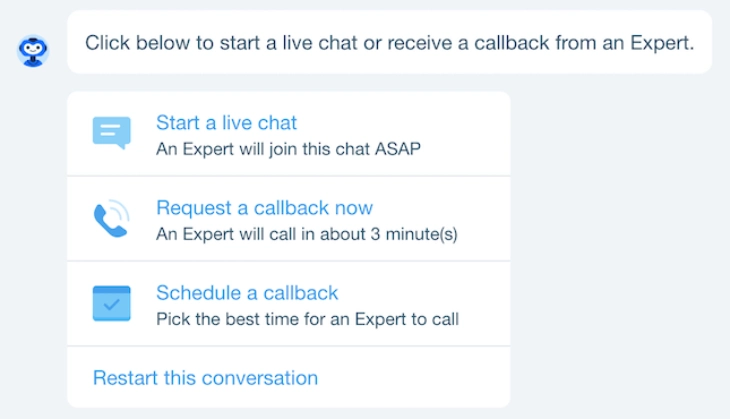
Wix live chat is available 24/7 at support.wix.com and starts with an AI-powered chatbot called Helpmate that handles common questions. To reach a human agent, type "agent," "human," or "speak to a person" in the chat window and the bot will escalate your session to a live representative.
Live chat is the fastest way to get real-time help with your Wix site. First response times from a human agent are typically between 40 seconds and 2 minutes during normal volume periods. It is best suited for account issues, publishing problems, and billing questions that require immediate answers. Have your site URL and account email ready before starting the chat to speed up verification.
One thing to know: the chatbot step is not optional. Wix routes all chat sessions through Helpmate first. For straightforward questions like "how do I connect my domain," the chatbot often provides the answer with a direct link to the right Help Center article. For anything account-specific or technical, you will need to ask for a human.
How Does Wix Phone Support Work?
Wix phone support works as a callback system. You submit a request at support.wix.com while logged into your account, and a Wix agent calls you back during the operating hours for your language. Wix does not publish a phone number you can dial directly.
You must be logged into your Wix account on a computer or mobile device to submit a callback request. English-language callbacks are available 24/7 with a typical wait of 2 to 3 minutes. Other languages have more limited windows. Here are the callback operating hours by language (note: hours are subject to change, so verify current times at support.wix.com):
Language |
Callback Operating Hours |
English |
24/7 |
Dutch |
Monday-Friday 7 AM-4 PM UTC |
French |
Every day 6 AM-10 PM UTC |
German |
Every day 6 AM-7 PM UTC |
Hebrew |
Sunday-Thursday 8 AM-8 PM (GMT +3) |
Italian |
Every day 6 AM-11 PM UTC |
Japanese |
Monday-Friday 1 AM-10 AM UTC |
Korean |
Monday-Friday 1 AM-7 AM UTC |
Polish |
Monday-Friday 7 AM-4 PM UTC |
Portuguese |
Every day 8 AM-11 PM UTC |
Russian |
Monday-Friday 7 AM-4 PM UTC |
Spanish |
Every day 10 AM-8 PM UTC |
If you are outside these hours for your language, you can switch to English support (available 24/7) or submit an email ticket and wait for a response when your language's support team is back online.
What to have ready when requesting a callback:
- Your Wix account email address
- The site URL you are having issues with
- A brief description of the problem (used to route your call)
- Your phone number in international format
How Does Wix Email Support Work?
Wix email support works through a ticket system at support.wix.com. You submit a request describing your issue, and a Wix support agent responds by email within 24 to 48 hours. Email support is the best option for non-urgent issues, billing disputes, or any situation where you want a written record of the interaction.
When submitting an email ticket, be as specific as possible. Include your site URL, a description of what you expected to happen versus what actually happened, and any error messages you received. Vague tickets like "my site doesn't work" take longer to resolve because the agent has to ask clarifying questions first, adding days to the process.
Email responses do not arrive at a fixed time. The 24-to-48-hour estimate is a guideline, not a guarantee. During high-traffic periods (major platform updates, holidays), response times can stretch beyond 48 hours. If your issue is urgent, phone callback or live chat will get you a faster answer.
What Is Wix VIP Support?
Wix VIP support is the priority support tier available to Business Elite plan subscribers. It gives you faster response times, dedicated phone callback queues, and access to senior support staff who can handle more complex issues.
With VIP support, phone callback wait times are significantly shorter than for standard plan users because VIP requests jump to the front of the queue. Live chat response times also tend to be faster. VIP users are also more likely to be connected directly to a senior specialist rather than a first-line agent, which reduces the number of handoffs needed to resolve complex account or billing issues.
The Business Elite plan is $159/month (billed annually), which is a significant jump from the Business plan at $39/month. Whether VIP support alone justifies that cost depends on how critical your site is and how often you need support. For most small business owners, the standard live chat and callback work well enough. For high-traffic stores or time-sensitive businesses where downtime costs money, the dedicated queue can be worth it.
How to Contact Wix Support via Social Media
Wix maintains active support presences on Facebook and X (formerly Twitter). For general questions, product feedback, and non-urgent issues, reaching out via social media is a valid option. Wix typically responds within a few hours during business hours.
Social media is not the right channel for account-specific issues, billing disputes, or anything that requires sharing account credentials or personal information. Those conversations need to happen through the secure support portal at support.wix.com. Save social media for public questions, feedback, or when you want a faster informal response on a general topic.
Wix also monitors mentions of its brand on social platforms and sometimes proactively replies to users sharing their Wix experience. If you post about a problem publicly, you may hear back from Wix's social team, though this should not be your primary support strategy for anything urgent.
How to Use the Wix Community Forum
The Wix Community Forum is a peer-to-peer support resource where Wix users, developers, and Wix staff interact. It is not a direct support channel, but it is one of the most useful places to find answers to technical questions, especially for Velo (JavaScript customization), design problems, and app-related issues.
The forum works best for:
- Technical or coding questions where community developers share working solutions
- Unusual edge cases that are not covered in the Help Center
- Getting multiple perspectives on a design or feature decision
- Finding workarounds for known Wix limitations
Search the forum before posting. Most common questions have already been answered, sometimes with step-by-step solutions. If you post a question, include your site URL (if relevant), what you tried, and what error or result you got. Specific questions get faster, more useful answers.
What Should You Prepare Before Contacting Wix Support?
Having the right information ready before you contact support speeds up the process significantly. Agents can resolve issues faster when they have context upfront instead of spending the first part of the conversation gathering details.
Prepare the following before opening a support session:
- Your Wix account email (the email you use to log in, not necessarily your contact email)
- The URL of the affected site (the full URL including https://)
- A clear description of the issue: what you were trying to do, what happened instead, and when it started
- Error messages: exact text or a screenshot of any errors you see
- Steps to reproduce: can the agent replicate the problem from a fresh session?
- Browser and device details: Chrome on Windows? Safari on iPhone? Agents may need to reproduce in the same environment
- Recent changes: did you install a new app, change DNS settings, or edit a specific page right before the issue appeared?
For billing or subscription questions, also have your plan name (Light, Core, Business, Business Elite) and the approximate date of the charge you are asking about.
How to Write an Effective Wix Support Ticket
The quality of your support ticket directly affects how quickly and accurately your issue gets resolved. Agents handle dozens of requests at a time, and tickets that are clear, specific, and well-organized move through the queue faster.
An effective Wix support ticket includes:
- A one-sentence summary of the issue in the subject line (e.g., "Wix payments not processing checkout for products over $100")
- The affected URL (your site address and, if relevant, the specific page where the issue occurs)
- What you expected to happen and what actually happened, with as much detail as possible
- When the issue started (exact date or "since I updated X")
- What you have already tried (cleared cache, tried a different browser, removed and reinstalled the app, etc.)
- Screenshots or a screen recording if the issue is visual or involves an error message
Do not write a ticket that says "my site isn't working." That forces the agent to ask several follow-up questions before any real troubleshooting begins. A specific, well-structured ticket often cuts the resolution time in half.
Expected Response Times by Channel
How quickly you hear back from Wix depends on the channel you choose and whether you have a VIP plan. Here are the typical response times based on user reports and Wix's own guidance.
Channel |
Typical Response Time |
Availability |
Phone callback (English) |
2 to 3 minutes |
24/7 |
Live chat (human agent) |
40 seconds to 2 minutes |
24/7 |
Email/ticket |
24 to 48 hours |
Submit anytime |
Social media |
A few hours |
Business hours |
Community Forum |
Hours to days (community-driven) |
Always open |
VIP plan holders (Business Elite) typically see shorter wait times across all channels because their requests are placed ahead of the standard queue.
How to Contact Wix Customer Service: Summary
Wix customer service is accessible through live chat, phone callback, email tickets, and social media, all starting at support.wix.com. Phone callback is the fastest option when you need to speak with a person, while live chat works well for quick questions where the AI chatbot might have the answer. Email support works best for non-urgent issues that benefit from a written trail.
Before reaching out, check the Wix Help Center and Community Forum. Most common issues are already documented there. If you are evaluating whether Wix is right for you, our review of Wix as a website builder covers what to expect from the platform overall, including its support reputation.
What to Do When Wix Support Cannot Resolve Your Issue
Most Wix support interactions end with a resolution. When they do not, there are concrete steps you can take before giving up or accepting an outcome you believe is wrong.
The first move is to ask for escalation directly. When a front-line agent cannot solve your problem, say: "I'd like to escalate this to a senior agent or your escalations team." This phrasing works. Not every agent will proactively offer escalation, but most will action it when you ask explicitly. Request a case reference number at the same time so the escalation team can pick up where the previous agent left off, without you having to explain everything again.
For technical issues where support has not been able to fix the problem, the Wix Community Forum is worth trying. Experienced Wix developers and power users post workarounds for known platform issues that support agents may not be aware of. Search the forum using the exact error message or the feature name causing the issue. Many threads include working code snippets and step-by-step fixes.
If your issue is a billing dispute and Wix has charged you incorrectly while refusing to issue a refund, contacting your credit card company about a chargeback is an option of last resort. Be aware that initiating a chargeback can result in account restrictions, so exhaust all other channels first: submit a formal ticket, request escalation to the billing team, and document every interaction with dates and case numbers.
For unresolved complaints about business practices, Wix has a profile with the Better Business Bureau. Filing a complaint at bbb.org is most appropriate for billing or account disputes that have gone unresolved after multiple support contacts, not for technical troubleshooting.
For developers dealing with technical problems that standard support cannot address, Wix's GitHub repositories and developer-specific forums often have answers that general support agents are not trained to give. Search github.com/wix for issues related to the specific API or SDK you are using. Wix engineers sometimes respond directly to GitHub issues, and the threads often contain confirmed workarounds for known bugs in Velo, Headless, and the Wix REST API.
Contacting Wix About Specific Issues: Billing, Technical, and Account Problems
The right channel to use depends on your issue type. Wix routes different problem categories to different teams, and knowing which channel each team monitors can shorten resolution time considerably.
Billing Issues (Wrong Charge, Subscription Renewal)
For billing questions, go to support.wix.com and select Billing and Subscriptions as your issue category. Email or ticket support is the best channel for billing, because it creates a written record of what was agreed. Before contacting support, pull up your invoice from your Wix account under Billing and Payments. Have your invoice number and the last four digits of the payment method on file ready before you start the conversation. These two pieces of information are the first things the billing team will ask for. Response time for billing tickets is usually within 24 hours.
Technical Issues (Site Not Loading, Builder Errors)
For technical problems, live chat is the fastest channel because agents can see your account in real time and walk through troubleshooting steps with you. Before opening a chat, check status.wix.com to confirm whether the issue is platform-wide or specific to your site. If the status page shows an active incident affecting the Wix Editor or Wix Sites, contacting support will not speed up the fix. The engineering team works to resolve incidents independently of support volume, and agents cannot escalate your site above others during a widespread outage. Wait for the incident to clear before contacting support about symptoms that match the reported problem.
Account Access Issues (Cannot Log In, Email Changed)
If you cannot access your Wix account, use the "I can't access my account" flow at support.wix.com rather than the standard live chat. This routes you to a team that handles identity verification. Wix verifies account ownership using the original email address associated with the account or, where that is not available, via SMS to the registered phone number. Have access to one of those two contact methods before starting the process. If your email address has changed and you no longer control the original inbox, the verification process takes longer and may require additional documentation.
Domain and Email Issues
Domain-related problems, including DNS not propagating, email not sending, or custom domain not pointing correctly, typically require 24 to 48 hours to resolve due to DNS propagation delays. Many of these issues are not fixable by support agents in real time. Phone callback is the best channel for domain issues because it lets you walk through nameserver and DNS record settings step by step with an agent, rather than exchanging multiple tickets over two days. Before contacting support, check your current DNS records using a tool like dnschecker.org to confirm whether the issue is propagation delay or an actual configuration error.
Checking Wix System Status Before You Contact Support
Wix maintains a public status page at status.wix.com that shows real-time health information for all major platform components. Checking it before opening a support ticket takes 30 seconds and can save you a much longer wait.
The status page tracks the following components individually:
- Wix Editor - the site-building interface
- Wix Sites - live site availability and loading
- Wix Payments - checkout and payment processing
- Wix Email Marketing - campaign sending and automation
- Wix API - developer-facing API endpoints
Each component shows one of three states: Operational, Degraded Performance, or Outage. If your issue matches a component currently showing an incident, the problem is on Wix's end and contacting support will not speed up the fix. The engineering team resolves incidents on their own timeline, and support agents cannot prioritize one account over others during a platform-wide event. The better move is to wait for the incident to be marked resolved, then verify your site is back to normal.
You can subscribe to status updates directly from the page using email or RSS. Email subscribers receive notifications when a new incident is posted and when it is resolved. This is useful if you run a business on Wix and need early warning of outages, rather than discovering them when customers report problems.
On historical uptime, Wix consistently maintains above 99.9% availability across its core services. When outages do occur, they are usually resolved within two hours. Longer incidents are uncommon and typically involve infrastructure issues that Wix documents in post-incident reports on the status page.
* read the rest of the post and open up an offer