

For most users, Wix Logo Maker is the better choice. It costs a flat $20 for a logo with full commercial rights, gives you PNG and SVG files, and takes about five minutes from start to finish. Tailor Brands is worth considering if you need ongoing branding assets like social media kits, business card designs, and brand guidelines bundled into one subscription. But for a standalone logo, Wix wins on price, speed, and simplicity.
This comparison breaks down the two platforms across pricing, features, logo output quality, file formats, ownership rights, and ease of use so you can pick the right tool for your situation.
Comparative Overview: Wix Logo Maker vs Tailor Brands
Choosing the right logo design platform can be critical for the branding of any business, and both Wix Logo Maker and Tailor Brands offer unique benefits and features. Understanding each platform's offerings will help you make a decision that supports your business's identity and goals.
This comparative overview guides you through the key differences and similarities between the two, helping you decide which might best meet your branding needs.
|
Price |
Features |
Ease of Use |
Customer Support |
|
|
Wix Logo Maker |
$20.00 (one-time payment) |
|
|
|
|
Tailor Brands |
$9.99 per month |
|
|
|
What Each Tool Actually Produces
The biggest practical difference between Wix Logo Maker and Tailor Brands is what the final logo looks like and how much control you have over it.
Wix Logo Maker generates several initial concepts based on your answers to a short questionnaire about your business name, industry, and style preferences. You then pick a concept and customize it in a drag-and-drop editor. You can change fonts, colors, icon size, spacing, and layout. The result tends to be clean and minimal, often icon-based or text-based logos that work well at small sizes.
Tailor Brands also uses AI to generate starting designs, but the output style is different. Tailor Brands asks whether you prefer icon-based, name-based, or initial-based logos, then generates options in that category. The editor gives you fewer manual controls than Wix, but the AI does more of the heavy lifting in terms of pairing fonts with icons. Tailor Brands' output tends to feel slightly more polished for name-based and initial-based logos specifically.
Here is what to expect from each tool:
- Wix Logo Maker: Better for icon-heavy logos. More manual editing control. Output is crisp but may look generic if you stick with defaults.
- Tailor Brands: Better for text-based or monogram logos. Less manual control but stronger AI pairing of fonts and colors. Can feel limited if you want a very specific layout.
Pros and Cons Overview: Wix Logo Maker vs Tailor Brands
When deciding between Wix Logo Maker and Tailor Brands for your logo design needs, it's important to weigh the advantages and disadvantages of each. By comparing their features and offerings, you can make a more informed choice that aligns with your business goals and budget.
Here's an overview of their pros and cons:
|
Wix Logo Maker |
Tailor Brands |
|
|
Pros |
|
|
|
Cons |
|
|
Pricing and Value: Wix Logo Maker vs Tailor Brands
The pricing models are fundamentally different. Wix Logo Maker uses a one-time payment structure, while Tailor Brands uses a monthly or annual subscription. This distinction matters more than the raw numbers because it affects your total cost over time.
Pricing Overview
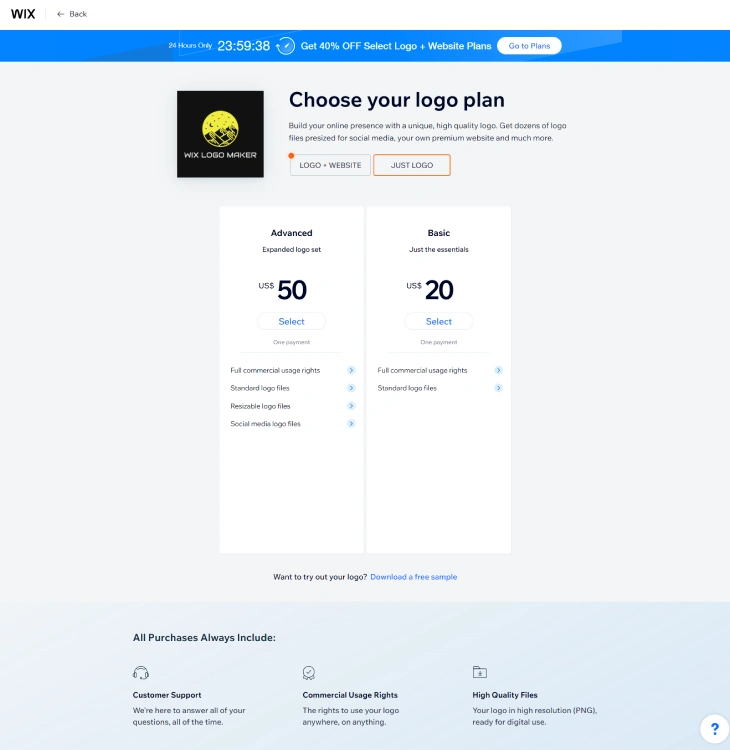
Choosing between Wix Logo Maker and Tailor Brands often comes down to cost among other factors. If budget is a concern, find out whether Wix Logo Maker is free before committing. Here is a breakdown of what each platform charges as of 2026:
|
Options |
Basic |
Advanced |
|||
|
Wix Logo Maker |
Just Logo |
$20.00 (one-time payment) |
$50.00 (one-time payment) |
||
|
Logo + Website |
Unlimited |
Value |
Business |
||
|
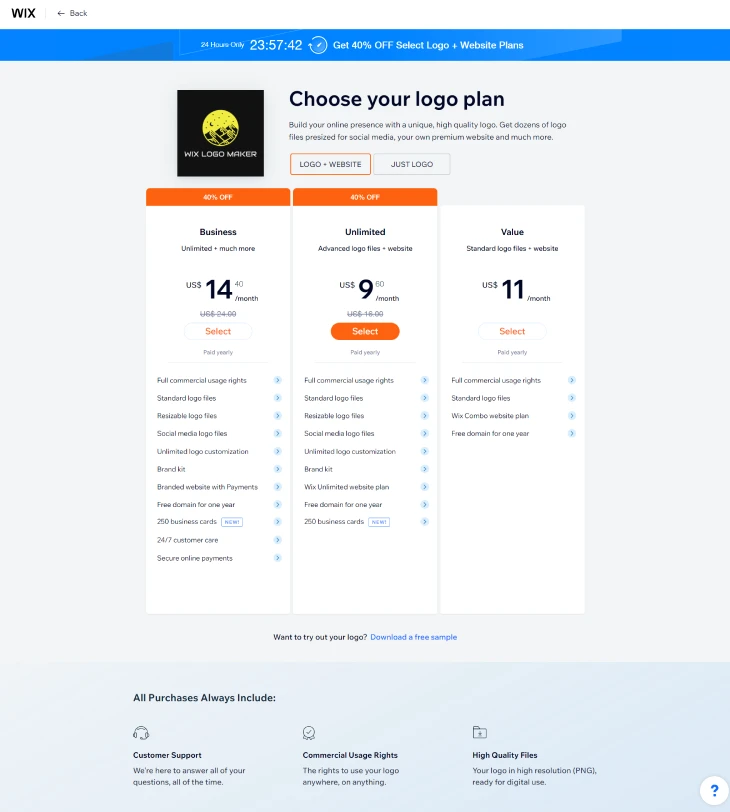
$9.60 per month (previously $16.00 per month) |
$11.00 per month |
$14.40 per month (previously $24.00 per month) |
|||
|
Tailor Brands |
1 Month |
Basic |
Standard |
Premium |
|
|
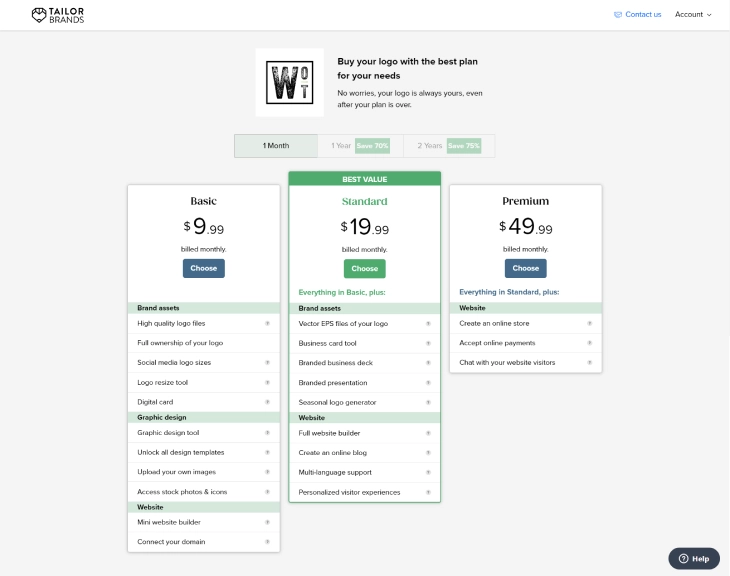
$9.99 per month |
$19.99 per month |
$49.99 per month |
|||
|
1 Year (Save 70%) |
Basic |
Standard |
Premium |
Elite |
|
|
$3.99 per month (billed annually) |
$5.99 per month (billed annually) |
$12.99 per month (billed annually) |
$20.75 per month (billed annually) |
||
|
2 Years (Save 75%) |
Basic |
Standard |
Premium |
||
|
$2.50 per month (billed bi-annually) |
$4.99 per month (billed bi-annually) |
$9.99 per month (billed bi-annually) |
The pricing for Wix Logo Maker and Tailor Brands differs greatly depending on the chosen package and length of subscription. Note that pricing may change; check each platform's website for the most current rates.
Wix Logo Maker has a one-time payment option for creating logos priced at $20 or $50, depending on the complexity desired. It also offers monthly plans that bundle logo creation with website services, now at reduced rates due to current promotions.
Tailor Brands provides various monthly subscription levels, Basic, Standard, and Premium, with substantial savings available for one or two-year commitments.
Value for Money
Wix Logo Maker offers good value with its clear and simple pricing structure. The one-time fee is economical for startups or small projects that just need a logo file and nothing else. You pay once, download your files, and you are done.
For users seeking more than just a logo, like a website package, Wix's subscription plans are competitively priced and currently discounted, making it a practical choice for small to medium-sized enterprises that also need web presence alongside branding.
Tailor Brands provides good value if you choose longer subscription periods. The tiered pricing allows businesses to adjust services to their growth and needs. Choosing annual or bi-annual payment plans can lead to significant savings, positioning Tailor Brands as an appealing choice for both new businesses and those looking to build out their branding over time.
Higher tier plans, which offer branding tools including detailed brand guides and social media graphics, deliver strong value for companies aiming to develop a consistent brand identity across multiple channels.
File Formats and Export Options
The file formats you receive matter just as much as the logo design itself. If you cannot get the right file type, your logo may look blurry on printed materials or fail to work with certain platforms.
Here is what each platform provides:
- Wix Logo Maker (Basic - $20): PNG files with transparent background. Good for websites and social media.
- Wix Logo Maker (Advanced - $50): PNG files plus SVG vector files. SVG files can be resized to any dimension without losing quality, which is essential for print materials like business cards, banners, and merchandise.
- Tailor Brands (Basic): High-resolution PNG and JPG files. No vector files on this tier.
- Tailor Brands (Standard and above): PNG, JPG, and EPS vector files. EPS works with professional design software like Adobe Illustrator.
If you need vector files (and most businesses eventually do for print), Wix's $50 Advanced plan is a one-time cost. With Tailor Brands, you need at least the Standard plan at $5.99/month billed annually to get vector files. Over a year, that adds up to $71.88 compared to Wix's flat $50.
Trademark Rights and Logo Ownership
One question that often gets overlooked: who actually owns the logo you create? This matters if you plan to trademark your logo or use it exclusively.
Both Wix Logo Maker and Tailor Brands grant you full commercial usage rights to the logos you create and purchase. You can use your logo on products, marketing materials, websites, and packaging without restrictions.
However, there are important differences:
- Wix Logo Maker: Once you purchase a logo, you own the rights to use it commercially. The individual design elements (icons, fonts) remain part of Wix's library, meaning another user could theoretically create a similar-looking logo using the same elements. You can still trademark your specific logo combination.
- Tailor Brands: Similar terms apply. You get commercial rights to use the logo, but the underlying design elements are shared across their platform. Tailor Brands does offer a logo trademark registration service through their higher-tier plans, which can save you the hassle of filing separately.
Neither platform creates a completely exclusive design the way a custom designer would. If trademark exclusivity is critical for your business, consider having a designer review and modify your AI-generated logo to make it more distinctive before filing for trademark protection.
Which One Is Better for Your Situation
The right choice depends on what type of business you are running and what you need the logo for. Here are specific recommendations:
Small Business on a Budget
Go with Wix Logo Maker. The $20 one-time fee keeps costs low, and you get a professional-looking logo in minutes. No ongoing subscription fees eating into your startup budget.
Freelancer or Solopreneur
Wix Logo Maker is the better fit here too. Freelancers typically need a clean, simple logo and do not require social media kits or brand guidelines documents. The $50 Advanced plan gives you SVG files that work for both your website and business cards.
Ecommerce Store Owner
This depends on your needs. If you just want a logo for your store header and favicon, Wix Logo Maker is enough. If you want matching social media templates, product label designs, and a consistent brand guide to share with suppliers, Tailor Brands' Standard or Premium plan gives you those extras.
Personal Brand or Content Creator
Tailor Brands has an edge here. Content creators need logos that work across YouTube, Instagram, TikTok, and other platforms, each with different size requirements. Tailor Brands' automatic logo resizing and social media asset generation saves time compared to manually resizing a Wix logo for each platform.
Agency or Multi-Brand Business
Neither tool is ideal for agencies managing multiple brands. Both are designed for single-brand use. For agencies, consider creating separate accounts on whichever platform you prefer, or invest in custom design work for client logos.
The Verdict: Wix Logo Maker vs Tailor Brands
Both Wix Logo Maker and Tailor Brands produce decent logos, but they serve different needs. Wix Logo Maker is the smarter pick for anyone who wants a logo and nothing else. You pay once, get your files, and move on. Tailor Brands is worth the subscription if you need a full branding toolkit that goes beyond just a logo. See our step-by-step Wix Logo Maker tutorial if you decide to go the Wix route.
Your choice between the two should depend on your specific branding needs, your budget, and whether you need just a logo file or a broader set of brand assets that you will use over time.
Wix Logo Maker vs Tailor Brands: What Happens After You Create Your Logo
Most comparisons of these two platforms stop at the logo creation step. But for a small business owner, what happens after you download your logo is just as important as how it gets made. The two platforms take very different paths once you have a logo in hand.
Using Your Logo on a Wix Website
If you already use Wix to build your website, Wix Logo Maker has a clear advantage. Because the logo maker lives inside the Wix ecosystem, your logo can be set as your site's favicon, header logo, and social sharing image in a few clicks from the Wix dashboard. There is no need to re-upload or resize anything manually. If you created your logo through Tailor Brands, you can still upload it to a Wix site, but it becomes a manual process: download the file, upload it to your Wix media library, and place it yourself. It works fine, but it takes more steps and is easier to get wrong.
Updating Your Logo Later
Businesses change. You might want to tweak your color palette after a year, try a different font weight, or adjust proportions as your brand matures. With Wix Logo Maker, updates are available for a new flat fee. You revisit the maker, regenerate a variation, and pay again if you want the updated files. With Tailor Brands, logo changes and brand kit updates are included as long as your subscription is active. The catch is that if you cancel your Tailor Brands subscription, your access to brand kit assets and ongoing updates goes away. You keep the files you downloaded, but nothing is refreshed going forward.
Social Media Kits
Tailor Brands automatically generates social media-sized versions of your logo, including cover images, profile pictures, and post templates sized for different platforms. This is a genuine time-saver if social media is central to how you market your business. Wix Logo Maker gives you your PNG and SVG files and leaves the resizing to you. If you need a Facebook cover image or an Instagram profile picture that matches your logo, you will need to create those yourself using a tool like Canva. For some business owners this is not a problem. For others, having everything sized and ready to go is worth paying for.
Business Cards and Print Materials
Tailor Brands includes business card design within its subscription and can print and ship physical cards directly through the platform. Wix Logo Maker is a digital-only product. If you want business cards, you take your SVG file to a third-party printer like Moo or Vistaprint. There is no difference in print quality between the two, since both platforms provide vector SVG files that scale to any size without losing sharpness. But Tailor Brands saves you the extra step of finding a printer and setting up a card design from scratch.
What to Do If You Outgrow Your Logo
AI-generated logos are a good starting point, but some businesses eventually want a custom logo designed by a human designer. When that time comes, having an SVG file makes the handoff straightforward. A designer can open the vector file, understand your existing brand direction, and build from there. Both Wix Logo Maker and Tailor Brands provide SVG files, so you are equally well-positioned for a future redesign regardless of which platform you started with.
The Bottom Line on Post-Creation Value
If you are already in the Wix ecosystem and primarily need your logo on a website, Wix Logo Maker wins on convenience. If you need a wider set of branding tools, including social media templates, business cards, and print fulfillment, Tailor Brands bundles more into one subscription. The right choice depends less on which logo looks better and more on how you plan to use the logo once it exists.
* read the rest of the post and open up an offer