

Wix Answers is a customer support platform built around four pricing tiers from $24 to $80 per agent per month (billed annually), covering everything from a basic self-service knowledge base up to an unlimited all-channel support workspace. Originally built to handle Wix's own user support, it's now sold as a standalone product to companies looking for a help-desk alternative to Zendesk, Intercom, or Freshdesk at a lower entry price.
This review covers exactly what each plan includes, how Wix Answers compares to the major alternatives, who it's a good fit for (and who should look elsewhere), and the practical pros and cons of running it day-to-day.
Wix Answers Pricing: Plans at a Glance
All four plans are billed annually. Per-agent math: a 5-agent team on the Self-Service plan pays $120/month or $1,440/year; the same team on Unlimited pays $400/month or $4,800/year.
Self-Service |
Call Center |
Multi-Channel |
Unlimited |
|
Price |
$24/agent/mo |
$56/agent/mo |
$60/agent/mo |
$80/agent/mo |
Key Features |
Knowledge base, help widgets, basic analytics |
Ticketing, phone, live chat, IVR, call recording |
Knowledge base + ticketing + chat + email/Facebook/web forms |
Everything above + advanced automation, dedicated account manager |
Best For |
Self-service support, small teams |
Phone-heavy support operations |
Most growing SaaS/service businesses |
Mid-sized teams needing all channels |
Self-Service Plan ($24/agent/month)
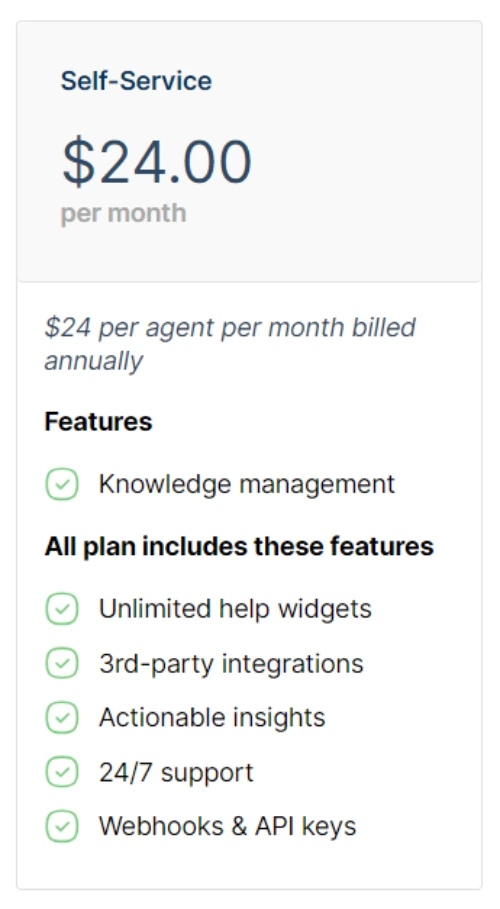
The Self-Service plan covers the customizable help center, task management, search functionality, and contextual help widgets. It's the right starting point for SaaS or service businesses where most customer questions can be answered by good documentation. SEO-optimized articles, mobile-friendly delivery, and feedback ratings on each article round out the offering.
What's included
- Customizable knowledge base - branded help center with your colors, logo, and structure.
- Article creation and management - editor with version history and bulk actions.
- Multimedia support - images, video embeds, and downloadable file attachments.
- Search functionality - keyword-based search with article ranking.
- User feedback and ratings - readers rate articles "helpful / not helpful" so you can improve weak content.
- Analytics - article views, search query tracking, and engagement metrics.
Call Center Plan ($56/agent/month)
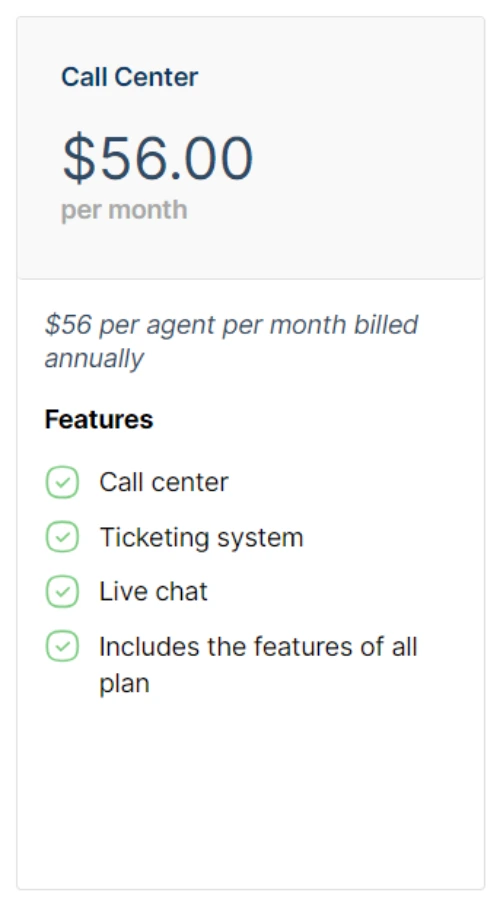
The Call Center plan focuses on phone and chat support. Inbound, outbound, and callback functions; smart call routing; call monitoring and recording; customizable IVR flows; auto-transcribed voicemails. It does not include the knowledge management module, so most teams need either Self-Service alongside it or skip to Multi-Channel.
What's included
- Ticketing system - centralized inbox for email, phone, chat, and social.
- Omnichannel handling - manage interactions across channels from one interface.
- Automatic routing - incoming tickets assigned by rule (skill, priority, region).
- Telephony integration - make and receive calls from inside the platform.
- Real-time monitoring - call volume, wait times, and per-agent performance.
- Collaboration - internal notes, ticket assignment, agent mentions.
- Customizable SLAs - define response and resolution targets per ticket type.
Multi-Channel Plan ($60/agent/month)
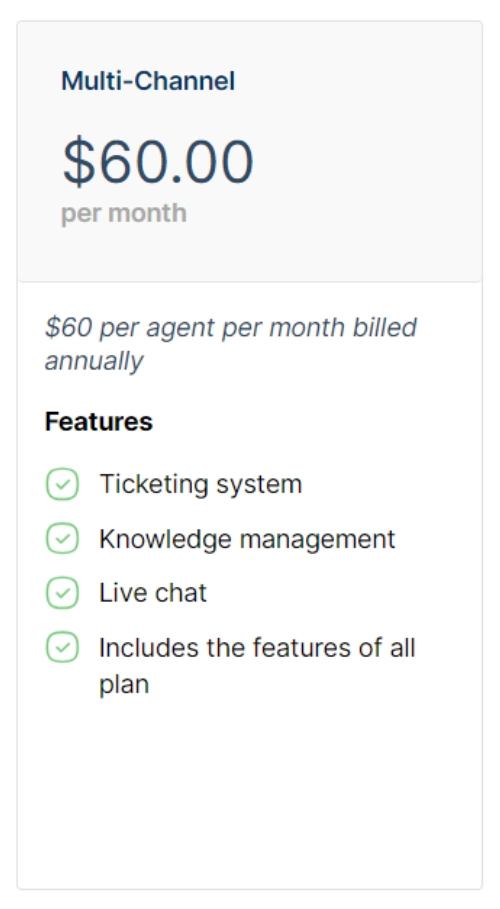
The Multi-Channel plan combines knowledge management, live chat, and ticketing - covering email, chat, Facebook, and web forms. Includes real-time triggers, AI-powered article recommendations during ticket handling, automation through unlimited labels and queues, and live chat features like automated routing, offline forms, and target messages. For most growing support teams, this is the sweet-spot plan.
What's included
- Unified inbox - email, chat, social, and messaging in one view.
- Channel integrations - Facebook Messenger, WhatsApp, email, web forms.
- Automated routing and prioritization - rule-based assignment.
- Real-time notifications - push alerts to agents on incoming inquiries.
- Conversation history - full context across channels per customer.
- Reporting and analytics - channel-by-channel performance breakdowns.
- Chatbots and automation - handle FAQs and triage before reaching a human agent.
Unlimited Plan ($80/agent/month)
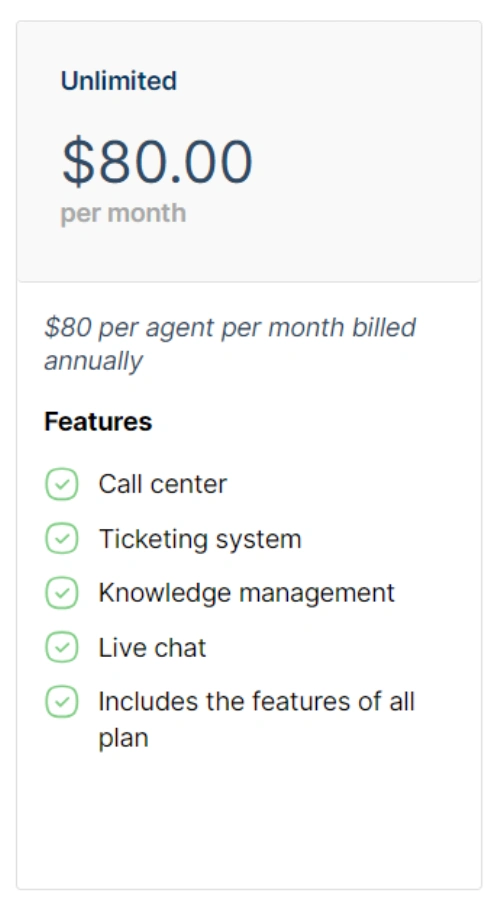
The Unlimited plan rolls all four modules - call center, ticketing, live chat, knowledge management - into one workspace with a single-tab interface. Adds unified timeline view, calls dashboard for workload monitoring, advanced automation through Spotter, real-time alerts, custom branding across the support portal, and (on most contracts) a dedicated account manager. Built for mid-sized teams running serious support operations across all channels.
What's included
- Unrestricted feature access - every Wix Answers capability included.
- Scalability - no per-feature add-on costs as your team grows.
- Custom branding - full control over portal and help center appearance.
- Priority support - faster response from Wix Answers' own support team.
- Advanced analytics - deeper reporting on team performance and customer trends.
- Integration options - wider library of CRM, productivity, and analytics integrations.
- Dedicated account manager - on most Unlimited contracts, a single contact for setup and ongoing support.
Wix Answers vs Zendesk vs Intercom vs Freshdesk
Wix Answers competes mainly on price and simplicity at the entry tier. Here's how it stacks up against the three help-desk platforms readers most often compare it to:
- Wix Answers (Self-Service): $24/agent/month annually. Knowledge base + basic ticketing.
- Zendesk Suite Team: $55/agent/month annually. Ticketing + email + social - no native knowledge base on the entry tier (you need Suite Growth at $89/agent for that).
- Intercom Essential: $39/seat/month + per-resolution fees for AI features. Strong messaging, weak knowledge management on the entry tier.
- Freshdesk Growth: $15/agent/month annually. Cheapest entry point; knowledge base included; weaker call center features than Wix Answers.
The honest verdict: Freshdesk wins on raw entry price, Zendesk wins on enterprise scale and integrations, Intercom wins on conversational/messaging UX, and Wix Answers sits in the middle - better than Freshdesk on call center, cheaper than Zendesk and Intercom for combined knowledge base + tickets at small scale.
Wix Answers Pros and Cons
The honest summary after looking at it across all four tiers:
Pros
- Self-Service plan is genuinely cheap for a knowledge-base + help-widget product at $24/agent/month.
- Unified workspace - calls, tickets, chat, and knowledge live in one timeline once you're on Multi-Channel or Unlimited.
- Built-in analytics - article performance, search queries, and agent metrics are surfaced without needing a third-party reporting layer.
- SEO-optimized help center - articles index well, which doubles as marketing content.
- Refunds and free trials - most plans offer a trial period before annual commitment.
Cons
- Annual billing only on listed prices - monthly billing is more expensive (typically 25–30% premium).
- Smaller integration ecosystem than Zendesk or Intercom - fewer pre-built CRM, BI, and workflow connectors.
- Call Center plan lacks knowledge base - confusing structure; most teams will end up needing Multi-Channel.
- Less brand recognition - Zendesk and Intercom are more familiar to candidates you might hire to run support.
- Enterprise feature gap - large support orgs (50+ agents) usually outgrow it within 12–18 months.
Who Should Use Wix Answers (and Who Shouldn't)
Good fit
- SaaS companies with 1–25 support agents looking to consolidate help-desk and knowledge base.
- Teams currently using free tools (email + spreadsheet) ready to professionalize support without a Zendesk-sized commitment.
- Service businesses where customer questions are repetitive - a strong knowledge base deflects volume.
- Teams already using Wix for their main website who want a tightly integrated support layer.
Poor fit
- Large support operations (50+ agents) - Zendesk Enterprise will scale better.
- Teams that need deep CRM integration (Salesforce, HubSpot bidirectional sync) - Wix Answers' integrations are thinner.
- Companies where messaging-first conversational support is critical - Intercom is purpose-built for that.
- Cost-only buyers needing <$15/agent/month - Freshdesk's entry tier is cheaper.
Real-World Setup and Learning Curve
Plan for 1–2 weeks of focused work to launch a Wix Answers help center properly. The work isn't the platform - it's writing the initial 30–50 articles your customers actually need. Wix Answers' editor and structure are easier than Zendesk's, but no help-desk shortcuts the content work. Once articles are live, agent onboarding takes a half day. The Multi-Channel and Unlimited plans require additional setup time for routing rules, SLAs, and channel integrations - budget another week.
Wix Answers: Functionality and Integration
Beyond the per-plan features, Wix Answers operates as a single platform that consolidates customer interactions across channels.
All-in-One Workspace
Calls, emails, chats, and social messages land in a unified timeline per customer. Agents see the full history without switching tools. This is the architectural advantage over running separate tools (Help Scout for tickets + Intercom for chat + a wiki for docs).
Self-Service and AI Assistance
The knowledge base is augmented by AI-powered article recommendations - when a customer types a question into chat or a ticket, the system surfaces matching articles before a human agent picks it up. Done well, this resolves 30–50% of tier-1 tickets without an agent touching them.
Efficiency and Insights
Built-in analytics covers article performance, search queries (what customers are looking for that you don't have content for), agent productivity, and channel volume. This data alone justifies the platform cost for most teams managing 500+ tickets a month.
Conclusion: Wix Answers Review
Wix Answers is a credible alternative to Zendesk and Intercom for small-to-midsize support operations, especially at the Self-Service ($24/agent) and Multi-Channel ($60/agent) tiers. It's not the cheapest option (Freshdesk wins there), and it's not the most feature-rich (Zendesk wins there), but it sits in the value middle for teams that want a unified help center, ticketing, and chat without paying enterprise pricing. Best fit: SaaS or service businesses with 5–25 agents currently running support out of email + a wiki, ready to consolidate. Worst fit: large enterprise teams or messaging-first companies. For more on Wix's broader product range, see our Wix eCommerce review.
* read the rest of the post and open up an offer