

Wix powers over 250 million websites across 190 countries, making it one of the most popular website builders available. The short verdict: Wix is genuinely good for small business sites, portfolios, blogs, and service-based businesses that need a professional site without hiring a developer. It falls short for high-volume online stores, sites that need frequent redesigns, and anyone who wants full control over their hosting or code. This guide covers every meaningful pro and con with specific numbers so you can make an informed decision.
For a full platform assessment beyond just pros and cons, see our guide on whether Wix is a good website builder.
Wix Pros and Cons at a Glance
This table summarises the key advantages and disadvantages before getting into the specifics. Learn how to check your Wix storage space to stay ahead of plan limits.
| Pros | Cons |
|---|---|
|
|
Wix Pros: What It Does Well
Wix's strengths centre on ease of use, design variety, AI-powered setup, and the fact that everything (hosting, security, backups) is handled for you. These make it a strong fit for beginners, freelancers, and small businesses that want to get online fast.
Drag-and-Drop Editor With No Coding Required
Wix's editor lets you place any element -- text, images, buttons, video, forms -- anywhere on the page by dragging it into position. There is no code to write and no file structure to learn. The editor includes undo/redo history, snap-to-grid alignment, a layers panel for stacking elements, and contextual help at each step.
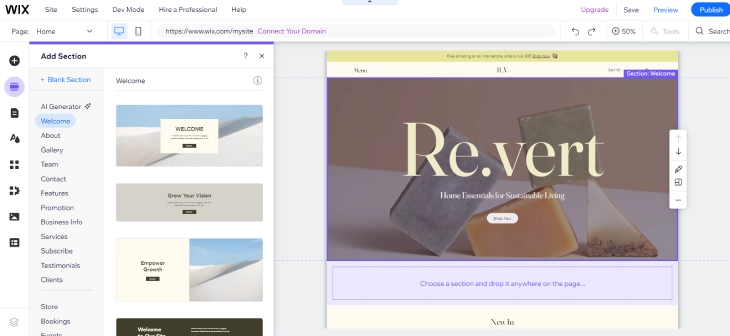
Most users can publish a basic website within a few hours of signing up. Compared to WordPress's block editor -- where you need to understand block types, templates, and sometimes PHP -- Wix has a significantly flatter learning curve for visual design work.
900+ Templates Across 70+ Categories
Wix offers over 900 professionally designed templates covering business, portfolio, restaurant, blog, photography, online store, and dozens of other categories. All templates are mobile-responsive by default. You can change colours, fonts, layouts, and sections freely within your chosen template. Browse the best free Wix templates for curated picks by industry.
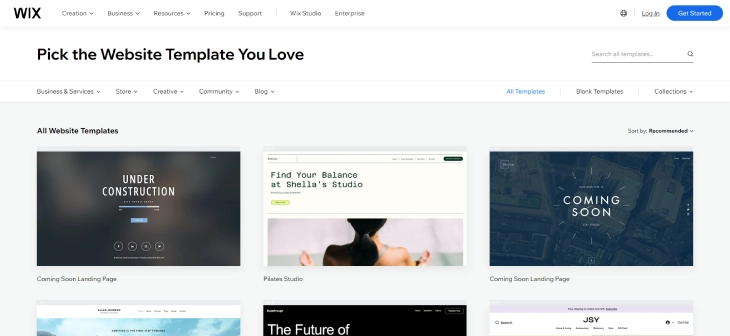
The critical caveat: once you select a template and start building, you cannot switch to a different template without rebuilding your site from scratch. This is covered in detail in the cons section below.
AI Site Generator Builds Pages in Minutes
Wix offers AI-powered site creation through Wix ADI (Artificial Design Intelligence) and the newer AI Site Generator. You answer a short set of questions about your business type, goals, and style preferences. Wix then generates a complete website -- including copy, images, layout, and multiple pages -- in under two minutes.
The AI Site Generator (launched in 2024) produces multi-page sites with contextually relevant content, and you can edit every element afterward with the standard drag-and-drop editor. Squarespace and most other hosted builders offer nothing comparable. This is a real time-saver for solo business owners who need to get a site up quickly and refine it later.
2026 Pricing: Free to $159/Month
Wix is free to start, with paid plans that remove branding, add a custom domain, and unlock additional features. Current 2026 pricing (billed annually):
- Free -- Wix subdomain, Wix ads displayed, 500MB storage, no ecommerce
- Light -- $17/month -- Custom domain, no Wix ads, 2GB storage, 2 collaborators
- Core -- $29/month -- 50GB storage, ecommerce enabled, 5 collaborators, basic analytics
- Business -- $39/month -- Unlimited storage, advanced ecommerce, subscriptions, 10 collaborators
- Business Elite -- $159/month -- Priority support, advanced performance, unlimited everything
For a full breakdown, see how much does Wix cost. The free plan works for personal projects and testing, but any business-facing site needs at least the Light plan to remove ads and connect a custom domain.
Mobile Optimisation With Separate Editor
Wix automatically generates a mobile version of your site from your desktop design. The mobile editor lets you reorder sections, resize elements, and hide desktop-only content for mobile visitors. All Wix templates pass Google's mobile-friendliness test out of the box.
With mobile traffic accounting for over 60% of global web visits, having automatic mobile optimisation matters. Wix handles it without manual configuration, though the mobile and desktop editors can sometimes fall out of sync (more on that in the cons section).
Built-in SEO Tools
Wix includes customisable title tags and meta descriptions per page, automatic XML sitemaps submitted to Google, structured data markup for local businesses and products, canonical tags, 301 redirect management, and alt text fields for all images. For a practical walkthrough of keyword placement across all of these locations, see our guide on how to add keywords to your Wix website.

The dashboard integrates directly with Semrush for keyword research, and the Wix SEO Setup Checklist walks new users through site-wide optimisation steps. Where Wix falls short vs. WordPress is in granular technical control -- advanced users cannot edit robots.txt directly or install plugins like Yoast or RankMath.
Wix Studio for Professionals and Agencies
Wix Studio is a separate, professional-grade design environment for agencies, freelancers, and advanced users. It provides CSS Grid-based layouts, responsive breakpoints for multiple screen sizes, reusable design assets across client sites, and a client management dashboard.
Wix Studio is free and runs on the same infrastructure as standard Wix. If you are a designer or agency building client sites, Studio gives you far more layout control than the standard editor.
Wix Cons: Where It Falls Short
Wix's biggest limitations are template lock-in, ecommerce depth gaps, scalability ceilings, hidden costs beyond the plan price, and restricted code access. These matter most to growing businesses, developers, and anyone selling at volume online.
Template Lock-In: No Switching After You Build
Once you select a Wix template and start adding content, you cannot switch to a different template. If your business rebrands, outgrows the design, or you simply want a fresh look, you must rebuild your entire site from scratch. All content, layout tweaks, and custom elements are tied to the original template.
WordPress lets you switch themes at any time while keeping all your content. Squarespace also allows template switching without data loss. If you expect your business to change direction or grow significantly within the next 2-3 years, this lock-in is one of the most important factors to weigh before choosing Wix.
Ecommerce Limitations vs. Dedicated Platforms
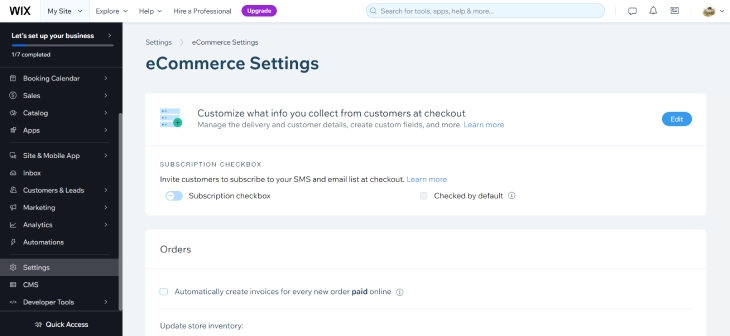
Wix ecommerce works for small to mid-size stores but has hard limits that become real problems at scale. Ecommerce features only activate from the Core plan ($29/mo) onward. Wix supports product listings, inventory management, discount codes, abandoned cart recovery, and selling on social platforms.
What Wix ecommerce lacks compared to Shopify:
- Product cap of 50,000 items (Shopify has no product limit)
- No advanced shipping rules or real-time carrier-calculated rates on lower plans
- Subscription management only available on Business plan ($39/mo) and above
- Around 500 apps in the Wix App Market vs. Shopify's 8,000+ apps
- No POS hardware integration as mature as Shopify POS
- Limited multi-currency and international selling features
For a detailed comparison, see our Wix ecommerce review. If your store does more than $10,000/month in revenue or you need advanced inventory and shipping management, Shopify is the better platform.
Scalability Ceiling: Editor Slows Past 50-100 Pages
Wix works well for sites with a few dozen pages. Once you exceed 50-100 pages, the editor becomes noticeably sluggish -- loading times increase, saving takes longer, and switching between pages can lag. This is a known issue that affects content-heavy blogs, large service directories, and businesses with extensive product catalogues.
If you plan to build a site with hundreds of pages, WordPress or a custom-built solution will handle the scale far more smoothly. Wix is best suited for sites that stay under 50 pages in the long run.
Hidden Costs Most Reviews Skip
The plan price is not the full cost of running a Wix site. Several additional expenses catch users off guard:
- Domain renewal: Wix includes a free custom domain for the first year on annual plans, but renewal costs $14.95-$17.79 per year depending on the TLD. Many users don't notice this charge until year two.
- Premium apps: The Wix App Market has hundreds of free apps, but many of the most useful ones (advanced forms, booking integrations, marketing tools) carry their own monthly subscription fees -- often $5-$15/month each. Three premium apps can add $15-$45/month to your bill.
- Email marketing: Wix includes basic email marketing in higher plans, but with subscriber limits. Once you exceed those limits, the email marketing add-on starts at $10/month and scales up based on your list size.
- Month-to-month billing: The advertised prices are for annual billing (paid upfront). Choosing month-to-month billing costs 15-25% more. The Core plan, for example, jumps from $29 to roughly $36/month on monthly billing.
- Payment processing fees: Every Wix Payments transaction carries a 2.9% + $0.30 fee, plus ~$20 per chargeback and ~2% for currency conversion on international orders. For a full breakdown, see our guide to Wix payment fees.
- Removing Wix branding: The free plan shows "Made with Wix" ads. Removing them requires at least the Light plan ($17/mo), which is effectively a $204/year branding fee.
A realistic budget for a small business Wix site is $35-$60/month when you factor in the plan, a couple of premium apps, and domain renewal -- not the $17/month headline price.
Page Speed: Adequate but Not Fast
Wix site speed is passable for most use cases but lags behind a well-optimised WordPress site. Independent tests typically show Wix pages loading in 1.5-3 seconds on desktop. Google Core Web Vitals scores are generally acceptable, but Largest Contentful Paint (LCP) can suffer on image-heavy pages.
Wix has invested in performance improvements since 2021 -- lazy loading, CDN optimisation, and infrastructure upgrades have narrowed the gap. For informational and service sites, Wix speed is not a ranking disadvantage. For high-traffic stores where every millisecond affects conversion rates, it is worth testing before committing.
Mobile and Desktop Can Fall Out of Sync
Wix generates the mobile version automatically from your desktop design, but the two editors are partially independent. Changes you make in the desktop editor don't always carry over to mobile correctly, and vice versa. This means you can end up with layout differences, missing elements, or styling inconsistencies between the two versions without realising it.
After making significant edits on desktop, always preview and adjust the mobile version manually. This extra step catches most sync issues, but it adds time to every update cycle.
Storage Caps on Lower Plans
Storage varies sharply by plan: 500MB on free, 2GB on Light ($17/mo), 50GB on Core ($29/mo), and unlimited on Business ($39/mo) and above. The 2GB Light plan limit fills up quickly if you upload high-resolution images, videos, or downloadable files. Photography portfolios, video-heavy sites, and media businesses need the Core plan at minimum.
Code Customisation Limited to Wix Velo
Wix Velo (formerly Corvid) is a JavaScript-based development environment built into the editor. It lets you write custom frontend and backend JavaScript, connect to external APIs, create dynamic database-driven pages, and build custom forms.
What you cannot do: access the server or hosting environment, install server-side packages, write PHP, or modify core platform files. Velo is useful for adding custom logic, but it runs inside Wix's sandboxed environment. Developers who need full server control should use a self-hosted platform instead.
Wix Ads on the Free Plan
Free Wix sites display a "Made with Wix" banner on every page and use a Wix-branded subdomain (yoursitename.wixsite.com). Any business-facing site needs a paid plan to remove this branding. The free plan is only suitable for personal projects, testing, or learning the platform before committing money.
How Wix Page Speed Compares to Competitors
Page speed matters for both SEO and conversions, so it's worth looking at how Wix actually performs against Squarespace and WordPress in head-to-head tests. Independent benchmarks using Google PageSpeed Insights on similarly structured pages (small business homepage, about 5 images, 3 sections) show the following typical ranges:
| Platform | Mobile Performance Score | Desktop Performance Score | LCP (Largest Contentful Paint) |
|---|---|---|---|
| Wix | 55-70 | 85-95 | 2.5-4s mobile |
| Squarespace | 50-65 | 80-92 | 3-5s mobile |
| WordPress (managed) | 65-85 | 90-98 | 1.5-3s mobile |
Wix consistently scores higher than Squarespace on mobile and is competitive on desktop. It trails a well-optimised WordPress site running a lightweight theme and caching plugin, but the gap is smaller than it was a few years ago. For most small business sites where the homepage loads 5-10 images, Wix's performance is acceptable. Where it genuinely hurts you is on image-heavy portfolio pages or product listing pages with dozens of photos -- those benefit from the extra control WordPress gives you over image optimization and caching.
One practical tip: Wix automatically serves WebP images and uses a global CDN, so you get some performance benefits without any configuration. The mobile score gap vs. WordPress is mainly due to JavaScript bundle size, which Wix is working to reduce with each platform update.
Who Should Use Wix
Wix is an excellent choice for these types of users and businesses:
- Local service businesses (plumbers, dentists, salons, consultants) that need a professional 5-15 page site with contact forms, booking, and a Google Maps listing. Wix handles all of this on the Core plan without any technical knowledge.
- Freelancers and creatives building a portfolio site. The template variety and drag-and-drop design give you a polished result without hiring a web designer.
- Small ecommerce stores selling fewer than 100 products and doing under $10,000/month in revenue. Wix ecommerce covers the basics well at this scale.
- Bloggers and content creators who want a site up fast and don't need the plugin ecosystem of WordPress.
- Event and wedding sites with a limited lifespan where template lock-in and scalability don't matter.
- Non-technical founders who need a web presence quickly and plan to upgrade to a custom platform later as the business grows.
Who Should NOT Use Wix
Wix is the wrong choice for these situations:
- High-volume online stores. If you sell more than a few hundred products or process more than $10,000/month, Shopify gives you better inventory management, shipping rules, and app options. The 50,000-product cap and limited third-party integrations will slow you down.
- Content-heavy sites with 100+ pages. The editor becomes sluggish at scale. WordPress handles thousands of pages without performance degradation in the admin panel.
- Businesses that rebrand frequently. Template lock-in means every major redesign starts from zero. If your brand evolves every 1-2 years, this becomes expensive and time-consuming.
- Developers who need server access. Wix Velo is capable but sandboxed. If you need PHP, custom server configurations, cron jobs, or direct database access, you need self-hosted WordPress or a custom stack.
- Sites requiring heavy third-party integrations. Wix's app market has around 500 apps. If your business depends on specific tools not available in the Wix ecosystem, you will hit walls quickly.
- Enterprise or high-traffic sites. Performance, customisation limits, and the lack of multi-site management tools make Wix unsuitable for most enterprise use cases. That said, Wix does offer a dedicated enterprise tier with custom pricing and SLAs; see our Wix Enterprise review for what it actually includes.
How Wix Compares to Alternatives
Each Wix limitation has a platform that handles it better. Here is a quick reference:
- For ecommerce at scale: Shopify -- purpose-built for online selling with no product limits, 8,000+ apps, and advanced shipping and inventory tools.
- For full customisation: WordPress.org (self-hosted) -- complete control over themes, plugins, code, and hosting. Steeper learning curve but no platform restrictions.
- For design flexibility without code: Squarespace -- fewer templates than Wix but allows template switching, and its design quality is consistently high.
- For budget sites: Hostinger Website Builder -- plans start at $1.95/month with similar drag-and-drop functionality, though fewer features overall.
- For professional web design: Webflow -- gives designers CSS-level control in a visual editor, with better performance and cleaner code output than Wix.
For a deeper comparison, see the best website builder alternatives to Wix. If you're weighing the top three builders specifically, our Wix vs. WordPress vs. Squarespace comparison covers pricing, ease of use, SEO, and eCommerce side by side.
Final Verdict: Are the Pros Worth the Cons?
Wix is a capable all-in-one website builder that works well within its sweet spot: small business sites, portfolios, blogs, and low-to-mid-volume online stores. The drag-and-drop editor, 900+ templates, AI site generation, and built-in SEO tools make it one of the most complete hosted platforms available in 2026. Plans starting at $17/month are competitive, though real-world costs typically land at $35-$60/month once you add domain renewal and a couple of apps.
The cons -- template lock-in, ecommerce caps, editor sluggishness at scale, and sandboxed code -- are deal-breakers only if your business specifically needs what they restrict. For most small business owners and content creators, those trade-offs are worth accepting in exchange for Wix's ease of use and the fact that hosting, security, and updates are handled for you. The question is not whether Wix is good, but whether it fits what you are building. See our full verdict: is Wix a good website builder?
True Total Cost of Wix: Year 1 vs Year 2 and Beyond
Most Wix pricing articles stop at the plan price. The actual cost of running a Wix site is higher once you include domain renewal, apps, and email marketing. Here is what a typical small service business actually pays over two years on the Light plan.
| Cost Item | Year 1 | Year 2+ |
|---|---|---|
| Light plan (annual billing) | $204/year ($17/mo) | $204/year |
| Custom domain | Free (included in plan) | $15-18/year (renewal) |
| Premium app (e.g., booking or forms) | $60-180/year ($5-15/mo) | $60-180/year |
| Email marketing add-on (if needed) | $0-120/year | $0-120/year |
| Realistic total | $264-504/year | $279-522/year |
That range looks wide, but in practice most small service businesses land between $280 and $400 per year from year two onward. A plumber, salon, or consultant using Wix Bookings ($16/mo) and one contact form app ($9/mo) on the Light plan pays roughly $492/year -- not $204. Year 1 is slightly cheaper because the domain is free.
How does that compare to WordPress? A self-hosted WordPress site on a shared hosting plan (SiteGround, Bluehost, or similar) typically costs $15-20/year for a domain plus $36-120/year for hosting, with optional premium plugins ranging from $0 to $200/year. Total: $51-340/year. WordPress can be cheaper at the low end, but it requires more technical setup and ongoing maintenance. Wix bundles that overhead into the plan price, which explains the cost difference.
The clearest cost signal: if you only need a brochure site with no apps or email marketing, the Light plan at $204/year is your real cost, and that is genuinely competitive. Every app you add narrows the gap between Wix and a self-hosted alternative. Before choosing a plan, list the apps your site actually needs and price them in the Wix App Market before committing.
Wix for Specific Business Types: Real Verdicts
General reviews tell you Wix is "good for small businesses." That is not useful if you run a restaurant or sell photography prints. Here is an honest verdict for five specific business types based on what Wix actually includes for each one.
Restaurants and Local Businesses
Wix is a strong choice for restaurants and local service businesses. The template library has a dedicated restaurant category with menus, hours, and location sections built in. Wix Table Reservations handles online booking natively, and the platform connects to third-party reservation tools like OpenTable if you already use one. You can embed a Google Map, set up a multi-location contact page, and manage a basic loyalty program through Wix's marketing tools.
The realistic ceiling is around five locations. Multi-location management on Wix requires manual duplication of pages and settings rather than a true multi-location dashboard. Chains with more than five locations will find that limiting. For a single restaurant or a small local business with one or two locations, Wix covers everything you need without custom development.
Photographers and Portfolio Sites
Wix is an excellent platform for photographers. Wix Pro Gallery handles high-resolution image display with multiple layout options (grid, slideshow, collage, masonry), lazy loading, and password-protected albums for client proofing. You can add video backgrounds to any page section, which works well for cinematographers and videographers. Apps for watermarking, digital downloads, and print-on-demand are available in the App Market.
The main watch-out is storage. The Light plan's 2GB cap fills up quickly with full-resolution photos. Photographers need the Core plan (50GB) at minimum, which pushes the cost to $348/year before apps. If you shoot video, Business plan storage is effectively required.
Online Stores Under $10k/Month Revenue
At lower revenue volumes, Wix ecommerce is a good fit. The Core plan covers product listings, discount codes, abandoned cart emails, and social selling on Instagram and Facebook. Payment processing through Wix Payments, PayPal, and Stripe works reliably. Order management and basic inventory tracking handle the typical volume of a small store without issues.
The picture changes above roughly $10,000/month in revenue. At that level, you start needing advanced shipping rules, real-time carrier rates, detailed inventory reporting, and deeper third-party integrations. Shopify has around 8,000 apps; Wix has around 500. That gap matters when your business depends on specific tools -- accounting integrations, 3PL connections, or advanced analytics.
Service Businesses: Coaches, Consultants, Agencies
Wix is well-suited for service businesses that need scheduling, payments, and client communication in one place. Wix Bookings handles appointment scheduling with calendar sync, client reminders, and recurring bookings. Wix Payments processes invoices and accepts card payments directly. Ascend by Wix adds email campaigns, automated follow-ups, and a basic CRM -- all from the same dashboard.
Coaches and consultants who want to sell digital products or online courses alongside their services can do so on the Business plan, which supports subscriptions and digital product delivery. For agencies managing multiple client sites, Wix Studio (free) adds a client management layer without extra cost. This is one of the strongest use cases for Wix in 2026.
Blogs and Content Sites
Wix Blog handles the basics well: post scheduling, categories, tags, author profiles, RSS feeds, and comments. The editor supports images, video embeds, and basic formatting. For a personal blog or a small business blog where SEO is not the primary growth channel, Wix is adequate.
Where it falls short is in content SEO tooling. WordPress with Yoast or RankMath gives you per-post SEO scoring, readability analysis, schema control, internal link suggestions, and a plugin ecosystem built around content performance. Wix has none of that depth. If organic search is your main traffic source and you plan to publish more than a few dozen posts, WordPress is the better long-term platform for a content-first site.
Questions Wix Users Actually Ask
These are the questions that come up repeatedly from people who have already tried Wix or are close to committing to it. The answers below are based on how the platform actually works, not the marketing copy.
Can I move my Wix site to another platform?
You can move your content, but not your design. Wix does not offer a direct export in WordPress XML, CMS format, or any format that another platform can import automatically. What you can export: your blog posts (as CSV), your contact list, and product data (for stores). Your pages, layouts, and design elements cannot be exported. Moving to WordPress, Squarespace, or Shopify means rebuilding the site's structure from scratch on the new platform. This is worth factoring in if you think you might outgrow Wix within two to three years. The cost is not just money -- it is also the time to rebuild.
What happens to my site if I cancel my Wix plan?
Your site does not disappear. When you cancel a paid plan, your account reverts to the free tier. Your site stays live but moves back to a Wix subdomain (yoursitename.wixsite.com), and the "Made with Wix" ads return. Your custom domain disconnects from Wix but you still own it -- you can point it elsewhere or let it expire through your registrar. All your content, pages, and media remain in your Wix account. If you resubscribe later, everything is still there. The practical downside is that any premium apps you had also deactivate, which can break functionality on live pages.
Is Wix good for SEO in 2026?
For most small business use cases, yes. Wix gives you full control over title tags, meta descriptions, canonical URLs, 301 redirects, structured data, and sitemaps -- the fundamentals that matter most for local and informational SEO. The Semrush integration inside the Wix dashboard makes basic keyword research accessible without leaving the platform. Where Wix is not the right tool is for technical SEO power users. You cannot edit robots.txt directly, you cannot install plugins like Yoast or RankMath, and Core Web Vitals scores on mobile tend to be lower than a well-optimised WordPress site. For a 10-50 page service site or blog, Wix SEO is more than enough. For a 500-page content site where organic search is the entire business model, the limitations matter.
Can Wix handle 10,000 visitors per day?
Yes. Wix runs on a distributed cloud infrastructure with global CDN delivery, and it handles traffic spikes without site owners needing to think about server capacity. A site receiving 10,000 visitors per day -- roughly 300,000 per month -- is well within what Wix's hosting handles without intervention. The platform has hosted viral content that spiked to hundreds of thousands of visits in hours without going down. The performance concern with Wix is not uptime or traffic handling -- it is page load speed on image-heavy pages, which is a different issue. High-traffic sites on Wix stay online; they just may not load as fast as a performance-tuned WordPress site on a dedicated server.
* read the rest of the post and open up an offer