

Compared to other options in the eCommerce space, Wix has established itself as a strong contender for small and mid-sized businesses looking to launch an online store quickly. With its drag-and-drop builder, built-in payment processing, tools for appointment management and booking, and a native Wix POS system for in-person selling, the platform aims to offer a full suite of solutions for businesses of all sizes. In 2026, Wix has updated its plan lineup: eCommerce features now start on the Core plan at $29/month, with the Business plan at $36/month offering the best all-round value for online sellers.
But what sets Wix apart from its competitors? This review covers Wix eCommerce pricing, features, pros and cons, real-world limitations, and a clear verdict on who it is best suited for (and who should look elsewhere).
Wix eCommerce: Pros and Cons Overview
Wix eCommerce offers a user-friendly platform for creating and managing online stores, particularly suited for small to medium-sized businesses looking for an easy-to-use solution with a range of customizable options. However, businesses with more advanced eCommerce needs may find other platforms better suited to their requirements. Here's an overview of the pros and cons. You can also boost retention with the Wix Loyalty Program.
|
Pros |
Cons |
|
A user-friendly drag-and-drop website builder for easy creation and customization of your online store without the need for coding skills |
Limited flexibility compared to dedicated eCommerce platforms may restrict advanced customization needs. |
|
Professionally tailored templates for visually appealing and functional online stores. |
eCommerce features are not available on the entry-level Light plan, you need Core or higher to sell online. |
|
Easy customization of store design and functionality with a range of add-ons and diverse integrations |
Template limitations may constrain extensive customization requirements. |
|
Automatic mobile optimization ensures smooth shopping on smartphones and tablets |
Some desired integrations or features may not be available or require additional development. |
|
Support for multiple payment gateways enables global transactions. See our comparison of Wix Payments vs Stripe to decide which processor works best for your store. For dedicated customer service tooling, see our Wix Answers customer support platform review. |
Performance issues may arise, particularly with larger stores or during peak traffic. |
|
Built-in SEO tools enhance store visibility, potentially boosting organic traffic and sales. |
Platform-specific features may complicate migration, limiting scalability and flexibility. |
|
Full customer support via email, phone, live chat, and knowledge base. |
May not meet complex eCommerce needs like advanced inventory management or enterprise-level automation without the Business Elite plan. |
Who Should NOT Use Wix eCommerce
Wix eCommerce works well for a specific type of seller. But for certain business profiles, the platform's limitations will create real friction. If any of the following apply to your situation, you may be better served by a different platform from the start.
Businesses with 10,000+ SKUs
Wix Stores was not built for large catalog management. There is no native bulk import or export tool that matches the CSV-based product management Shopify offers. Managing thousands of SKUs requires significant manual effort, and filtering, organizing, and updating products at that scale becomes impractical. Shopify and BigCommerce both handle large catalogs with dedicated bulk editing tools and more flexible product taxonomy options.
International Sellers Who Need Per-Market Pricing
Wix does offer multilingual site support (read our full guide on how to make your Wix site multilingual), but it falls short for sellers who need true per-market pricing or localized storefronts. If you need to show different prices in different currencies based on the customer's country, or run market-specific promotions with separate inventory pools, Wix's current toolset is not up to the task. Platforms built specifically for cross-border commerce handle this with more flexibility.
Businesses That Need B2B Features
Wix has no native support for wholesale pricing tiers, purchase orders, or net payment terms (such as Net 30 or Net 60). If your business sells to other businesses and needs these features built into the checkout flow, you will need workarounds or third-party apps that add cost and complexity. Shopify Plus includes B2B features natively, making it the more practical option for sellers who operate both B2C and B2B channels.
High-Volume Sellers Processing Over $1M Per Year
Once your store processes significant volume, the standard 2.9% + $0.30 per transaction rate starts to add up. At that scale, processors like Stripe and Shopify Payments offer custom interchange-plus pricing that can meaningfully reduce per-transaction costs. Wix Payments does not offer negotiated rates, so very high-volume sellers often find they save more by moving to a platform where the processor can accommodate their volume.
Wix eCommerce Pricing (2026)
Wix overhauled its plan structure and now offers four unified plans, eCommerce capabilities are available from the Core plan upward. For a full cost breakdown including domains and add-ons, see our Wix pricing guide. Here's an overview of the current Wix eCommerce pricing plans:
|
Light |
Core |
Business |
Business Elite |
|
|
Price (Annual) |
$17 per month |
$29 per month |
$36 per month |
$159 per month |
|
Key Features |
Free Domain for 1 Year Remove Wix Ads 2 GB Storage Free SSL Certificate 24/7 Customer Care No eCommerce |
All Features of Light 50 GB Storage 5 Video Hours Basic eCommerce Accept Online Payments |
All Features of Core 100 GB Storage 10 Video Hours Advanced eCommerce Customer Accounts Multiple Currencies |
All Features of Business Unlimited Storage Unlimited Video Hours Priority Support Advanced Automations Enterprise-grade Performance |
|
Best For |
Personal websites and portfolios, not suited for selling |
Small stores and entrepreneurs starting out with online selling |
Growing businesses needing full eCommerce features and more storage (see our Wix storage limits guide for the full breakdown) |
High-volume businesses and enterprises needing maximum performance and support |
All prices above are billed annually. Monthly billing is available at a higher rate. Wix pricing may vary by country, figures shown are for the US market.
Light Plan, $17/month
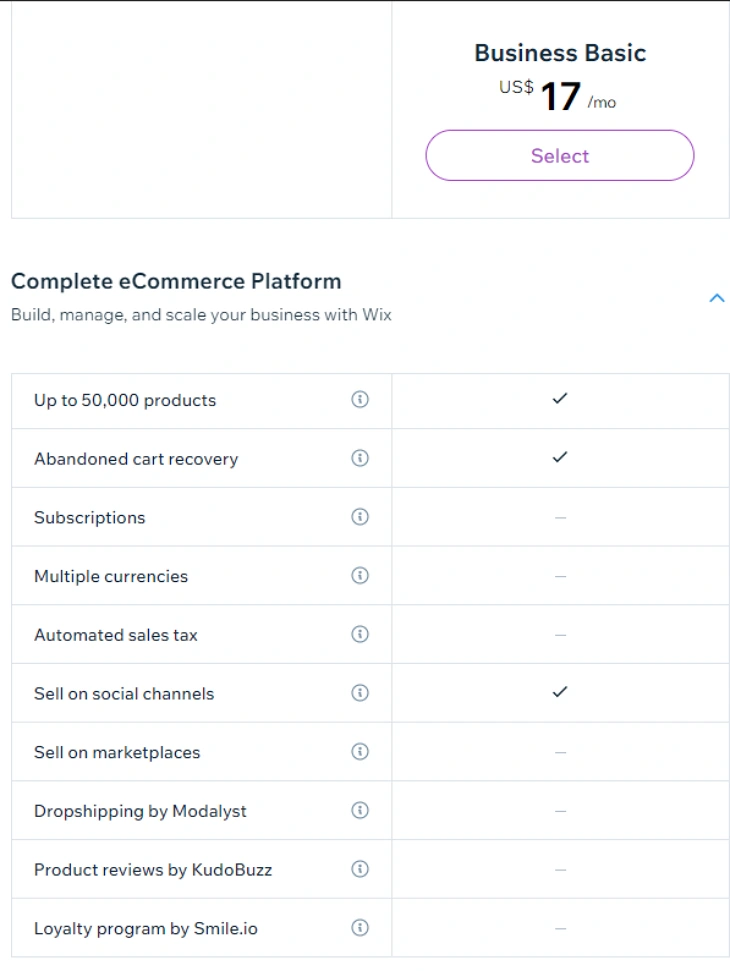
The Light plan is Wix's entry-level paid plan, but it does not include eCommerce features. It is best suited for personal websites, portfolios, and informational sites. If you need to sell products or accept payments online, you will need to upgrade to the Core plan or higher.
Core Plan, $29/month
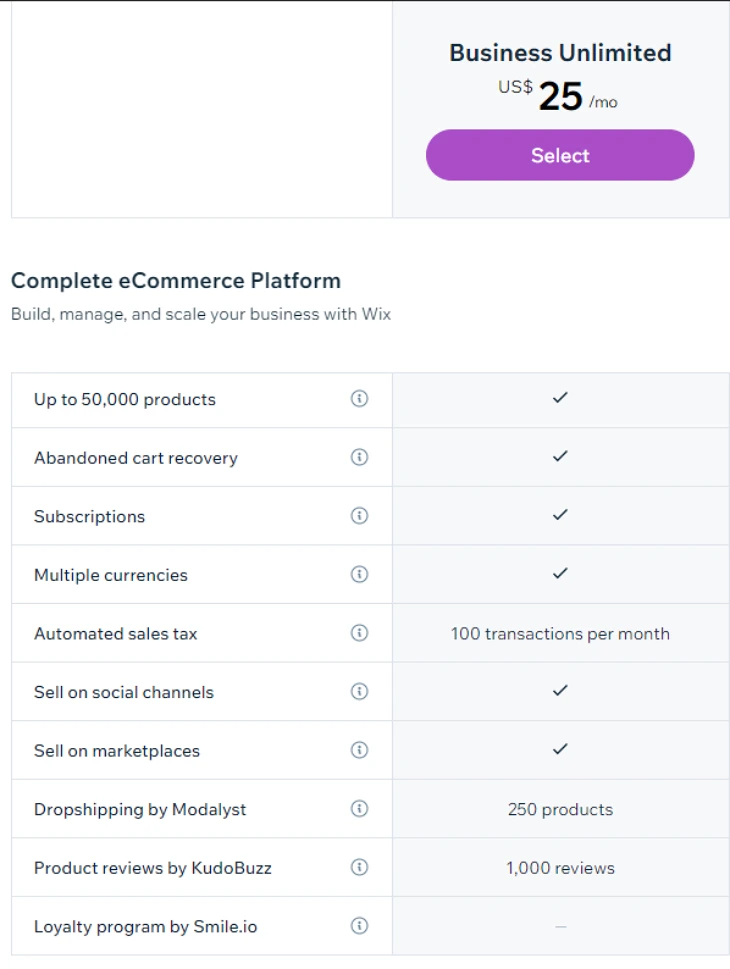
The Core plan is the entry point for Wix eCommerce, offering basic online store capabilities including the ability to accept payments, manage products, and configure shipping. With 50 GB of storage (check your Wix storage space anytime from Settings) and 5 video hours, it suits small businesses launching their first online store and testing their product range before scaling up.
Business Plan, $36/month
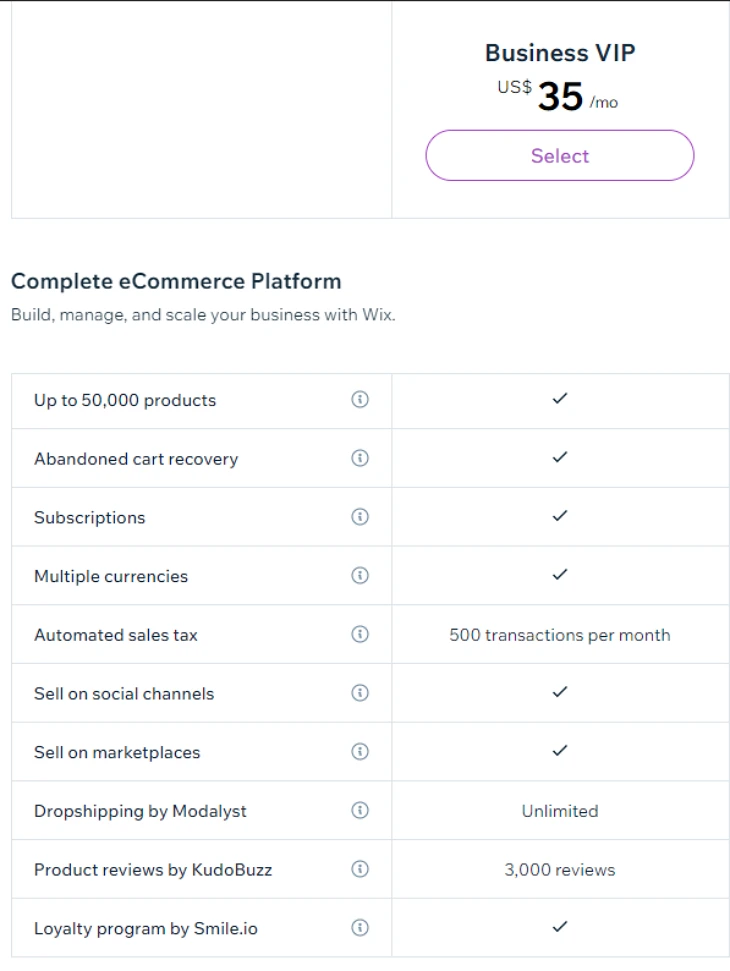
The Business plan is the most popular Wix eCommerce option for growing stores. It builds on Core with advanced eCommerce tools including customer accounts, multiple currency support, and 100GB storage. Businesses that need to manage a larger product catalog or want to offer a more personalized shopping experience will find this plan the best value. You can also enable Wix Reviews on your product pages to build social proof.
Business Elite Plan, $159/month
Business Elite is Wix's premium tier, designed for high-volume online stores and enterprise use cases. It includes unlimited storage and video, priority support, and advanced automations. If your store processes a large number of orders daily or you need enterprise-grade performance and dedicated support, this is the plan to consider.
Getting Started with Wix eCommerce
Setting up a store on Wix is faster than most eCommerce platforms. From choosing a template to listing your first product, most new sellers can have a functioning store ready within a day. Here's what the setup process actually involves, not the marketing version, but the practical steps.
Choose a Template Built for eCommerce
Wix has several hundred templates, but not all of them are optimized for selling. When starting, filter by 'Online Store' in the template gallery. Store templates come with pre-built product pages, cart functionality, and checkout flows already wired up. Starting from a store template saves hours compared to adapting a general-purpose design. For real-world inspiration, see these Wix eCommerce website examples showing finished stores across different industries. For a head start on design, browse the best Wix eCommerce templates to find one that matches your industry and product type.
Add Your Products
Products are managed through the Wix dashboard under 'Store Products'. For each product, you can add images (up to 15 per product), write a description, set pricing and inventory levels, create variants (e.g. size or color), and set a product type (physical, digital, or service). Adding a product video is also supported: see our guide on how to add and set up Wix Video to embed demos or walkthroughs directly on product pages. Physical products require a weight and shipping configuration. Digital products can be delivered automatically via a download link after purchase.
One practical note: Wix's product import tool accepts CSV files, which is useful if you're migrating from another platform and have products already in a spreadsheet. If you're connecting Wix to a dropshipping supplier, see our guide on how to start dropshipping on Wix.
Configure Shipping and Payments
In the Wix dashboard, go to Settings > Shipping and Delivery to set up your shipping zones, rates, and carriers. You can offer free shipping above a threshold, flat-rate shipping, or real-time carrier rates (via Wix's shipping integrations). For payments, connect Wix Payments or a third-party processor like Stripe or PayPal. See our guide on Wix shipping for a full walkthrough of the configuration process. For a full breakdown of payment processing costs , transaction rates, chargebacks, and currency conversion , see our guide to Wix payment fees.
Straightforward Product Management
Once your store is live, day-to-day product management is handled through the same dashboard. You can update stock levels, add new variants, run price changes across multiple products, and manage orders from one interface. Wix also integrates with accounting tools like QuickBooks, which helps keep your finances in sync without manual data entry.
Advanced Wix eCommerce Features
Wix eCommerce offers several advanced features to enhance the functionality and performance of online stores. Some of these advanced features include:
Abandoned Cart Recovery
Automatically send follow-up emails to customers who have abandoned their shopping carts, encouraging them to complete their purchases. This is one of the most effective tools for recovering lost revenue on any eCommerce platform.
Multi-Channel Selling
Sell products not only through your Wix online store but also on social media platforms like Facebook and Instagram, as well as marketplaces like Amazon and eBay. This multi-channel approach ensures your products are visible across the web, increasing your chances of making a sale. If you sell to customers in other countries, you can also translate your entire store into multiple languages using the Wix Multilingual app.
Subscription & Recurring Payments
Set up subscription-based services or sell products with recurring billing, providing a steady stream of revenue for your business.
Advanced Product Options
Offer customizable products with advanced options such as color variants, size variations, and personalization features.
Inventory Management
Track and manage inventory levels in real-time, receive low-stock alerts, and automatically update product availability on your website.
Advanced Analytics
Access detailed analytics and reports to gain insights into customer behavior, sales performance, and marketing effectiveness, enabling data-driven decision-making.
Customizable Checkout Process
Customize the checkout process to match your branding and optimize conversion rates, with options for guest checkout, one-click upsells, and more.
Dropshipping Integration
Integrate with dropshipping suppliers to manage order fulfillment without holding inventory. If you want to explore this further, check out our guide on dropshipping on Wix.
Custom Development
Access Wix's APIs and developer tools to create custom integrations, extensions, or functionality tailored to your specific business needs.
Wix eCommerce for Specific Business Types
Not every online store is the same, and Wix's platform performs differently depending on what you're selling. Here's an honest breakdown by business type.
Handmade and Craft Sellers
Wix works well here. Product photos upload quickly, variants like size and color are easy to configure, and the templates look polished without much effort. The main gap is shipping: if you need real-time carrier rates from USPS, UPS, or FedEx at checkout, that's only available on Business Elite. On Core and Business plans, you set flat rates or rules manually.
Digital Product Sellers
Wix handles digital downloads natively. After a customer pays, they receive an automatic download link via email. File size limits apply (up to 5GB per file), which works for most ebooks, templates, and software downloads. If you sell large video files or need a dedicated course platform, Wix's digital download system is functional but basic compared to platforms like Gumroad or Teachable.
Service Businesses That Also Sell Products
This is actually where Wix shines compared to pure eCommerce platforms. The combination of Wix Stores for physical products, Wix Bookings for appointments, and Wix Subscriptions for retainers covers the full service-business stack in one place. A massage therapist selling branded merchandise alongside booking sessions, or a personal trainer selling programs alongside one-on-one packages, gets a lot of functionality without bolting multiple platforms together.
Local Retail with In-Person Sales
Wix POS works with hardware from Wix's partners and connects directly to your online inventory. Stock levels update automatically whether a sale happens in-store or online. For a single-location retailer wanting unified inventory management, this integration works reliably. Multi-location POS management requires Business Elite.
Dropshippers
Wix integrates with Modalyst (now part of Wix's ecosystem as Wix eCommerce Dropshipping) and also connects with DSers for AliExpress sourcing. Setup is simpler than building the same connections on WooCommerce, though the app adds cost. If dropshipping is your entire business model at scale, Shopify's broader supplier network and more mature fulfillment integrations give it an edge.
Wix eCommerce Tax, Shipping Rules, and Returns: What You Need to Set Up
Most eCommerce reviews focus on features and pricing. Tax compliance and return policy setup are the unglamorous parts that actually matter when orders start coming in.
Sales Tax in the US
Wix integrates with Avalara's automated tax calculation, which handles US state and local tax rates automatically based on the customer's location and product category. This is available on all eCommerce plans. You define whether your products are taxable, set your nexus states, and Wix calculates the correct amount at checkout. You still need to file and remit the collected tax yourself to each state, or use a service like TaxJar for filing automation.
EU VAT and International Tax
For EU sellers, Wix supports manual VAT rate configuration by country. You can set up VAT-inclusive pricing and configure tax rules by region. This works for straightforward EU VAT compliance, but sellers dealing with complex cross-border VAT obligations (UK post-Brexit, OSS scheme, or B2B reverse charge rules) will likely need additional configuration or a tax advisory service to ensure full compliance.
Refunds and Return Policies
Wix does not have a built-in return management system in the traditional sense. You can process refunds directly from the order dashboard (full or partial), but the process of accepting returned physical goods, issuing labels, and restocking inventory requires a manual workflow or a third-party returns app. For a store doing fewer than 50 orders a month, this is manageable. At higher volume, you'll want to evaluate returns automation.
Legal Pages You Need to Set Up
Wix provides templates for Privacy Policy and Terms of Use pages, accessible from the Wix dashboard. For stores selling in the EU or to EU customers, you'll also need a cookie consent banner (Wix includes a basic cookie bar you can activate) and a GDPR-compliant data processing setup. Wix's native tools cover the basics; legal-specific compliance for your jurisdiction should be reviewed with a lawyer.
Wix eCommerce Conversion Rate Tools: What's Built In vs What Costs Extra
Improving your store's conversion rate matters more than almost any other optimization. Here's what Wix gives you natively and where you'll need to pay for apps.
Built Into All eCommerce Plans
- Abandoned cart recovery emails: Automatic follow-up emails to customers who left without buying. You set the delay (15 minutes, 1 hour, 24 hours) and customize the email. This feature alone can recover 5-15% of abandoned carts depending on your niche.
- Coupon and discount codes: Create percentage-off, fixed-amount, or free shipping discounts. You can set usage limits, expiry dates, and apply them to specific products or the entire store.
- Product reviews: Collect and display customer reviews on product pages using the Wix Reviews app (free). Social proof on product pages consistently improves conversion rates.
- Related products: Show recommended products on product pages to increase average order value.
Features That Require Paid Apps
- A/B testing: Wix has no native A/B testing for product pages or checkout flows. You'll need a third-party tool like Convert or VWO, which add significant monthly cost.
- Post-purchase upsells: Native post-purchase offers are not available. Apps like Reconvert add this capability for $7-$29/month.
- Product page countdown timers and urgency tools: No native urgency widgets. Third-party apps add these but they require checking compatibility with your template.
- Advanced loyalty programs: Wix Loyalty Program is available as a native app, but more advanced tiered loyalty systems require paid third-party integrations.
The Honest Takeaway on CRO
Wix gives you the foundational conversion tools at no extra cost. For a new store doing under $10,000/month, the built-in tools are enough to run a proper abandoned cart sequence, collect reviews, and offer discounts. Beyond that threshold, you'll start hitting the limits of what's native and spending on apps to fill the gaps.
Wix eCommerce Real-World Limitations
Most Wix eCommerce reviews stop at listing features. But there are real-world constraints that Wix doesn't advertise prominently, and that matter a lot once your store starts growing.
Product Variant Limits
Wix supports up to 6 product options per product (e.g. size, color, material) and up to 1,000 variants per product. For stores selling highly configurable items, custom clothing, personalized gifts, or anything with many combinations, hitting the variant ceiling is a real risk. Shopify, by comparison, supports up to 100 variants per product but handles complex configurations more gracefully through its metafields system.
No Checkout Customization on Lower Plans
On the Core and Business plans, Wix's checkout page has limited customization options. You can't add custom checkout fields, upsell widgets, or third-party checkout scripts without upgrading to Business Elite or using Wix's developer tools. For stores that rely on checkout-page optimizations to boost average order value, this is a meaningful constraint.
App Market Can Get Expensive
Wix's built-in eCommerce features are solid for a starter store, but many common requirements, advanced product filters, subscription billing beyond the basics, loyalty programs, and review systems (including how to embed Google Reviews on your Wix store), require paid apps from the Wix App Market. These add-ons typically cost $8–$30/month each, which can push your total monthly cost well above the headline plan price. Factor this into your budget when comparing Wix against Shopify or WooCommerce.
Migration Is Not Painless
Wix does not offer a native export tool for moving your store to another platform. If you decide to migrate away from Wix in the future, you'll need to manually export product data (via CSV), rebuild your page designs from scratch on the new platform, and set up 301 redirects for all your existing URLs. This is worth knowing upfront, Wix is a reasonable starting point, but switching platforms later involves real work.
Performance Under Load
Wix's infrastructure handles typical small store traffic well. However, stores that run flash sales or experience sudden traffic spikes (e.g. from a viral product or a large email campaign) can encounter slow page loads. Wix is a shared hosting environment for most plans, if site speed under load is critical for your business, Business Elite's enhanced performance tier or a dedicated platform like Shopify Plus may be more appropriate.
Verdict: Is Wix eCommerce Worth It?
Wix eCommerce is a genuinely capable platform for small to medium-sized businesses, and it has improved significantly in recent years. Here is a quick guide to who it suits best:
- Best for beginners and small stores: If you want to launch an online store without hiring a developer, Wix is one of the easiest platforms to get started with. The drag-and-drop builder and guided setup mean you can be selling within hours.
- Best plan for most sellers: The Business plan at $36/month offers the strongest combination of eCommerce features, storage, and value. Customer accounts and multiple currencies make it viable for stores with an international audience.
- Not ideal for high-volume sellers: If you are processing hundreds of orders per day or need deep third-party integrations, dedicated eCommerce platforms may serve you better at scale.
- Good for service-based businesses: Combined with Wix Bookings and the Wix Loyalty Program, Wix is a strong all-in-one option for service businesses that also sell products.
Our rating: 4/5. Wix eCommerce earns high marks for ease of use, design flexibility, and built-in tools. It loses a point for limited scalability at the enterprise level and the fact that eCommerce features require at least the Core plan.
Is Wix eCommerce the Right Platform for Your Store?
Wix eCommerce is a user-friendly, feature-rich platform ideal for entrepreneurs looking to launch an online store. With its easy setup, full set of tools, and competitive pricing starting at $29/month on the Core plan, Wix provides a solid foundation for building a successful online store, particularly for sellers who want everything in one platform without managing hosting or plugins. If you want to earn commissions by recommending Wix, see our Wix affiliate program review for rates and sign-up details. You can also build trust with customers by enabling Wix Reviews on your product pages. If you want to use Shopify's checkout on your existing Wix site, see our guide on how to connect Shopify to Wix. If you are weighing Wix against WordPress and WooCommerce for your store, our Wix vs WordPress for online stores guide covers the full comparison. For a direct platform matchup, our WooCommerce vs Wix breakdown covers costs, flexibility, and which suits different store types. If Shopify is the alternative you're considering, see our Wix vs Shopify for eCommerce breakdown.
* read the rest of the post and open up an offer