

If you need a quick answer on Wix Email Marketing vs Mailchimp: pick Wix Email Marketing if you already run a Wix website and want a simple, tightly integrated email tool. Pick Mailchimp if you need advanced multi-step automation, deeper analytics, or plan to send campaigns across several channels. Both have free tiers, but the paid plans, feature depth, and pricing differ quite a bit once you go beyond the basics.
Below, this Mailchimp vs Wix comparison breaks down ease of use, templates, automation, integrations, and pricing so you can decide which platform fits your goals and budget.
Note: You may still see references to "Wix Shoutout" in older articles. Wix Shoutout was the original name for Wix's email campaign tool. It has since been rebranded to Wix Email Marketing with an updated interface and new features. If you searched for "wix shoutout vs mailchimp," you are in the right place.
Wix Email Marketing vs Mailchimp: Feature Comparison
When you compare Wix Email Marketing and Mailchimp side by side, the differences show up mainly in automation depth and integration breadth. Wix keeps things simple with a drag-and-drop builder that pulls products, images, and contact data straight from your Wix site. Mailchimp gives you more control over multi-step workflows, audience segments, and cross-platform campaigns.
Price (Starting) |
Ease of Use |
Email Templates |
Automation |
Integration |
|
|---|---|---|---|---|---|
Wix Email Marketing |
$10/month (Essentials) |
|
|
|
|
Mailchimp |
$13/month (Essentials) |
|
|
|
|
Pros and Cons: Wix Email Marketing vs Mailchimp
Neither platform is perfect for every business. Wix shines on simplicity and tight website integration, while Mailchimp pulls ahead on power features and third-party support. Here is how the pros and cons stack up.
Pros |
Cons |
|
Wix Email Marketing |
|
|
Mailchimp |
|
|
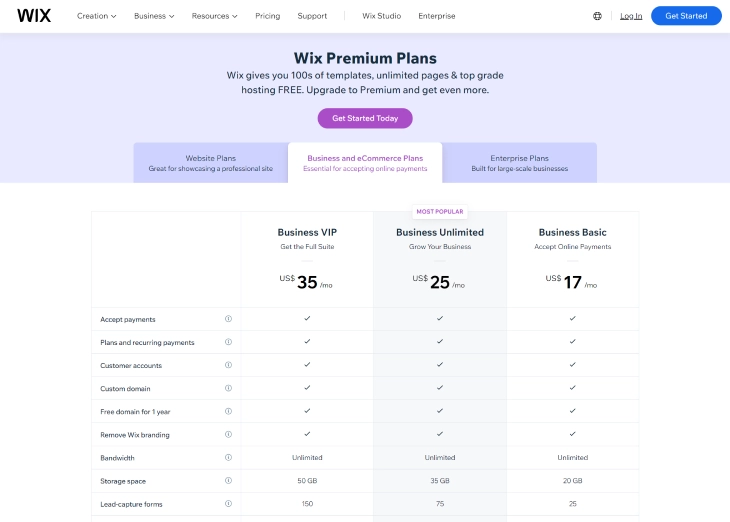
Pricing Comparison: Wix Email Marketing vs Mailchimp (2026)
Pricing has changed for both platforms since their earlier versions. Wix now sells email marketing as a standalone add-on separate from its website plans, while Mailchimp has restructured its tiers and cut its free plan limits. Here is how Wix's pricing compares to Mailchimp's plans in 2026.
Wix Email Marketing Plans (2026)
| Plan | Price | Emails per Month | Key Features |
|---|---|---|---|
| Free | $0/month | 200 | Drag-and-drop editor, templates, basic reporting, Wix branding on emails |
| Essentials | $10/month | 500 | No Wix branding, scheduled sending, multiple sender addresses |
| Core | $24/month | 5,000 | Automation, advanced reporting, priority support |
| Advanced | $49/month | 1,000,000 | Full automation suite, advanced analytics, priority support |
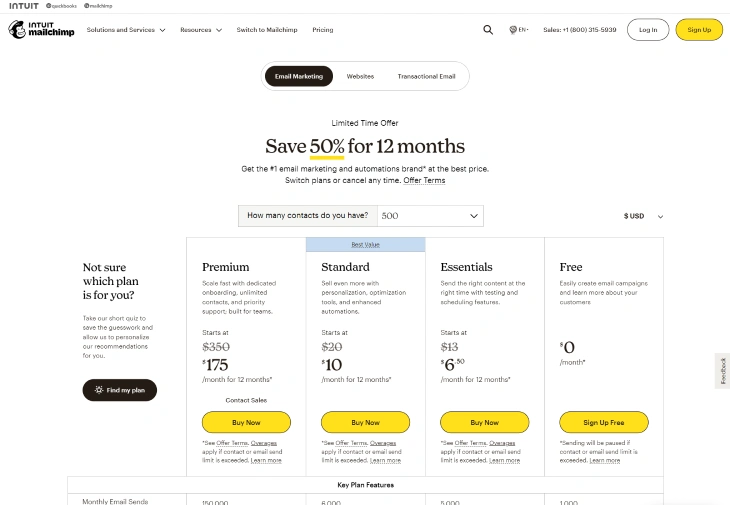
Mailchimp Plans (2026)
| Plan | Price (500 contacts) | Contact Limit | Key Features |
|---|---|---|---|
| Free | $0/month | 250 contacts, 500 emails/month | Basic templates, single-step automation removed (Jan 2026), Mailchimp branding |
| Essentials | $13/month | Up to 50,000 | All templates, A/B testing, no Mailchimp branding, chat + email support |
| Standard | $20/month | Up to 100,000 | Multi-step automation with branching, send-time optimization, dynamic content |
| Premium | $350/month | Up to 200,000+ | Multivariate testing, phone support, advanced segmentation |
Which Offers Better Value?
For small lists under 500 contacts, Wix's Essentials plan at $10/month is cheaper than Mailchimp's Essentials at $13/month, and Wix's free tier gives you 200 sends without needing a paid plan at all. However, Mailchimp scales better for larger lists because its pricing is contact-based and its automation tools are more advanced.
One thing to watch out for with Mailchimp: it counts every contact in your audience toward your billing limit, including unsubscribed and cleaned contacts. That can push you into a higher tier faster than expected.
Wix Shoutout vs Mailchimp: Understanding the Name Change
If you searched for "Wix Shoutout vs Mailchimp," here is what you need to know: Wix Shoutout and Wix Email Marketing are the same product. Wix rebranded Shoutout to Wix Email Marketing around 2021, updating the interface and adding features like automation, improved reporting, and deeper Wix CRM integration.
The rebrand did not affect existing users. If you had a Shoutout account before the change, your campaigns, contact lists, and campaign history carried over automatically. Nothing was lost in the transition. The only difference is the name and an updated dashboard layout.
You may still find the old name in third-party blog posts, YouTube tutorials, and even some older Wix help documents. When you see "Wix Shoutout," treat it as a reference to Wix Email Marketing. The features described will map to what you find in your Wix dashboard today, under "Email Marketing" in the Marketing and SEO section of the sidebar.
For anyone comparing the two products: there is nothing to compare. Wix Shoutout no longer exists as a separate product. The current version, Wix Email Marketing, is what Shoutout became after several years of development and rebranding.
What Wix Email Marketing Does That Mailchimp Can't
Most comparison articles treat Wix Email Marketing as the weaker option, but that misses the point of what it is actually built for. For businesses running on Wix, the native integration creates advantages that Mailchimp simply cannot replicate without extra configuration work.
Zero-Setup Wix Store Triggers
If you run a Wix Store, abandoned cart emails and post-purchase follow-up sequences are ready to activate with a few clicks. No API keys, no third-party connector, no Zapier glue. Because Wix Email Marketing sits inside the same platform as Wix Stores, the trigger data (cart items, order totals, product names) flows directly into your email templates. Setting up the same workflow in Mailchimp requires installing the Mailchimp for WooCommerce plugin or using a Zapier integration, then mapping the fields manually. It takes significantly more time and introduces more failure points.
Wix Forms Sync Contacts Without a Third-Party Tool
Any form you build with Wix Forms (contact forms, lead magnets, event registrations) automatically adds new contacts to your Wix Contacts list, which feeds directly into Wix Email Marketing segments. There is no export-import step and no webhook to configure. With Mailchimp, connecting a Wix form to your audience requires either the official Mailchimp for Wix app or a workaround through Zapier. This is a real friction point for beginners who just want form submissions to go into their email list without troubleshooting an integration.
Wix Ascend CRM Connects Directly to Campaigns
The Wix CRM (formerly part of Wix Ascend) stores every contact interaction: form submissions, purchases, bookings, chat history, and page visits. When you build an email segment in Wix Email Marketing, you can filter by any of those CRM data points directly. Want to email everyone who booked a service in the last 30 days but has not made a second booking? That segment builds in seconds from CRM data that is already there. Mailchimp can do behavior-based segmentation, but it relies on data being passed from external sources through the API or integrations. For Wix users, the data pipeline is already built in.
When to Pick Wix Email Marketing
Wix Email Marketing makes the most sense in these situations:
- Your website already runs on Wix. Contacts, orders, and bookings flow into your email campaigns without any extra setup. No CSV exports, no third-party connectors.
- You want one dashboard for everything. Website edits, email forwarding, CRM, and email campaigns all live in the same place.
- You send fewer than 5,000 emails per month. The Core plan at $24/month covers that volume with automation and reporting included.
- You are new to email marketing. The wizard-style campaign builder walks you through every step, and templates auto-match your site branding.
- Budget is tight. The free plan (200 emails) and $10/month Essentials plan are among the lowest entry points for a website-integrated email tool.
When to Pick Mailchimp
Mailchimp is the stronger choice when:
- You need multi-step automation with branching logic. Mailchimp's Standard plan lets you build complex workflows with conditional paths, something Wix does not offer at any tier.
- Your site is not on Wix. Mailchimp connects to WordPress, Shopify, Squarespace, and hundreds of other platforms through its integrations.
- You run an e-commerce store with complex segments. Predictive segmentation, purchase-behavior triggers, and product recommendation blocks are built into the Standard and Premium plans.
- A/B testing is a priority. Mailchimp lets you test subject lines, content blocks, and send times on the Essentials plan and above.
- You manage a list over 10,000 contacts. Mailchimp's contact-based pricing and scalable infrastructure handle larger audiences more smoothly.
Final Verdict: Wix Email Marketing or Mailchimp?
The best pick depends on where your website lives and how complex your email strategy needs to be.
If your site runs on Wix, start with Wix Email Marketing. The built-in sync with your contacts, store, and bookings saves setup time, and the drag-and-drop editor is easy enough for a first campaign. You can also pair Wix Email Marketing with the Wix Loyalty Program to send automated points balance reminders and reward notifications directly from your loyalty dashboard. You can always add Mailchimp later if you outgrow the automation options.
If you run a site on another platform, or you need branching automations, A/B testing, and deep audience segmentation from day one, Mailchimp is the better fit despite its higher entry price and recent free-plan cuts.
Either way, both platforms let you start for free. Try each one with a test campaign and see which workflow feels right before committing to a paid plan.
* read the rest of the post and open up an offer