

Wix and WooCommerce are two of the most popular ways to build an online store, but they take very different approaches. Wix is a fully hosted, all-in-one platform where everything is set up for you. WooCommerce is a free WordPress plugin that gives you far more control, but requires you to manage hosting, security, and plugins yourself. This comparison breaks down exactly what each platform costs, who it works best for, and which one you should choose.
WooCommerce vs Wix: Quick Comparison
| Feature | \t\t\tWix | \t\t\tWooCommerce | \t\t
|---|---|---|
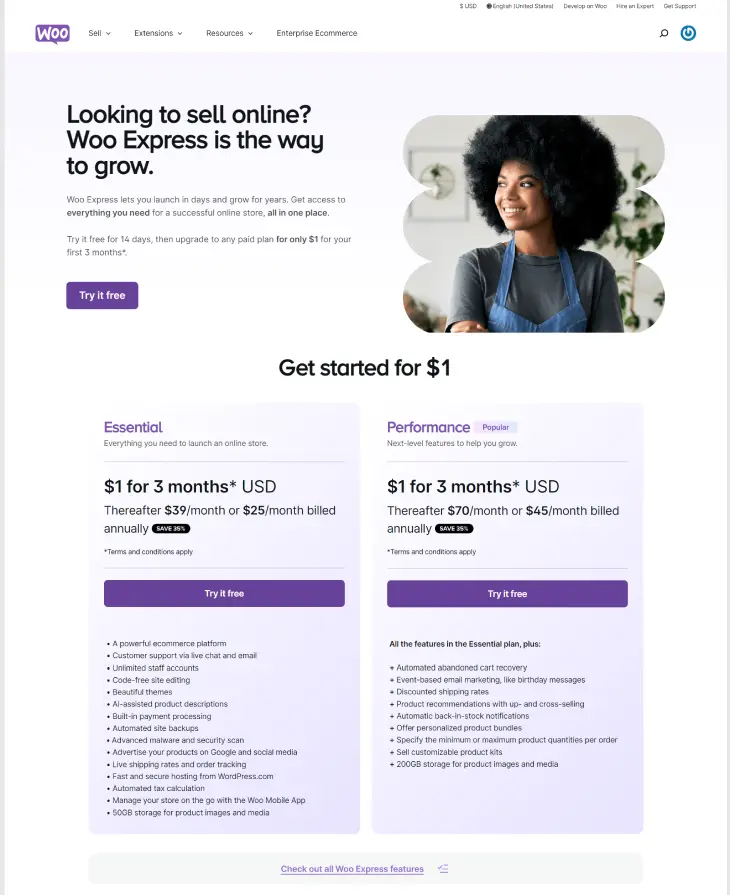
| Starting price (eCommerce) | \t\t\t$17/month (all-in) | \t\t\t$39/month (managed) or self-hosted from ~$15/month + extras | \t\t
| Hosting included | \t\t\tYes | \t\t\tNo (self-hosted) or Yes (WooCommerce.com managed) | \t\t
| Ease of use | \t\t\tBeginner-friendly | \t\t\tIntermediate to advanced | \t\t
| Design flexibility | \t\t\tHigh (500+ templates, drag-and-drop) | \t\t\tVery high (full code access) | \t\t
| eCommerce features | \t\t\tGood for small/mid stores | \t\t\tExcellent, especially for large catalogs | \t\t
| SEO control | \t\t\tGood built-in tools | \t\t\tExcellent (Yoast, RankMath, full control) | \t\t
| Transaction fees | \t\t\t0% on paid plans | \t\t\t0% (plus gateway fees) | \t\t
| Technical skill needed | \t\t\tNone | \t\t\tModerate to high | \t\t
| Customer support | \t\t\t24/7 phone, email, chat | \t\t\tEmail and forums (community-based) | \t\t
| Best for | \t\t\tSmall businesses, beginners, service sites | \t\t\tEstablished stores, developers, complex needs | \t\t
Pricing: What You Actually Pay
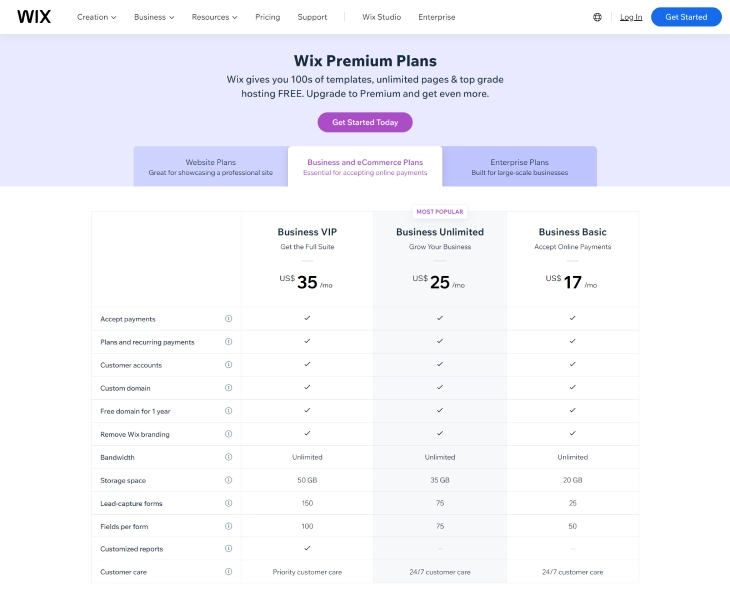
Wix publishes clear, predictable pricing. WooCommerce advertises itself as free, but the real number is much higher once you account for everything a working store requires.
Wix Pricing Plans
| Plan | \t\t\tMonthly price | \t\t\tWhat's included | \t\t
|---|---|---|
| Light | \t\t\t$17/month | \t\t\tBasic site, no eCommerce | \t\t
| Core | \t\t\t$29/month | \t\t\t5 collaborators, basic eCommerce | \t\t
| Business | \t\t\t$36/month | \t\t\tFull eCommerce, subscriptions, 0% transaction fees | \t\t
| Business Elite | \t\t\t$159/month | \t\t\tAdvanced analytics, priority support | \t\t
All Wix plans include hosting, SSL, a free domain for the first year, and security. There are no surprise bills.
WooCommerce Real Cost of Ownership
WooCommerce itself is a free plugin, but you cannot run it without additional services. Here is what a typical small WooCommerce store actually costs per year:
-
\t
- Hosting: $120 to $600/year (budget shared hosting to managed WordPress hosting like WP Engine or Kinsta) \t
- Domain name: $15 to $20/year \t
- SSL certificate: Free on most hosts, but some charge $50 to $100/year \t
- Premium theme: $50 to $200 one-time (or $99 to $300/year for subscription themes) \t
- Essential plugins: Security ($50 to $150/year), backup ($50 to $100/year), SEO ($89/year for Yoast premium), page builder ($49 to $199/year) \t
- Payment gateway: Stripe/PayPal charge 2.9% + $0.30 per transaction regardless of plan \t
- Developer time: Even "simple" customizations often require hiring a developer at $50 to $150/hour
A conservative estimate for a small WooCommerce store runs $500 to $1,200 per year before any developer fees. A comparable Wix Business plan costs $432/year and includes everything. The cost gap narrows or reverses as your store grows and needs more WooCommerce extensions.
Who Should Choose Wix vs WooCommerce
The right platform depends on your situation, not just your preferences. Here are the specific personas that fit each platform best.
Choose Wix if you are:
-
\t
- A first-time store owner who wants to get selling quickly without learning WordPress, plugins, or server management \t
- A local service business (salon, restaurant, photographer, consultant) that needs a polished website with some online selling on the side \t
- A small product seller with fewer than 500 SKUs who does not need complex product variations or custom checkout logic \t
- Someone on a fixed monthly budget who needs predictable costs with no surprise plugin renewals or hosting upgrades \t
- A business owner without technical staff who cannot maintain a WordPress site, run updates, or troubleshoot plugin conflicts
Choose WooCommerce if you are:
-
\t
- An established store owner who already runs WordPress and wants the most flexible eCommerce solution available \t
- A developer or technical founder who wants full code access, custom hooks, and the ability to build anything \t
- A large catalog seller with thousands of products, complex variations, or custom pricing rules \t
- An SEO-focused business that needs granular control over technical SEO, structured data, and page speed optimizations \t
- A business with custom requirements such as wholesale pricing, subscription boxes, B2B ordering, or multi-currency checkout
Ease of Use: Wix vs WooCommerce
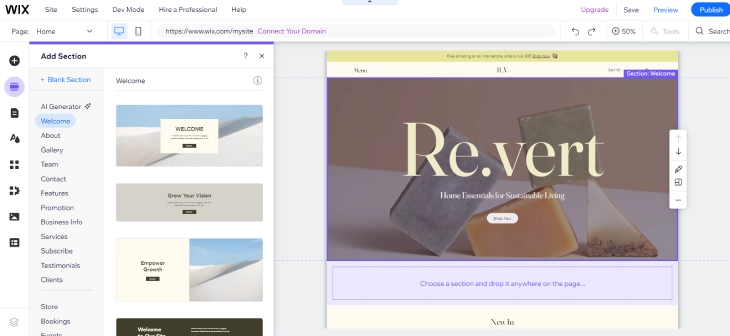
Wix is significantly easier to use. Its drag-and-drop editor lets you build a fully functional store in a few hours with no technical knowledge. You pick a template, add products, connect a payment method, and you are live. There is no server configuration, no plugin compatibility testing, and no WordPress security updates to manage.
Wix Editor
Wix's editor is purpose-built for non-developers. You click any element on the page and edit it directly. Adding a product, setting up shipping zones, or creating a coupon code all follow the same simple, guided flow. Wix also offers an AI site generator that builds a starter site from a short description, which can cut setup time to under an hour.
WooCommerce Setup
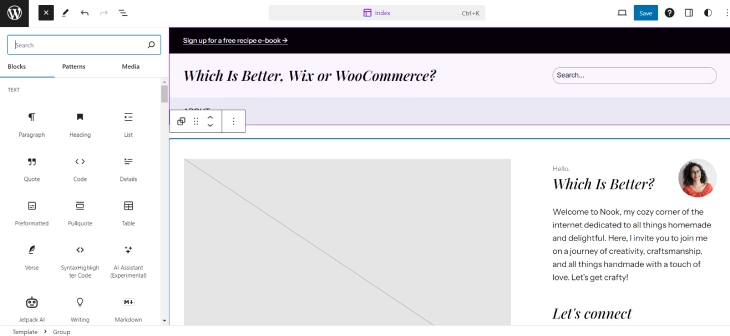
WooCommerce requires more steps before you can sell anything. You need to install WordPress, choose a hosting plan, install the WooCommerce plugin, configure a theme, set up payment gateways, and work through the settings panel. That is manageable for someone with WordPress experience. For a first-timer, it typically takes several days of setup and troubleshooting. You also need to stay on top of WordPress core updates, plugin updates, and occasional conflicts between plugins.
Design and Customization
Wix has over 500 professionally designed templates across dozens of categories. Every template is fully editable, including fonts, colors, layouts, and individual element positioning. You can also build from a blank canvas. The level of visual control Wix offers without touching code is genuinely impressive.
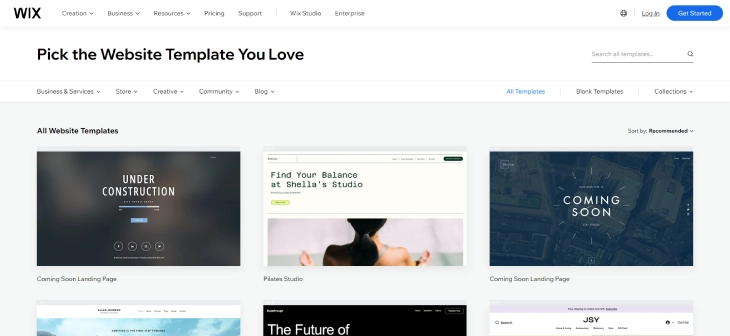
Wix Templates
Wix templates are polished and modern out of the box. The downside is that you cannot switch templates after publishing without rebuilding your content. So picking the right one at the start matters.
WooCommerce Themes
WooCommerce gives you access to thousands of WordPress themes, both free and premium. The default Storefront theme is functional but plain. Most store owners buy a premium theme ($50 to $200) or use a page builder like Elementor or Divi to create custom layouts. The ceiling for design customization is higher than Wix, but reaching it requires technical skill or a budget for a developer.

eCommerce Features
Both platforms support selling physical and digital products, managing inventory, accepting major payment methods, and setting up shipping rules. Where they differ is in depth and flexibility. See our full Wix eCommerce review for a detailed look at what Wix's store features can do.
Wix eCommerce
Wix eCommerce covers everything a small to mid-size store needs:
-
\t
- Sell physical products, digital downloads, and services \t
- Product variants (size, color, material) with individual pricing and inventory \t
- Abandoned cart recovery emails (Business plan and above) \t
- Subscriptions and recurring payments \t
- Multi-channel selling on Facebook, Instagram, and Google Shopping \t
- Built-in tax calculations and shipping rate rules \t
- Point of sale (POS) integration via Wix POS hardware
Where Wix falls short is in handling very large catalogs (10,000+ products), custom checkout flows, and complex wholesale or B2B pricing. Those use cases push past what Wix's built-in tools handle well.

WooCommerce eCommerce
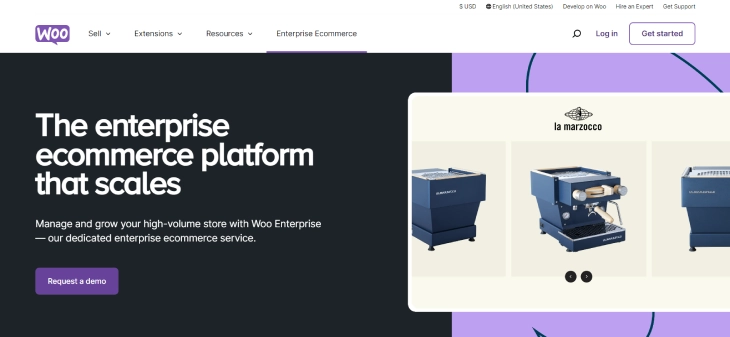
WooCommerce was built from the ground up for eCommerce, and it shows. Product variations, custom attributes, tiered pricing, and complex shipping rules are all native. With the right extensions, you can build virtually any store type:
-
\t
- Product bundles and grouped products \t
- Wholesale pricing and B2B order forms \t
- Subscriptions (via WooCommerce Subscriptions, $199/year) \t
- Auction-style listings \t
- Print-on-demand and dropshipping integration \t
- Multi-currency and multi-language stores \t
- Custom checkout fields and conditional logic
The catch is that each of these features typically requires a paid extension. That $199/year for subscriptions is just one example. Complex stores can easily spend $500 to $1,000 per year on WooCommerce extensions alone, on top of hosting and theme costs.
SEO: Wix vs WooCommerce
WooCommerce holds a real advantage here, mostly because of the WordPress plugin ecosystem. With plugins like Yoast SEO or RankMath, you get full control over meta tags, schema markup, XML sitemaps, canonical URLs, breadcrumbs, and page speed optimizations. You can also use caching plugins, image compression tools, and CDN integrations to hit Core Web Vitals scores that affect rankings.
Wix has improved its SEO tools significantly. You can edit meta titles and descriptions, set canonical tags, generate sitemaps automatically, and add structured data for products and articles. For most small stores, Wix's SEO tools are more than adequate. The gap versus WooCommerce only becomes meaningful for stores that want very granular control or are competing in highly technical SEO niches.

Third-Party Integrations
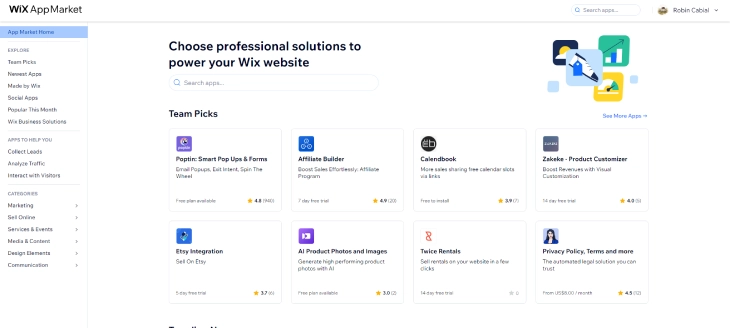
Wix offers integrations through the Wix App Market, which includes hundreds of apps covering email marketing, live chat, loyalty programs, shipping providers, and accounting tools. For most standard use cases, the App Market has what you need.
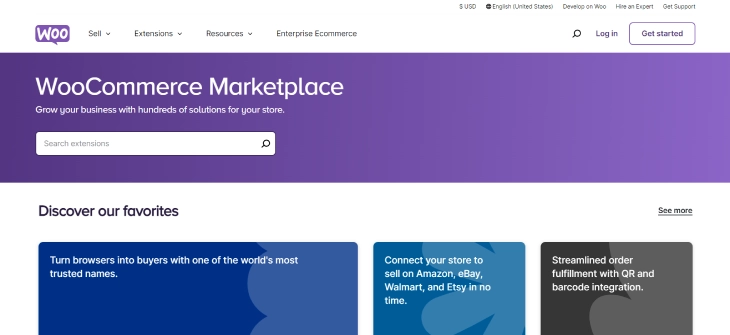
WooCommerce connects with almost everything. There are thousands of plugins for payment gateways, CRM tools, ERP systems, tax automation, shipping carriers, and more. If an integration exists in the eCommerce world, there is likely a WooCommerce plugin for it. This breadth of integration is one of WooCommerce's strongest advantages for enterprise-level stores.
Performance and Speed
Wix hosts your site on its own global CDN infrastructure. You do not control the server, but you also do not have to optimize it. Page load times are consistent and generally fast for typical store pages. Wix automatically serves modern image formats and handles caching behind the scenes.
WooCommerce performance depends entirely on your hosting. A store on a $5/month shared host will load slowly and struggle under any real traffic. A store on a managed WordPress host like Kinsta or WP Engine, with a good caching plugin and CDN, can be extremely fast. The potential ceiling is higher than Wix, but you have to build and maintain that configuration yourself. For store owners who do not have time to manage server performance, Wix's consistent baseline speed is often preferable to a WooCommerce setup that has never been properly optimized.
Customer Support
Wix provides 24/7 support through phone, email, and live chat. You can also request a callback so you do not have to wait on hold. The support team handles everything from billing questions to technical issues, and the response quality is generally good.

WooCommerce support is community-based. There is no phone number to call. You file a ticket with WooCommerce.com, post in the support forums, or search the documentation. Response times and quality vary. Many WooCommerce users end up hiring a developer when something breaks, which adds cost and time. The trade-off is that the WooCommerce community is enormous, so solutions to common problems are usually findable with a search.
Migration: Switching Between Platforms
Migrating from one platform to the other is possible but not painless. This is a factor worth considering before you commit, because switching later carries real cost in time and potential SEO disruption.
Moving from WooCommerce to Wix
You can export your WooCommerce product catalog as a CSV and import it into Wix. Customer data, order history, and custom integrations do not transfer automatically. You will need to rebuild your store design from scratch in Wix and reconfigure all payment and shipping settings. URL structures will differ between the two platforms, which means you need 301 redirects to preserve any SEO value your WooCommerce URLs had built up.
Moving from Wix to WooCommerce
Wix does not offer a direct data export in a WooCommerce-compatible format. Third-party migration tools like Cart2Cart can automate some of the product and order transfer, but expect to spend several days on the process. As with any platform migration, plan for a temporary dip in rankings while Google re-indexes the new URLs.
Verdict: Which Is Better, Wix or WooCommerce?
For most small business owners and first-time store builders, Wix is the better choice. The all-in monthly price, fast setup, and zero maintenance overhead make it far more practical than WooCommerce for stores that do not require advanced custom functionality. Wix handles the overwhelming majority of what a typical small store needs, without requiring any technical skill.
WooCommerce is the better choice if you are already on WordPress, need a large product catalog with complex variations, want maximum SEO control, or need integrations that Wix's App Market does not cover. The platform is more powerful, but that power comes with real cost and complexity that many store owners underestimate.
If you are comparing options beyond just these two, see our Wix vs WordPress comparison for a broader look at how the Wix platform stacks up against the WordPress ecosystem as a whole.
The bottom line: if you want to open a store this week without hiring a developer or managing a server, go with Wix. If you are building a store you plan to scale to tens of thousands of products and need every advanced feature available, WooCommerce is worth the extra effort and cost.
* read the rest of the post and open up an offer