

The best Wix wedding website template depends on your style and what you need it to do. Anna & Ryan for classic RSVP-driven invites, Sarah & Josh for photo-heavy storytelling, Tanya & Josh for modern parallax-scrolling designs, and Giardino 12 if you're a venue marketing to wedding clients. All seven templates below are free to start, and you can launch a fully working site (with a custom domain like yourname-and-mine.com) on Wix's Light plan for around $17/month.
This post covers all 7 templates in detail, what Wix plan you actually need for a real wedding site, how to set up RSVPs without a third-party tool, and the common mistakes couples make when building their wedding website on Wix.
* read the rest of the post and open up an offer
Quick Comparison: All 7 Wix Wedding Templates
- Anna & Ryan: Best for: classic invitations with full event details. Strengths: schedule, accommodation info, easy RSVP.
- Mary and Anno: Best for: intimate weddings with personal touches. Strengths: photo + registry integration, Wix Events RSVP.
- Abigail & Rick (A & R): Best for: soft, romantic-themed weddings. Strengths: save-the-date calendar, ceremony + venue sections.
- Sarah & Josh: Best for: photo-heavy storytelling and large guest counts. Strengths: image galleries, simple navigation.
- Tanya & Josh (T & J): Best for: modern, design-forward couples. Strengths: parallax 3D scrolling, classic-meets-modern layout.
- Giardino 12: Best for: venues marketing to wedding clients (not couples). Strengths: image-led venue showcase, Wix Forms inquiries.
- KC Events: Best for: wedding planners showcasing past work. Strengths: Wix ProGallery portfolio, contact forms, service displays.
What Should a Wix Wedding Website Include?
Before picking a template, it helps to know what a working Wix wedding website actually needs. Most couples focus on the visual style first and then realize halfway through setup that they're missing key sections. Here's what to plan for from the start.
RSVP form. This is the most important functional element on any wedding site. Wix Forms handles RSVPs natively, so you don't need a separate service like RSVPify or Zola. You can collect guest names, meal preferences, and plus-one confirmations directly through your Wix dashboard.
Schedule or timeline page. Guests want to know when and where to be at each point in the day. A dedicated schedule section covering the ceremony, cocktail hour, and reception saves you from answering the same questions over text in the week before the wedding.
Accommodation info. Out-of-town guests need hotel recommendations, nearby options, and ideally a note about any room block you've arranged. A short accommodation page or section handles this cleanly.
Photo gallery. Wix Pro Gallery gives you a polished way to display your engagement photos or venue shots. It supports multiple layout styles (grid, slideshow, masonry) and works on mobile without extra configuration.
Registry link section. Rather than linking to registries in the invitation, collect all your registry URLs in one place on the site. Most guests will check the wedding website before purchasing anyway.
Password protection. If you want to keep the site private from uninvited guests or people who find it through search, Wix supports page-level password protection. You can lock the full site or individual pages (like RSVP or registry) behind a password you share only with invited guests.
7 Wix Wedding Website Templates
Walk down the aisle with these 7 Wix wedding website templates, each built for a distinct style and use case. Whether you're a couple announcing the big day, a venue attracting bookings, or a planner showcasing past events, one of these will fit.
Anna & Ryan Template

Best for: classic, detail-rich wedding invitations where guests need to find ceremony, accommodation, and registry info quickly.
The Anna & Ryan template is the most "complete" of Wix's wedding designs. It ships with sections for the schedule of events, accommodation options for out-of-town guests, registry, and a built-in RSVP. The layout works without much customization, which makes it the right pick if you don't want to spend a weekend tweaking design details. Personalize it with your photos and text to match your wedding theme.
Anna & Ryan Highlights
- Schedule of events section pre-built for ceremony, reception, and post-wedding brunch.
- Dedicated accommodation page for hotel blocks and out-of-town guests.
- RSVP integrated, no third-party tool required.
Mary and Anno Template
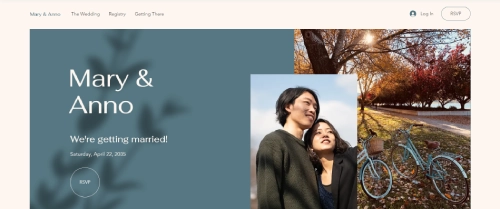
Best for: intimate weddings with under 100 guests where personal photos and registry links are the focus.
Mary and Anno leans personal. There\'s room to add your photos and registry links right on the homepage instead of burying them in subpages. The template integrates Wix Events for guest list management and RSVPs, so you can see who's coming without setting up a separate spreadsheet. Venue details and the day-of schedule are presented clearly without overwhelming the visitor.
Mary and Anno Highlights
- Intimate, photo-forward design that highlights your love story above logistics.
- Registry and gift links embedded on the homepage.
- Wix Events integration for RSVP management.
Abigail and Rick Template

Best for: soft, romantic, garden-style weddings where you want a clean visual feel.
The A & R template is the most visually delicate of the seven, with a pale color palette, gentle typography, and well-spaced layout. Wix Events powers the RSVP and save-the-date features, including a one-click calendar add for guests. All the standard wedding sections are there (ceremony info, venue, registry), and the design holds up well even when you swap in your own brand colors.
Abigail & Rick Highlights
- One-click "Save the date" that adds your event to the guest's calendar.
- Wix Events drives RSVP tracking and guest communication.
- Ceremony, venue, and registry sections pre-built.
Sarah & Josh Template

Best for: couples with strong engagement photos who want the site to be photo-led, and large guest counts (100+).
Sarah & Josh is the photo-heavy pick. It\'s designed around image galleries that can hold dozens of engagement and pre-wedding photos. The navigation stays simple even as the page count grows, which matters when you're hosting 150+ guests who will check the site on their phones. RSVP and guest communication tools are built in.
Sarah & Josh Highlights
- Image galleries built for 20+ photos without slowing the page.
- Simple top-nav that stays usable as you add more pages.
- Built-in RSVP and guest messaging tools.
Tanya & Josh Template

Best for: modern, design-conscious couples who want a "wow" effect when guests open the site.
T & J is the most design-forward of the seven, built around a parallax 3D scrolling effect that makes the site feel more like a digital experience than a static invitation. The image gallery tells your story visually, and the layout works for both classic and modern wedding themes. Best paired with high-quality engagement photos, parallax effects fall flat on low-resolution images.
T & J Highlights
- Parallax 3D scrolling for a memorable first impression.
- Strong image gallery that drives the design.
- Works for both classic and modern wedding themes with a few color tweaks.
Giardino 12 Template

Best for: wedding venues (not couples) marketing themselves to engaged couples and planners.
Giardino 12 is built for the venue side of the wedding industry. It targets, garden venues, banquet halls. The layout pushes high-quality venue photography and includes Wix Forms for capturing inquiry leads. If you run a venue, this template gives you a faster path to a working site than building from a generic business template.
Giardino 12 Highlights
- Image-led layout designed for venue photography.
- Wix Forms integration for capturing inquiry leads.
- Warm, inviting design that matches how venues are typically marketed.
KC Events Template

Best for: wedding planners and coordinators showcasing past events to attract new clients.
KC Events targets the planner side of the wedding business. Wix ProGallery handles the portfolio of past events with professional-quality presentation, and the contact form is set up to capture new client inquiries. Use this if you run a wedding planning business, it's not designed to be a couple's wedding invitation.
KC Events Highlights
- Wix ProGallery for portfolio-quality presentation of past events.
- Service displays and contact form for client inquiries.
- Timeless layout that won't look dated 12 months from now.
What Wix Plan You Actually Need for a Wedding Site
The templates are free, but to launch a working wedding site with a custom domain (yourname-and-mine.com instead of yourname.wixsite.com/wedding), you need a paid plan. Here's the honest breakdown:
- Free plan: Works for testing the template, but the URL stays as a Wix subdomain and Wix ads show on the page. Not appropriate for a live wedding site.
- Light plan (~$17/month): The minimum for a real wedding site. Includes custom domain, no Wix ads, and basic forms. Most couples can stop here.
- Core plan (~$29/month): Adds basic e-commerce (useful only if you're selling something, most weddings don't need this).
- Business plan (~$36/month): Overkill for a wedding site. Skip unless you're using the same Wix account for a business.
Most couples only need the site live for 8–12 months total (3 months pre-wedding for invites, 6 months post for thank-you photos and updates), so the total cost lands around $130–$200 for the entire wedding cycle. Cancel after that. For more on what Wix plans cost, see how much a Wix domain costs.
Setting Up RSVPs on Your Wix Wedding Site
Every template above includes some form of RSVP, but the setup process is the part most couples get stuck on. Here's how it actually works:
- Enable Wix Events on your site. Open the Wix Editor → Add Apps → Wix Events. It's free.
- Create your wedding as an event. Add the date, location, and ceremony time.
- Set RSVP fields. Standard fields: name, attending Y/N, plus-one count, meal choice, song requests, dietary needs.
- Generate guest links. Wix can send unique RSVP links to each invited email, or you can use one open RSVP form.
- Track responses in the dashboard. Wix shows you who's responded, who hasn't, and lets you export the guest list as a CSV for your seating chart.
For couples who want fancier RSVP (meal allocation by table, automated reminders), Wix Forms with conditional logic does the job, no third-party tool like RSVPify or Joy is required. Learn more about the basics in our guide on how to use Wix Forms.
Destination & Virtual Wedding Considerations
The original templates assume a local in-person wedding. Two adaptations to know:
Destination Weddings
Add a dedicated travel page covering airports, recommended hotels with your booking code, ground transportation, currency, and a packing list. Couples often forget the packing list, guests appreciate it. Sarah & Josh and Anna & Ryan are the easiest to extend with extra pages for travel info.
Virtual or Hybrid Weddings
Wix supports embedded video, so you can drop a Zoom or YouTube Live link directly into a "Watch Live" section. Add a tech-help page (how to join, what to do if Zoom crashes), virtual guests are often older relatives who appreciate the explicit instructions. Mary and Anno's homepage layout adapts well to this.
Common Wix Wedding Site Mistakes (and Fixes)
- Mistake: Publishing the site before the URL is on a custom domain. Fix: Wait until the Wix Light plan is active and the domain is connected before printing the URL on save-the-dates.
- Mistake: Putting the venue address only in image form. Fix: Include the address as text so it shows up in Google Maps when guests tap it.
- Mistake: Using only desktop photos that look bad on mobile. Fix: Preview every page in Wix's mobile editor and crop hero images for vertical screens.
- Mistake: Forgetting to password-protect sensitive info. Fix: Use Wix's page password protection for the registry, gift, or address pages if privacy matters.
- Mistake: Not setting up SEO blocking. Fix: A wedding site shouldn't be in Google's index, toggle "Hide from search engines" in Wix's SEO settings so your guest list stays private.
How to Pick the Right Template
Choosing the right Wix wedding template comes down to four questions, in order:
1. What story do you want the site to tell first?
If it's photos and emotion → Sarah & Josh or T & J. If it's logistics and details → Anna & Ryan. If it's venue → Giardino 12.
2. How many guests will use the site?
Under 50 guests: any template works. 50–150: prioritize ones with strong RSVP integration (Anna & Ryan, Mary and Anno). 150+: Sarah & Josh handles the bigger guest lists best.
3. How much customization do you want to do?
If you want plug-and-play: Anna & Ryan or Mary and Anno. If you want a custom look: T & J gives you the most flexible canvas.
4. Is this for the couple, the venue, or the planner?
Couples → first 5 templates. Venues → Giardino 12. Planners → KC Events.
A Brief History of Wedding Websites
Personal wedding websites weren't always a thing. Here's how they evolved:
- Early 2000s: Concept began emerging, but options were limited and pricey. Tech-savvy couples built their own from scratch.
- Mid-2000s: The Knot started offering basic templates, couples could share event details online with minimal customization.
- 2010s: Social media influence made wedding sites more interactive. Zola and Joy added RSVP management and photo sharing.
- Late 2010s: Wix wedding templates introduced highly customizable, free options. Couples could build personalized sites without code.
- Now: From one-pagers to multi-page sites with virtual ceremony streaming, the wedding website space has more options than couples can sort through, which is exactly why a comparison post like this one matters.
Wix vs. Dedicated Wedding Website Builders: When to Use Each
Wix is not the only option for a wedding website. Dedicated platforms like Zola, Joy, and Minted Weddings exist specifically for this purpose and work differently from Wix. Here is a plain comparison so you can pick the right tool for your situation.
When to Use Wix for a Wedding Website
Wix makes sense if you want full visual control over how your site looks. You can match your site exactly to your invitation design, add custom sections, embed videos or photo galleries from third-party services, and have a URL like yournames.com rather than yournames.zola.com. You own the site and it will not disappear if a third-party service shuts down or changes its free-tier terms. Wix also lets you keep the site up as long as you want after the wedding for anniversary use or as a memory archive.
The trade-off is setup time. A Wix site takes more effort to configure than a dedicated wedding platform, especially for couples who are not used to website builders.
When Dedicated Platforms Win
Zola and Joy are purpose-built for weddings and include features Wix does not offer natively: gift registry integration (synced directly to stores like Amazon or Crate and Barrel), built-in RSVP management with meal preference and plus-one tracking, and automated reminder emails to guests who have not responded. Minted Weddings integrates with its print shop, so your website, save-the-dates, and invitations can all come from one place with matching designs.
If a gift registry is important to you, using Zola or Joy is significantly simpler than embedding a third-party registry on a Wix site. For couples with limited time or no web-building experience, a dedicated platform will get you live in under an hour. If you just need a functional, attractive wedding site quickly, the dedicated platforms are genuinely faster.
Side-by-Side Comparison
- Custom domain: Wix (paid plan) vs Zola/Joy (yournames.zola.com or yournames.withjoy.com, free)
- Gift registry integration: Wix (manual embed or link) vs Zola (direct sync with 500+ stores)
- RSVP management: Wix (Wix Forms, manual tracking) vs Joy (automated tracking with meal, dietary, and plus-one fields)
- Design control: Wix (full custom) vs Zola/Joy (template-based with color pickers)
- Cost: Wix Light ~$17/month vs Zola/Joy (free with commission on some registries)
- Post-wedding use: Wix (keep the site, update it) vs Zola/Joy (site typically archived after event)
For most couples, the right answer is: use Wix if design and customization matter to you, use Zola or Joy if gift registry integration or quick setup matters more.
Wix Wedding Template Checklist: 8 Things to Update Before Going Live
Every Wix wedding template ships with placeholder content: stock photos, sample names, and default text. Before sharing the URL with guests, work through these eight updates so nothing catches you off guard the night before the wedding.
- Replace the placeholder photos. Pick 3–5 of your best engagement shots for the hero and gallery sections. Horizontal photos work better on desktop; vertical crops look cleaner on mobile.
- Update the date and location on every page. Dates and venue names often appear in multiple places: the homepage hero, schedule page, and RSVP form. Check all three.
- Connect your custom domain before printing anything. Don't print invitations or send save-the-dates with a Wix subdomain in the URL. Connect the domain first, then distribute it.
- Set up the RSVP form fields properly. Default templates include basic name and attendance fields. Add meal choice, dietary restrictions, plus-one count, and song requests before the site goes live.
- Add your actual registry URLs. Most templates have a placeholder registry page. Swap in your real Zola, Amazon, or store links before guests arrive.
- Preview the mobile layout in the Wix Editor. Switch to mobile preview and verify hero images are cropped correctly and all text is readable on a phone screen. Most guests will open the site on their phones.
- Block search engines. Open SEO Settings in the Wix dashboard and toggle off "Let search engines index my site." A wedding website should not turn up in Google.
- Password-protect any sensitive pages. If your registry, travel info, or accommodation page includes private details (hotel discount codes, home addresses, venue access info), lock those pages behind a password shared only with invited guests.
If you want a monogram or custom crest for your wedding site, Wix lets you build one in minutes. See our Wix Logo Maker tutorial for the full process.
Wedding photographers often use a portfolio page alongside the wedding site itself. For a step-by-step walkthrough of building one, see our guide on creating a Wix portfolio site.
Conclusion: 7 Wix Wedding Website Templates
The best Wix wedding website template is the one that matches your story and your guest experience. For most couples, Anna & Ryan covers the essentials with the least customization work. Photo-driven storytellers should start with Sarah & Josh. Couples who want a "wow" first impression should pick Tanya & Josh. Venues use Giardino 12; planners use KC Events.
All seven are free to start, the Wix Light plan at ~$17/month gets you a real domain, and the total cost for an entire wedding cycle (engagement through thank-you season) lands around $130–$200. Pair the template with built-in Wix Events for RSVP, password-protect anything sensitive, and remember to hide the site from search engines so your guest list stays private. The right template doesn't just inform, it sets the tone for everything else, from save-the-dates to the morning-after thank-you note.
* read the rest of the post and open up an offer