

Hiding a page on Wix sounds simple, but there are three different methods and each one controls a different layer of visibility. Removing a page from your site menu keeps it out of your navigation bar, but anyone with the direct URL can still visit it. Adding a noindex tag tells Google to leave the page out of search results. Password protection blocks everyone who does not have the correct credentials. Most Wix users pick the wrong method because they do not realize these are separate controls.
This guide covers all three approaches step by step, explains when each one makes sense, and flags the mistakes that cause problems after you think a page is hidden. It also covers differences between the classic Wix Editor and Wix Studio, since page management works differently in each.
Hiding vs Unpublishing vs Deleting: Know the Difference
Before choosing a method, make sure you understand what each action actually does. Wix users frequently confuse these three options, and picking the wrong one can break links, remove content permanently, or leave pages exposed when you thought they were private.
| Action | Page still exists? | Accessible via URL? | In Google index? | Reversible? |
|---|---|---|---|---|
| Hide from menu | Yes | Yes | Yes (unless you also add noindex) | Yes (toggle back on) |
| Hide from Google (noindex) | Yes | Yes | No (after Google re-crawls) | Yes (toggle indexing back on) |
| Password protect | Yes | Only with password | Partially (Google sees the password wall) | Yes (remove the password) |
| Unpublish entire site | Yes (in editor) | No | No (after Google re-crawls) | Yes (publish again) |
| Delete page | No | No (404 error) | Drops out eventually | No (content is gone) |
If you need to take your entire site offline temporarily (for a full redesign, for example), unpublishing is the right tool, not hiding individual pages. See our guide on how to unpublish a Wix site for the full process. If you are sure you no longer need a page at all, deleting the page is cleaner than letting hidden pages pile up in your editor.
If you want to hide every page at once rather than page by page, you can unpublish your entire Wix site from the Settings menu instead. It takes effect within seconds and is fully reversible.
Method 1: Hide a Page From Your Wix Site Menu
This is the most common approach. It removes the page from your site's navigation so visitors cannot find it through your menu. The page itself stays live at its original URL, and search engines can still crawl it.
How to Do It in the Classic Wix Editor
Step 1: Log Into Your Wix Account
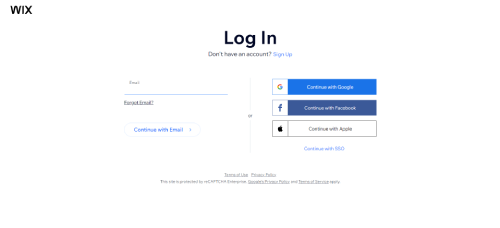
Go to Wix and sign into your account. You can log in with your email address, Google account, or Facebook.
Step 2: Open the Wix Editor
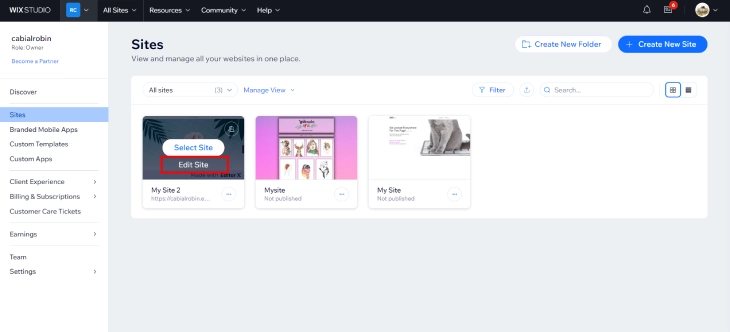
From your dashboard, click "Go to All Sites," select the website you want to edit, and click "Edit Site" to open the Wix Editor. Page visibility settings are only available inside the editor, not from the main dashboard.
Step 3: Open the Pages Panel

Click the "Pages" button on the left side of the editor. This opens a panel listing every page on your site, where you can control page order, navigation structure, and visibility.
Step 4: Hide the Page From the Menu

Find the page you want to hide. Click the three-dot menu icon next to the page name, then look for the "Show in menu" toggle and turn it off. The page is now removed from your navigation but still accessible through its direct URL.
Step 5: Publish Your Changes

Click "Publish" in the top-right corner. Until you publish, visitors will still see the page in your menu. You can reverse this at any time by toggling visibility back on and publishing again.
How to Do It in Wix Studio
If you are using Wix Studio instead of the classic editor, the process is slightly different because Wix Studio separates page management from menu management:
- Open your site in the Wix Studio editor.
- Click the Pages panel on the left side.
- Hover over the page you want to hide and click the three dots (More Actions).
- Select Page Settings, then go to the General tab.
- You can also manage which pages appear in specific menus by clicking the menu element on your page, selecting Manage Menu, and unchecking the page you want to remove.
- Publish your changes.
The key difference: Wix Studio lets you control page visibility per menu, so you can show a page in one navigation menu but hide it from another. The classic editor applies the hide setting globally across all menus.
Method 2: Hide a Wix Page From Google (Noindex)
Removing a page from your menu has zero effect on search engines. Google crawls pages independently of your site navigation. It follows links, checks sitemaps, and re-visits URLs it has seen before. To actually keep a page out of Google search results, you need to add a noindex meta tag.
Step 1: Open Page SEO Settings
In the Wix Editor, go to the Pages panel and click the three-dot menu next to the page. Select "SEO (Google)" or "SEO Basics" depending on your editor version. In Wix Studio, open Page Settings and look for the "SEO" tab.
Step 2: Turn Off Search Engine Indexing
Find the toggle labeled "Let search engines index this page" and turn it off. This inserts a <meta name="robots" content="noindex"> tag into the page's HTML, which tells Google and other search engines to exclude it from their results.
Step 3: Publish and Wait
Publish your site to make the change live. Google does not process noindex tags instantly. Depending on how frequently Google crawls your site, it may take anywhere from a few days to several weeks for the page to disappear from search results.
How to Speed Up Removal From Google
If you cannot wait for Google to re-crawl the page naturally, you have two options:
- Google Search Console URL Removal Tool: Log into Google Search Console, go to "Removals" under the Indexing section, and submit the page URL for temporary removal. This hides the page from search results for about 6 months while Google processes the noindex tag permanently.
- Request re-indexing: In Google Search Console, use the URL Inspection tool to enter the page URL and click "Request Indexing." This prompts Google to re-crawl the page sooner, at which point it will see the noindex tag and drop the page from results.
When to Use Noindex
Noindex is the right choice for:
- Thank-you pages shown after form submissions
- Landing pages for paid advertising campaigns (you want traffic from ads, not organic search)
- Internal pages meant only for your team
- Duplicate pages that exist for testing or layout purposes
- Pages with thin or placeholder content that you do not want Google to judge your site by
Method 3: Password Protect a Wix Page
If you need to completely block access so that only people with a password can view the page, Wix has built-in password protection. This is the strongest form of hiding because it stops all visitors (including search engine bots) from seeing the content without credentials.
Step 1: Open Page Permissions
In the Wix Editor, open the Pages panel and click the three-dot menu next to the page you want to protect. Select "Settings," then go to the "Permissions" tab. In Wix Studio, open Page Settings and look for the permissions or access section.
Step 2: Set a Password
Choose the option to make the page password-protected and enter your chosen password. Any visitor who tries to access this page will see a password prompt before they can view any content.
Step 3: Publish and Share Selectively
Publish your site, then share the password only with people who should have access. Pick a password that is easy to communicate but not obvious to guess. You can change it anytime from the same settings panel.
Password protection works well for:
- Client portals where you share project files or mockups
- Members-only content like course materials or premium guides
- Early access previews of products or services before a public launch
- Event-specific pages with details only attendees should see
- Internal documentation for your team
For a more detailed walkthrough including how to manage multiple password-protected pages, read our full guide on how to password protect a Wix page.
Method 4: Using Wix Members App for Role-Based Access
Password protection gives everyone the same key: one password, shared with anyone you choose. That works for small groups, but it breaks down when you need different people to see different things, or when you want to revoke access for one person without changing the password for everyone else. The Wix Members app solves this by giving each visitor their own account, so you can control access at the individual level.
How It Differs From Page Password Protection
With a standard page password, access is all-or-nothing. Anyone who has the password gets in. If you want to remove access for a specific person, your only option is to change the password and redistribute it to everyone who should still have access. That is not practical once you have more than a handful of people involved.
The Wix Members app works differently. Visitors create individual accounts on your site (or you invite them directly). You assign pages a permission level of "Members Only," and only logged-in members can view those pages. You can also create member roles and restrict specific pages to specific roles. A photographer, for example, could have one set of pages for wedding clients and a separate set for corporate clients, with each group only seeing their own content.
How to Set It Up
- Install the Wix Members app: From your Wix dashboard, go to the App Market and search for "Wix Members." Install it and follow the setup prompts. This adds a login bar and member account functionality to your site.
- Open the Pages panel in the editor: Click the three-dot menu next to the page you want to restrict.
- Go to Page Settings, then Permissions: You will see options including "Everyone," "Members Only," and any custom roles you have set up. Select "Members Only" (or a specific role if you need more granular control).
- Set up your member roles (optional): In the Members app settings, you can create roles such as "Premium Member" or "Client" and assign pages to those roles. Members are assigned roles from your dashboard, either manually or through a paid plan trigger.
- Publish your site. Non-logged-in visitors will be redirected to a login page when they try to access the restricted page.
When to Use Members vs Password Protection
Use password protection when you have a small, fixed group who all need the same access and you do not expect that to change often. Use the Wix Members app when your audience is larger, when different people need access to different content, or when you need to add and remove individual users without disrupting everyone else.
Practical examples where the Members app is the better choice:
- Fitness studios: Active members see class schedules and booking pages. Expired members lose access automatically when their subscription ends, rather than requiring a manual password change.
- Photography client galleries: Each client logs in and sees only their own gallery. No shared password means no risk of one client accidentally accessing another client's photos.
- Online course creators: Students who have purchased a course see the course content pages. Students who have not purchased see a sign-up prompt instead. You can add new courses as separate member roles without rebuilding your access structure.
The tradeoff is setup time. The Wix Members app requires more configuration than a simple page password, and your visitors need to create an account rather than just entering a password. For anything beyond a handful of trusted contacts, that extra setup is worth it.
How to Unhide a Page on Wix
If you previously hid a page and need to make it visible again, the process reverses the steps you took to hide it. The exact steps depend on which hiding method you used.
Unhiding a Page From the Menu (Classic Wix Editor)
Open your site in the classic Wix Editor and go to the Pages panel on the left side. Hidden pages still appear in this list but show a visibility icon (an eye with a slash) or a "hidden from menu" indicator next to the page name. Click the three-dot menu next to the page, then toggle "Show in menu" back on. Click Publish to make the change live. The page will reappear in your site navigation immediately after publishing.
Unhiding a Page in Wix Studio
In Wix Studio, open the Pages panel and hover over the hidden page. Click the three-dot icon (More Actions), then select Page Settings. Go to the General tab and re-enable the menu visibility option. Publish your changes. If you hid the page from a specific menu rather than the global setting, click the menu element on your page, select Manage Menu, and re-add the page there.
Re-enabling Indexing After a Noindex
If you also added a noindex tag when you hid the page, you need to reverse that separately. Go back to the page's SEO settings (three-dot menu next to the page, then SEO Basics or SEO tab in Wix Studio). Find the "Let search engines index this page" toggle and turn it back on. Publish your site. Google will not re-index the page automatically until it re-crawls it.
Requesting Google to Re-crawl After Unhiding
Once you have re-enabled visibility and indexing, do not just wait for Google to find the page on its own. Open Google Search Console, go to the URL Inspection tool, enter the page's full URL, and click "Request Indexing." This sends a signal to Google that the page is ready to be crawled and considered for search results again.
One thing worth checking: pages that were hidden for 30 days or more may have been removed from your sitemap during that time. After unhiding, visit yoursite.com/sitemap.xml and confirm the page appears there. If it does not show up in the sitemap, Google may not rediscover it through the sitemap path. The URL Inspection request will still work, but having the page in your sitemap speeds up the process.
Real-World Scenarios: When to Hide a Wix Page
The three methods above cover the mechanics, but knowing which one to use depends on your specific situation. Here are the most common scenarios and the recommended approach for each.
Hiding Pages During a Site Redesign
If you are rebuilding sections of your site and do not want visitors to see half-finished pages, hide them from the menu and add noindex. This prevents both navigation access and search engine visibility while you work. Once the redesign is complete, toggle both settings back and publish. If you are redesigning your entire site, unpublishing the whole site may be a better option.
Seasonal or Time-Limited Pages
Holiday promotions, seasonal sales pages, and event registrations only need to be visible during certain periods. Instead of deleting these pages and rebuilding them every year, hide them from the menu when the season ends and unhide them when it comes back around. This preserves your content, images, and any SEO value the page has built up.
Draft Pages and Works in Progress
If you are building out new content and want to preview it on your live site without making it accessible to visitors, hide the page from the menu and add noindex. You can share the direct URL with colleagues or clients for feedback without worrying about random visitors finding it. This is particularly useful if you want to test how the page looks on the live site rather than just in the editor preview.
A/B Testing and Alternate Versions
When you want to test different versions of a landing page or sales page, create the alternate version as a hidden page. You can send traffic to it directly through ads or email links while keeping it out of your main navigation. Add noindex so Google does not try to rank both versions, which could cause duplicate content issues.
Members-Only or Gated Content
For content you want to restrict to specific people (clients, subscribers, team members), password protection is the right tool. Hide the page from the menu as well so it does not appear in navigation. Share the direct URL and password only with authorized people.
SEO Implications of Hiding Pages on Wix
Hiding pages affects your site's search performance in ways that are not always obvious. Here is what happens behind the scenes.
Internal Link Signals Drop
When you remove a page from your navigation menu, you are removing internal links that pointed to that page. Internal links are one of the signals Google uses to determine how important a page is within your site. If the hidden page had no other internal links pointing to it (from blog posts or other pages), its authority in Google's ranking system will decrease over time.
Noindex vs Robots.txt: They Are Not the Same
A noindex tag tells Google "do not show this page in search results," but Google still crawls the page to read the tag. A robots.txt disallow rule tells Google "do not crawl this page at all." On Wix, you do not have full control over robots.txt (Wix generates it automatically), so noindex is the primary tool for keeping pages out of search results.
One important gotcha: if you block a page via robots.txt but do not add noindex, Google might still index the page based on external links pointing to it. It just will not know about the noindex tag because it cannot crawl the page to see it. This is why noindex through the Wix SEO settings is the reliable method.
Crawl Budget Considerations
For most Wix sites, crawl budget is not a concern. Google has plenty of resources to crawl small-to-medium sites. But if your site has hundreds of pages and many of them are hidden with noindex, Google is still spending time crawling those pages only to find the noindex tag. Over time, this can slow down how quickly Google discovers and indexes your new content. If you have pages you will never bring back, deleting them is better for your crawl budget than hiding them indefinitely.
What Google Search Console Shows for Hidden Pages
After you add noindex to a page, Google Search Console will eventually show that page under "Excluded by 'noindex' tag" in the Pages report. This is normal and expected. It confirms Google has seen your noindex tag and is respecting it. If the page still shows as "Indexed" weeks after you added noindex, it means Google has not re-crawled the page yet. Use the URL Inspection tool to request a re-crawl.
How to Find All Hidden Pages on Your Wix Site
After months of hiding seasonal pages, drafts, and test pages, it is easy to lose track of what you have hidden. Wix does not have a dedicated "hidden pages" report, but you can find them all through the editor.
In the Classic Wix Editor
Open the Pages panel in the editor. All pages on your site appear here, including hidden ones. Hidden pages show a visibility icon (an eye with a slash through it) next to the page name, or a "hidden from menu" label. Scroll through the full list to spot every page with that indicator. There is no filter or bulk view, so you need to scan the list manually.
In Wix Studio
In the Wix Studio Pages panel, hidden pages may show a label or badge indicating their status. You can also click into each page's Settings to see its current visibility state. As with the classic editor, there is no bulk "show all hidden pages" filter, so checking each page individually is the only method available.
No Bulk Unhide Feature
Wix does not offer a way to unhide all hidden pages at once. If you have ten hidden pages you want to bring back, you need to toggle each one individually and publish after each change (or after all changes, since Wix batches your edits into a single publish). This is a known limitation worth factoring in when you are planning a major site relaunch.
Why a Periodic Review Matters
Hidden pages still use storage and count toward your Wix plan's page limit. A site that has accumulated 20 or 30 hidden pages over two or three years may be unnecessarily close to its page limit. More practically, some of those hidden pages may contain content worth bringing back or consolidating into active pages. A review every few months keeps your editor tidy and your page count honest. If you find pages you are certain you will never use again, deleting them frees up that slot permanently.
Hiding Wix Blog Posts (A Different Process)
Blog posts on Wix are not managed through the Pages panel. If you open your Pages panel looking for a blog post you want to hide, you will not find it there. Blog posts live inside the Wix Blog app and are controlled through a separate dashboard. This catches a lot of people off guard, especially those who have been managing regular site pages and assume the same controls apply.
Where Blog Posts Actually Live
To manage your blog posts, go to your Wix dashboard and click on "Blog" in the left sidebar. This opens the Blog Manager, where you can see all your published and draft posts. From here you can edit, unpublish, schedule, or delete individual posts. None of these controls exist in the main Pages panel, which is why searching there leads nowhere.
How to Unpublish (Draft) a Blog Post
To hide a published blog post from visitors, open the Blog Manager and find the post you want to hide. Click the three-dot menu next to the post and select "Revert to Draft" or "Unpublish," depending on your Wix version. The post immediately becomes inaccessible to visitors. Anyone who tries to visit the original URL gets a 404 error page, not a redirect to your homepage or a login prompt. This is an important distinction: unlike hiding a regular page (which stays live at its URL), drafting a blog post kills the URL entirely. If that post had any inbound links or search traffic, those are now pointing at a dead end.
Scheduling Posts for Future Dates
If you want a blog post to go live at a specific date and time rather than immediately, Wix lets you schedule posts instead of publishing them right away. In the Blog Manager, open the post and look for the scheduling option before you publish. Set the date and time you want the post to go live. Until that date arrives, the post stays in a scheduled state and is not accessible to visitors or search engines. This is particularly useful for content tied to product launches, events, or campaigns where timing matters.
Using Noindex on a Published Blog Post
Sometimes you want a blog post to stay accessible via its direct URL (so you can share it with specific people) but you do not want it appearing in Google search results. In that case, you can add a noindex tag to the individual post without unpublishing it. Open the post in the Blog Editor, go to the SEO settings for that post, and turn off the indexing toggle. Publish the change. The post stays live and accessible to anyone with the link, but Google will eventually drop it from search results after re-crawling it.
This approach works well for:
- Beta content you are sharing with a test group before a public launch
- Archived posts you want to keep for reference but do not want ranking in search
- Promotional posts tied to a specific campaign that has ended
- Internal updates meant only for your existing subscribers, shared via email link
The Key Difference to Remember
Drafting a blog post removes access entirely and breaks the URL. Adding noindex keeps the URL working while removing it from search results. Choose based on whether you still want anyone to be able to reach that post via a direct link. If the answer is no, draft it. If the answer is yes but you just do not want Google traffic, use noindex.
Common Mistakes When Hiding Pages on Wix
These are the errors that trip up Wix users most often. Avoiding them will save you from accidentally exposing pages you thought were private or losing SEO value you meant to keep.
Mistake 1: Assuming "Hidden From Menu" Means Hidden From Everyone
This is the most common misunderstanding. Hiding a page from the menu only removes the navigation link. The page URL is still live, and anyone who has it (from a shared link, a bookmark, an email, or Google) can still access it. If you need actual privacy, you need password protection.
Mistake 2: Forgetting to Check Mobile Visibility
Wix manages desktop and mobile site versions somewhat separately. Hiding a page from the desktop menu does not always hide it from the mobile menu. After hiding a page, switch to the mobile editor view and verify the page is also hidden there. This catches a problem that most people do not notice until a mobile visitor points it out.
Mistake 3: Hiding a Page That Was Already Indexed Without Adding Noindex
If Google has already crawled and indexed a page, removing it from your menu will not make it disappear from search results. Google keeps its own copy and will continue showing the page until you either add a noindex tag or use the URL Removal tool in Google Search Console. Many users hide a page from the menu and assume it is gone from Google, then wonder why it still appears in search results weeks later.
Mistake 4: Hiding Too Many Pages Without Cleaning Up
Over time, hidden pages accumulate in your editor. A site with 30 visible pages and 40 hidden pages becomes difficult to manage. Each hidden page still uses storage, counts toward your page limit, and clutters your pages panel. Review your hidden pages every few months and delete pages you are certain you will not need again.
Mistake 5: Not Updating Internal Links to Hidden Pages
If other pages on your site link to a page you just hid, those links still work and visitors can still reach the hidden page through them. Check your other pages and blog posts for links pointing to the hidden page. Either remove those links or keep them intentionally if you want specific people to find the page through your content.
Mistake 6: Using the Wrong Method for Paid Landing Pages
If you are running Google Ads or Facebook Ads to a landing page, you want the page accessible via its URL but not competing with your other pages in organic search. The correct setup is: hide from menu (so it does not appear in navigation) plus noindex (so Google does not index it). Do not password protect ad landing pages, as that would block your ad traffic from seeing the page.
Quick Reference: Which Method to Use
| Your Goal | Hide from Menu | Add Noindex | Password Protect |
|---|---|---|---|
| Remove page from navigation only | Yes | No | No |
| Keep page out of Google search results | Optional | Yes | No |
| Block all unauthorized visitors | Optional | Optional | Yes |
| Work-in-progress / draft page | Yes | Yes | No |
| Seasonal page (bring back later) | Yes | No | No |
| Paid advertising landing page | Yes | Yes | No |
| Client portal / members-only page | Yes | Optional | Yes |
| Full site redesign (all pages) | Unpublish the entire site instead | ||
You can combine methods for layered control. For example, hiding from the menu plus adding noindex keeps a page out of both navigation and search results while still letting you share the direct URL with specific people. Adding password protection on top of that restricts access to only those with the password.
If you are starting a new site and want to plan your page structure from the beginning, our guide on how to create a new page on Wix covers organizing pages before you need to start hiding them.
* read the rest of the post and open up an offer