

The Wix Owner app lets you manage your Wix website directly from your phone or tablet. Instead of being tied to your desktop, you can update pages, respond to visitors, and check site performance from wherever you are. The app is available on both iOS and Android and connects to any Wix site you own.
Whether you're a business owner, blogger, or freelancer, keeping your website updated matters. For people who manage their site while running a business, the Wix Owner app reduces the need to sit at a computer for routine tasks. This guide walks you through everything you need to know to get started with the Wix Owner app.
Wix Owner App: Overview
The Wix Owner app is a tool that allows you to manage and grow your website and business from anywhere, at any time. As a Wix site owner, this app provides you with the flexibility and control to update your webpage, engage with customers, and monitor your performance, all from the convenience of your smartphone or tablet. Whether you're running an eCommerce store, managing a blog, or overseeing a service-based business, the Wix Owner app puts the essential features you need right at your fingertips.
The Wix mobile app is separate from the full Wix desktop editor. It's purpose-built for on-the-go management rather than full site building. If you also use the member-facing side of Wix, you may want to read our guide to Spaces by Wix to understand how the two apps compare.
Key Features of Wix Owner App
The Wix Owner app goes beyond basic site editing, offering a wide range of features designed to help you manage and grow your website. It is a practical tool that allows you to manage your website and business from anywhere, at any time. It covers many aspects of running an online business from a single mobile app.
Here are the key features that make the Wix Owner app an essential business tool:
Website Management
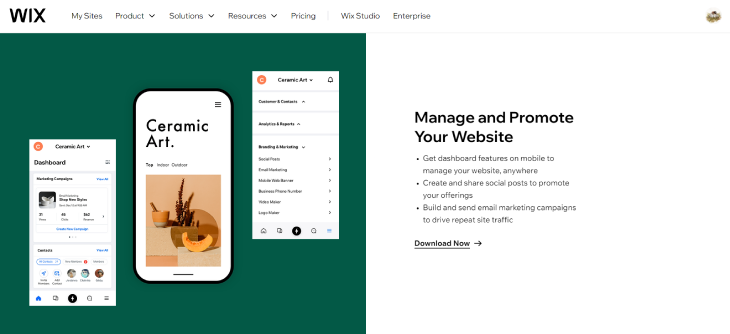
Edit content, update pages, and manage your entire website with ease. The Wix Owner app provides a dashboard with features to manage your website from your mobile device. You can view your live site, make updates, and even create and share social media posts to promote your business. This ensures your audience always experiences the best possible version of your website.
Customer Engagement

The Wix Owner app enables you to chat live with visitors on your website. You can set up automatic greetings to engage customers, reply instantly to messages, and even send coupons or offers to boost sales. This direct communication channel helps you provide excellent customer service and build stronger relationships with your audience.
eCommerce Engagement
For businesses with online stores, the Wix Owner app allows you to manage your online store from your mobile device. You can manage your inventory, take payments, fulfill customer orders, and even offer coupons and special discounts to boost sales. This keeps the buying experience running smoothly for your customers and helps you stay on top of your online sales.
Marketing Automation
Schedule and send targeted email marketing campaigns directly through the Wix Owner app. This built-in functionality allows you to nurture leads, promote special offers, and stay connected with your audience without needing a separate email marketing platform. This feature helps you make informed decisions about your business and refine your marketing strategies.
Integrations
Connect your Wix site with various third-party applications to expand its functionality. The Wix Owner app supports integrations with tools for social media management, customer relationship management (CRM), and more. You can connect your payment methods, manage your domain, and even create and manage member apps. This extensibility allows you to expand your business capabilities and simplify your operations. For even more ways to extend your site, explore the best Wix Market apps.
Benefits of Using the Wix Owner App
Using the Wix Owner app offers a range of advantages that can significantly improve your website management experience and help you reach your online goals.
Here are the key advantages of using the Wix Owner app.
Convenience
Gone are the days of being stuck at your desk for website updates. The Wix Owner app allows you to manage your site on the go, edit content, make design tweaks, and respond to inquiries, anytime, anywhere. Whether you're on the road, at a meeting, or simply away from your desk, you can access your site's dashboard, make updates, and even create and share social media posts to promote your offerings. This convenience allows you to stay productive and responsive, even when you're not physically in the office.
Real-Time Updates
The Wix Owner app provides you with real-time insights and data about your website's performance. You can track important metrics like site traffic, sales, and blog engagement, allowing you to make informed decisions about your marketing strategies and business operations. Respond to comments and messages instantly, capitalize on trending topics with timely content additions, and fix minor errors as soon as you discover them.
Enhanced Customer Experience
The Wix Owner app's live chat and communication features allow you to engage with your site visitors and customers in real-time. You can set up automated greetings, respond to messages, and even send coupons or special offers to boost sales and build stronger relationships with your audience. This focus on exceptional customer service can turn website visitors into loyal brand advocates.
Simplified Operations

For businesses that offer services or classes, the Wix Owner app makes it easy to manage your bookings, appointments, and client information. You can review your calendar, check in clients, and even create pricing plans and packages, all within a single mobile application. This consolidated approach eliminates the need to juggle multiple platforms and saves you valuable time and effort.
Getting Started with the Wix Owner App
Before you can get value from this mobile app, it helps to understand how the setup works. The process involves a few key steps that will ensure you can effectively manage your website and business from your mobile device.
Here's how you can get started.
Download and Installation

Head over to the App Store (for iPhone) or Google Play (for Android) and search for "Wix Owner". Download and install the app on your mobile device.
Setting Up Your Account
Launch the Wix Owner app and log in using your existing Wix account credentials. If you don't have one, you can create a free account directly within the app. This ensures that you have access to all the features and settings available in the app.
Navigating the Interface
The app's dashboard provides a centralized view of your site's performance, including real-time analytics, visitor tracking, and messaging. You can also access various tools and settings to manage your site, such as adding apps, creating and managing member badges, and editing your business information. Familiarize yourself with the interface layout. Key features are accessible through clear icons and menus, making it straightforward to find the tools you need.
Customizing Your Settings
The Wix Owner app allows you to customize your settings to suit your business needs. You can choose how your site looks on the Wix Member Apps, manage your contacts, and assign roles and permissions to your collaborators. You can also create introductory offers, manage your pricing plans, and set up live chat to engage with visitors directly from the app.
Tips for Maximizing the Wix Owner App
The Wix Owner app puts the control of your website at your fingertips, allowing you to manage and optimize it from anywhere. You can react to situations quickly, engage with your audience in real-time, and gain valuable insights into your site's performance, all from your mobile device.
Here are some key ways to get the most from the Wix Owner app:
Manage Your Site on the Go
No longer tied to your desktop, the Wix Owner app gives you the flexibility to manage your website from anywhere. You can view your live site, make updates, and even create and share social media posts to promote your business, all from your mobile device. This is especially useful for busy entrepreneurs or small business owners who need to stay on top of their online presence while on the move.
Engage with Site Visitors in Real-Time
Respond to customer inquiries and comments directly through the app, building a more personalized connection with your audience. You can set up automatic greetings to engage customers, reply instantly to messages, and even send coupons or offers to boost sales. This prompt responsiveness can turn website visitors into loyal customers by demonstrating that you value their feedback and questions.
Monitor Your Site's Performance

Gain valuable insights into your website's traffic, visitor engagement, and overall effectiveness through the Wix Owner app's built-in analytics. You can see which campaigns are driving the most visitors, monitor your online store's performance, and get the data you need to make informed decisions about your business.
Manage Your Bookings & Appointments

For businesses that rely on appointments or reservations, the Wix Owner app simplifies scheduling and management. You can check in clients, accept payments, and even create pricing plans and packages, all from your mobile device.
Give Your Members a Mobile App

The Wix Owner app allows you to create a custom mobile app for your site's members. This gives your customers the ability to access your content, make purchases, book appointments, and engage with your community directly from their smartphones. Providing a dedicated mobile experience can help you better serve your audience and build deeper connections.
What You Cannot Do in the Wix Owner App
The Wix Owner app covers a lot of ground, but it is not a full replacement for the desktop editor. Knowing where its limits are will save you frustration when you need to make certain changes.
Build New Pages from Scratch
The Wix Owner app lets you edit existing page content, but you cannot add a new page or change your site's page structure from mobile. For that, you need the desktop Wix Editor.
Change Your Site Template
Template changes require the desktop editor. If you want to switch layouts or restructure your site design, you'll need a computer to do it.
Access the Full SEO Settings Panel
The app gives you basic SEO options like editing page titles and descriptions for individual items, but the full SEO setup panel, including URL redirects, structured data, and sitemap settings, is only available on desktop.
Use Wix Velo (Code)
If your site uses Velo for custom functionality or database collections, you cannot access or edit that code from the mobile app. All Velo development requires the desktop editor.
Manage All App Settings
Some Wix apps installed through the Wix App Market have settings that are only configurable through the desktop dashboard, not through the Wix Owner app. If a setting is missing from the mobile view, check the desktop version first.
Upload and Organize Large Media Files
While you can upload individual images through the app, bulk uploads, folder management in the Media Manager, and video uploads work better on desktop. For any significant media work, the desktop experience is more reliable.
Wix Owner App: Getting the Most From It
The Wix Owner app is a practical tool that lets you step away from the desktop and manage your website from anywhere. It simplifies routine tasks, supports real-time customer engagement, and gives you useful insights into your website's performance, all from the palm of your hand. Whether you're looking to update your site on the go, respond to customer inquiries in real-time, or review your site's analytics, the Wix Owner app provides a straightforward platform to help you get it done.
This guide has walked you through the Wix Owner app, from the initial setup process to the key features, benefits, and limitations it offers. Remember to keep the Wix mobile app updated to access the latest features and improvements, and take time to get the most from the app to make managing your Wix-powered website and business easier, no matter where your day takes you.
* read the rest of the post and open up an offer