

Wix and Bluehost are two of the most searched website platforms, but they serve very different purposes. Wix is a fully hosted website builder with a drag-and-drop editor, designed so anyone can launch a site without touching code. Bluehost is a web hosting provider that pairs shared hosting with a WordPress-powered builder, giving more control but requiring more setup. Picking the right one depends on what you are actually trying to build.
This post provides a full review of Wix and Bluehost, comparing their ease of use, design and customization options, features and functionality, and customer support. By examining each of these factors in detail, this review will help you make an informed decision on which platform to use for your specific needs. Whether you are looking to create a simple personal blog or a complex eCommerce site, this review will give you what you need to choose the best platform for your website.
Wix Vs. Bluehost: Comparative Overview
Wix and Bluehost are both reputable platforms, each with its unique strengths. Wix is a website builder known for its user-friendly interface, while Bluehost is a hosting service that offers a website builder as part of its package.
|
Price |
Ease of Use |
Design and Customization |
Features and Functionality |
Customer Support |
|
|
Wix |
From $17 per month |
|
|
|
|
|
Bluehost |
From $2.95 per month |
|
|
|
|
Who Should Choose Wix vs Bluehost?
Wix is the right pick if you want to get a site live fast and prefer a visual editor over any technical setup. It suits freelancers, small business owners, portfolio sites, and anyone who has never built a website before. The builder handles hosting, security, and updates for you, so you can focus entirely on the content and design.
Bluehost makes more sense if you are comfortable with WordPress or plan to learn it, need more control over your server environment, or want to run a larger site with specific plugin requirements. It also has a clear cost advantage at entry level, which matters if you are building on a tight budget and are willing to do more of the setup yourself.
Pricing and Value: Wix or Bluehost
Pricing is a significant factor when choosing a platform. Both Wix and Bluehost offer different pricing structures.
Pricing Plans: Overview
|
Free |
Light |
Core |
Business |
Business Elite |
|
|
Wix |
$0.00 per month |
$17 per month |
$29 per month |
$36 per month |
$159 per month |
|
Basic |
Choice Plus |
Online Store |
Pro |
||
|
Bluehost |
$2.95 per month (introductory rate, billed annually; renews at ~$11.99/mo) |
$5.45 per month (introductory rate, billed annually; renews at ~$18.99/mo) |
$9.95 per month (introductory rate, billed annually; renews at ~$21.99/mo) |
$13.95 per month (introductory rate, billed annually; renews at ~$28.99/mo) |
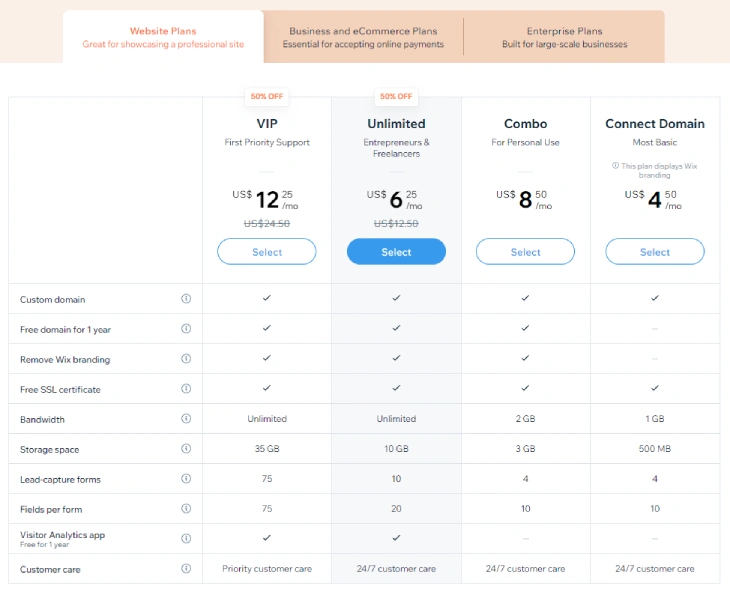
Wix pricing in 2026 runs from free (with Wix branding and ads) up to $159 per month for Business Elite, billed annually. The Light plan at $17/mo covers most personal and small business sites, while Core at $29/mo adds eCommerce basics. Bluehost starts at $2.95/mo as an introductory rate on the Basic plan, but that price is only for the first billing term. After renewal it moves to around $11.99/mo. The gap between Wix and Bluehost narrows considerably at renewal time.
Value of Money
Both Wix and Bluehost have their pros and cons. Wix offers a range of pricing plans to suit different budgets, with the most affordable paid plan starting at $17 per month. Wix plans include features such as unlimited bandwidth, free hosting, and a free domain for the first year. However, advanced features such as eCommerce tools and email marketing require more expensive plans.
Bluehost, on the other hand, offers a range of hosting plans starting at $2.95 per month as an introductory price. Bluehost's plans include a free domain for the first year, a free SSL certificate, and 24/7 support. Bluehost also offers a range of advanced features, such as unlimited email accounts and unlimited storage, on some of their more expensive plans. However, some users may need additional plugins or integrations for necessary functionality.

Ease of Use: Wix or Bluehost
Both platforms aim to ease website creation and management, but they approach it differently.
Drag-and-Drop Editors
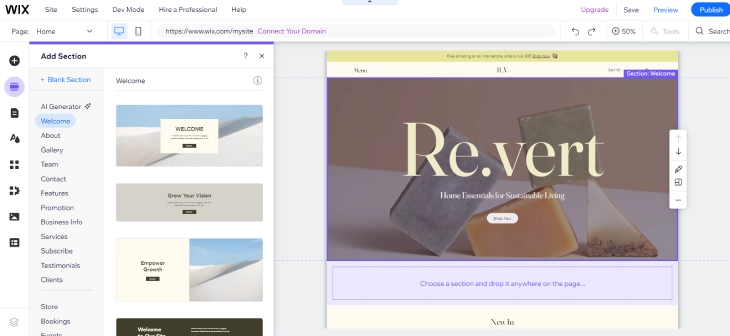
Both Wix and Bluehost offer drag-and-drop editors that make it easy to build and customize your website. Wix's editor is known for its ease of use and intuitive interface, allowing users to add and move elements around their site with ease. Wix also offers a range of design options, such as fonts, colors, and backgrounds, that you can use to create a unique look for your site.
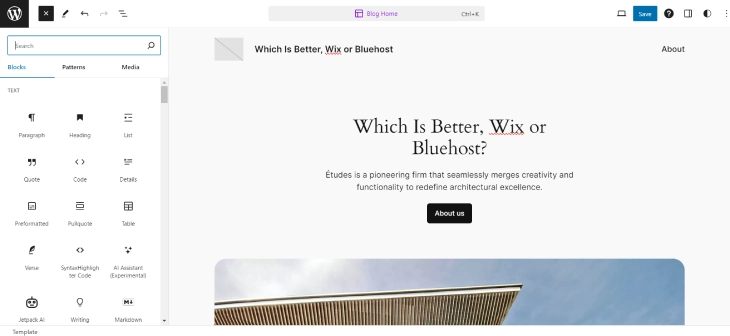
Bluehost's drag-and-drop editor is powered by WordPress, which means it offers a lot of flexibility and customization options. The editor allows you to add and move elements around your site, and you can also add plugins to extend the functionality of your site. However, some users may find that the WordPress editor has a steeper learning curve than Wix's editor.
Site Navigation and Editing
Wix offers a user-friendly drag-and-drop editor that makes it easy to navigate and edit your website. The editor allows you to add and move elements around your site with ease. You can also customize your site structure, such as adding pages and creating drop-down menus. Wix also offers a mobile editor to optimize your site for mobile devices, which is important for SEO and user experience.
Bluehost's navigation, on the other hand, is based on WordPress, which may require some learning for beginners. However, WordPress is a powerful content management system that offers a lot of functionality and customization options. Bluehost's customization is mainly plugin-based, which means you can add plugins to extend the functionality of your site. Bluehost also offers mobile responsive themes that automatically adjust to different screen sizes, so you do not have to worry about optimizing your site for mobile devices.
Design and Customization: Wix or Bluehost
Design and customization options are important for creating a unique website that stands out.
Templates
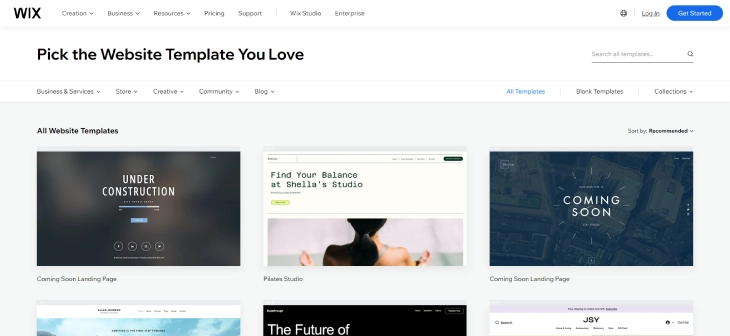
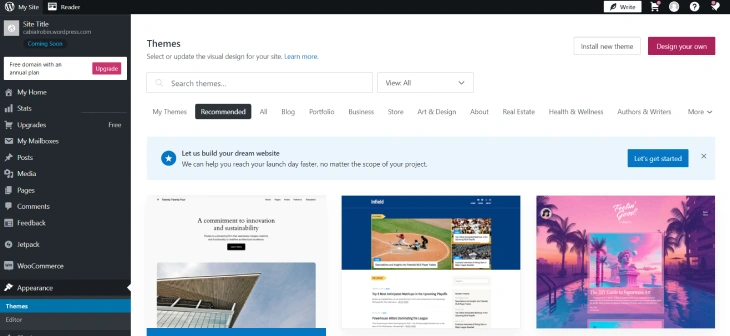
Wix offers a wide variety of free templates that are mobile-optimized and customizable. Wix's templates cover a range of industries, such as restaurants, photography, and eCommerce. You can also switch templates at any time, although you will have to redesign your site from scratch if you do. Wix's templates are designed to be easy to use, even for beginners with no design experience.
Bluehost offers WordPress themes that may require some adjustment to match your website's needs. WordPress gives you a lot of freedom in how you style and build out your site. You can add plugins to extend the functionality of your site, and you can also switch themes at any time without losing your content. Bluehost offers a range of themes to choose from, including free and premium options.
Design Flexibility
Wix's design interface is drag-and-drop, which makes it easy to customize your site. You can add and move elements around your site with ease, and you can also customize the look and feel of your site with built-in design features. Wix offers a range of design options, such as fonts, colors, and backgrounds, that you can use to create a unique look for your site. However, Wix has limited access to CSS/HTML, which may restrict your customization options if you have technical knowledge.
Bluehost uses the WordPress customizer, which may require some learning for beginners. However, the customizer offers a lot of room for adjustment and fine-tuning your site's appearance. You can add plugins to extend the functionality of your site, and you can also adjust the look and feel with advanced options. Bluehost offers access to CSS/HTML, which allows for more advanced customization if you have technical knowledge.
Features and Functionality: Wix or Bluehost
Both platforms offer various features to enhance your website's functionality.
eCommerce
Wix has built-in eCommerce tools, known as Wix eCommerce, which makes it easy to set up an online store. You can add products, set up payment gateways, and manage orders from your Wix dashboard. Wix also offers abandoned cart recovery, which can help you recover lost sales. However, Wix's eCommerce tools may not be as advanced as some dedicated eCommerce platforms.

Bluehost offers WooCommerce integration for eCommerce functionality. WooCommerce is a powerful eCommerce plugin for WordPress that offers a lot of functionality and customization options. You can add products, set up payment gateways, and manage orders from your WordPress dashboard. Bluehost also offers advanced eCommerce plugins for more functionality, such as subscription-based products and advanced shipping options.

SEO
Wix offers SEO Wiz for optimization, which is a built-in tool that guides you through the process of optimizing your site for search engines. Wix allows for URL structure customization and mobile optimization, which are important for SEO. However, Wix's SEO options may not be as advanced as some dedicated SEO tools.
Bluehost offers the Yoast SEO plugin for WordPress users, which is a powerful SEO tool that offers a lot of functionality and customization options. Yoast SEO allows you to optimize your site for keywords, set up meta descriptions and titles, and analyze your content for readability. Bluehost also offers permalink settings and mobile responsiveness for SEO optimization.
Third-Party Integrations
Wix offers an app market for third-party integrations, which allows you to add functionality to your site. Wix offers integrations for social media, marketing, and more. However, Wix's app market may not be as extensive as some dedicated integration platforms.
Bluehost offers access to the WordPress plugin library, which is a vast collection of plugins that can extend the functionality of your site. Bluehost offers plugins for social media, marketing, eCommerce, and more. Bluehost also offers advanced marketing tools for more functionality, such as email marketing and SEO tools.
Customer Support: Wix or Bluehost
Good customer support is essential for resolving any issues that may arise.
Support Channel
Wix offers phone, email, and knowledge base support, which allows you to get help when you need it. Wix's support is designed to be easy to use, even for beginners with no technical knowledge. However, Wix's support response time may vary, and live chat support is not available 24/7.
Bluehost offers live chat, phone, email, and knowledge base support, which allows you to get help when you need it. Bluehost's support is available 24/7, which is important for users who may need help outside of regular business hours. Bluehost's support is designed to be easy to use, even for beginners with no technical knowledge.
Support Quality
Wix offers quality support, with knowledgeable and helpful support agents. Wix's support is designed to be easy to use, even for beginners with no technical knowledge. However, Wix's support response time may vary, and live chat support is not available 24/7.
Bluehost also offers quality support, with knowledgeable and helpful support agents. Bluehost's support is available 24/7, which is important for users who may need help outside of regular business hours. Bluehost's support is designed to be easy to use, even for beginners with no technical knowledge. Bluehost also offers advanced support options for users with technical knowledge, such as access to server logs and advanced security features.
Conclusion: Which Is Better, Wix or Bluehost?
Both Wix and Bluehost are solid options for creating a website, but they cater to different needs and preferences. Wix is a user-friendly website builder that offers a range of design options and easy customization, making it ideal for beginners who want to create a simple website without needing to know how to code. Bluehost, on the other hand, is a web hosting service that offers more advanced features and functionality, making it a better choice for users who want to create a more complex website or have specific hosting needs.
The best choice for you will depend on your specific needs and preferences. By considering factors such as ease of use, design and customization options, features and functionality, and customer support, you can make an informed decision on which platform to use for your website. We hope that this full review of Wix vs Bluehost has given you the information you need to make the best choice for your website.
* read the rest of the post and open up an offer