

The Dennis Coleman template is our top pick for building a memorial website on Wix -- it was designed specifically as a tribute page, with built-in sections for sharing stories, uploading photos, and accepting condolences. If you need a ready-made memorial website template that treats the subject with the care it deserves, start there.
Choosing a memorial website template that feels right can be difficult, especially when you are still in the early stages of grief. You want a design that looks respectful, works on every device, and makes it easy for family and friends to contribute memories without needing any technical help. The good news is that Wix offers several memorial website templates, and free ones at that, which means you can have a tribute site live within an hour without spending anything or hiring a designer.
Wix makes the process easier with a library of free templates that balance beauty and simplicity. Below, we review the 4 best memorial website templates from Wix -- each selected for its ability to create a meaningful in memory website where loved ones can gather, share, and remember.
* read the rest of the post and open up an offer
4 Best Memorial Website Templates by Wix
Here are the 4 best memorial Wix templates for building an online tribute. Each one provides a respectful starting point that you can customize with photos, stories, and interactive features to honor someone's life.
Dennis Coleman Template
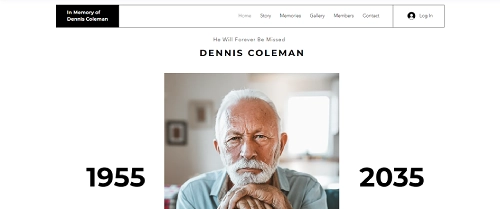
The Dennis Coleman template is the only Wix template built specifically as a memorial website template. It gives you a dedicated space for sharing stories, uploading photos, and letting visitors send condolences -- all without needing to repurpose a template from another category.
What sets this obituary website template apart is its focus on tribute-specific features. The layout includes sections for a biography, a photo gallery for life milestones, and a condolence form where visitors can leave messages. You can also add a timeline of key life events, embed videos of favorite memories, and include links to donation pages for memorial charities or funeral expenses.
Dennis Coleman Template Highlights
- Purpose-built memorial layout with biography, photo gallery, and condolence sections.
- Easy image uploading so family members can contribute photos from different life stages.
- Built-in condolence form that lets visitors leave messages of support directly on the site.
- Customizable color schemes and fonts to match the personality of the person being honored.
Robinson Family Reunion Template
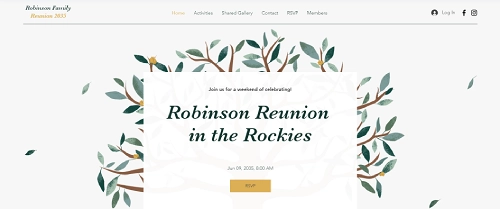
The Robinson Family Reunion template works well as a memorial website when the tribute includes a gathering or remembrance event. Originally built for family reunions, its event management tools are a natural fit for organizing memorial services, anniversary remembrances, or celebration-of-life events.
The template includes a media gallery where you can display cherished photos and videos. You can set up an event page with Wix Events for RSVP tracking, add location maps, and share logistical details like parking and dress code. The community features -- comments and sharing updates -- let family members stay connected before and after the event.
Robinson Family Reunion Template Highlights
- RSVP management with real-time tracking, ideal for memorial services or celebrations of life.
- Media gallery for displaying photo slideshows and tribute videos.
- Community engagement features like comments and update sharing to keep families connected.
- Map integration to help guests find the memorial event location.
Lucas & Kati Template

The Lucas & Kati template was designed for wedding invitations, but its bold, textured design translates surprisingly well to a celebration-of-life memorial website. If the person you are honoring had a colorful personality or a love for art and creativity, this template captures that energy.
You can repurpose the event details section for memorial service information, swap the registry section for a donation link to a favorite charity, and use the personal storytelling area for a biography or tribute essay. The drag-and-drop editor makes these changes quick, even if you have never built a website before.
Lucas & Kati Template Highlights
- Bold, textured design that stands out from more subdued memorial templates.
- Sections for event details, donation links, and personal storytelling -- all easily repurposed for tributes.
- Simple drag-and-drop customization of images, text, and color palettes.
- Works well for celebrating someone who lived a vibrant, creative life.
Emma & Niles Template
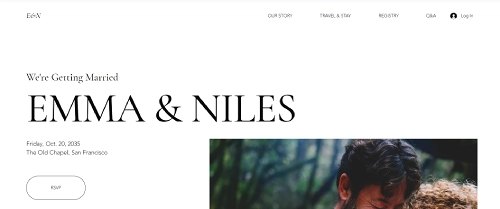
The Emma & Niles template offers a clean, modern look that works well for a formal memorial or obituary website template. Originally a wedding template, its elegant layout and neutral design make it easy to adapt for a dignified tribute page.
The template integrates with Wix Events for managing memorial service RSVPs, includes a FAQ section you can fill with information about the service, and has a map feature for directing guests to the venue. The editing interface is straightforward enough for anyone to use, regardless of technical experience.
Emma & Niles Template Highlights
- Elegant, modern design suited to formal memorial and obituary websites.
- Wix Events integration for RSVP management and service details.
- Built-in FAQ and map sections to answer guest questions and provide directions.
- Accessible editing interface for users of all skill levels.
How to Create a Memorial Website on Wix
Building a memorial website on Wix takes about 30 to 60 minutes once you have your photos and text ready. Here is a step-by-step walkthrough to get your tribute site live.
Step 1: Sign Up and Pick a Template
Create a free Wix account if you do not already have one. From the template gallery, search for "memorial" to find the Dennis Coleman template, or browse the Events category for alternatives like Robinson Family Reunion. Click "Edit" to open the template in the Wix editor.
Step 2: Add the Biography and Life Timeline
Replace the placeholder text with a biography of your loved one. Include key dates, accomplishments, and the things that made them who they were. If the template does not have a timeline section, add one using the Wix editor's strip or section tools -- list life milestones in chronological order so visitors can follow their story.
Step 3: Upload Photos and Videos
Use the Wix Pro Gallery to create a photo gallery with images from different stages of their life. You can also embed tribute videos, slideshow montages, or audio recordings of favorite songs or speeches.
Step 4: Set Up a Guestbook or Condolence Form
Add a contact form or comments section where visitors can leave condolences, share their own memories, or write messages to the family. Wix Forms lets you customize the fields -- you might include name, relationship, and a text area for the message.
Step 5: Add a Donation Button (Optional)
If the family is collecting donations for a memorial fund, funeral expenses, or a charity in the person's name, add a donation button. You can connect it to PayPal, Stripe, or link to an external fundraising page like GoFundMe.
Step 6: Include Event Details
If there is a memorial service, celebration of life, or anniversary gathering, add the date, time, location, and any instructions (parking, dress code, livestream link). Use the Wix Events app for RSVP tracking if you need a headcount.
Step 7: Review, Preview, and Publish
Preview your site on both desktop and mobile to make sure everything looks right. Check that all links work, images load properly, and the text reads well. When you are satisfied, hit Publish. You can share the link with family and friends by email, text, or social media.
What to Include on a Memorial Website
A thoughtful memorial website goes beyond a single obituary paragraph. Here are the key elements that make an in memory website meaningful for visitors.
- Biography or obituary: A written account of the person's life, including birth and passing dates, family, career, hobbies, and what made them special.
- Photo gallery: Images from childhood through adulthood -- candid shots, family photos, travel pictures, and milestone moments.
- Video tributes: Recorded speeches, home videos, or slideshow montages set to meaningful music.
- Guestbook or tribute wall: A space where visitors can write messages, share their own stories, and leave condolences for the family.
- Donation or memorial fund link: A way for visitors to contribute to a cause the person cared about, or to help with funeral costs.
- Event details: Date, time, location, and logistics for any memorial service, celebration of life, or anniversary gathering.
- Favorite quotes or sayings: Words that the person lived by, or that remind family and friends of them.
- Music playlist: Songs that were meaningful to the person or that capture the mood of the tribute.
- Social media links: Connections to the person's existing social profiles, if the family is comfortable sharing them.
- Privacy settings: Password protection for pages that should only be visible to close family and friends.
How to Select the Right Memorial Template
With several tribute website templates available on Wix, here is how to narrow down the best fit for your needs.
Match the Template to Their Personality
Think about the person you are honoring. Were they all about jazz music and spontaneous road trips? Or did they prefer the quiet comfort of a good book? Choose a template that mirrors who they were. A colorful, bold design suits a vibrant personality; a clean, minimal layout fits someone more reserved.
Prioritize Easy Navigation
Visitors to a memorial site are often emotional and may not be tech-savvy. Pick a template with clear menus, logical page flow, and obvious calls to action. Your visitors should feel guided through a story, not lost in a confusing layout.
Look for Multimedia Support
Photos, videos, music playlists -- these are what bring a memorial to life. Templates that support various media types let you create a rich collection of memories. Check that the template handles image galleries and embedded video well.
Check Customization Options
Fonts, colors, backgrounds, section layouts -- the best memorial websites let you adjust every detail. You want a template that gives you control without requiring design skills. Wix's drag-and-drop editor makes most customization straightforward.
Confirm Mobile Responsiveness
Many visitors will view the memorial website on their phone, especially if the link is shared through text or social media. Wix templates are generally responsive, but always preview on mobile before publishing to catch any layout issues.
What to Write on a Memorial Website: A Content Guide
Choosing a memorial website template is only the first step. The harder part for most families is knowing what to actually write. A blank page can feel paralyzing when you are grieving, so this guide breaks down each section of a typical memorial website and tells you exactly what to put there.
Writing the Biography
The biography is the heart of any memorial website. Aim for 200 to 400 words: long enough to give a real sense of the person, but short enough that visitors will read the whole thing. Start with the basics: full name, birth date and place, passing date, and immediate family. Then move beyond the facts.
Include what they did for work, but more importantly what they loved doing. What did they talk about at the dinner table? What made them laugh? What were they proudest of that never made it onto a resume? A biography that captures personality will stay with readers far longer than a list of career milestones. Write in the past tense and use a warm, personal tone.
If multiple family members want to contribute, assign sections rather than writing by committee. One person might cover childhood, another their adult years, and someone else their role as a parent or friend. Bring the sections together and edit for a consistent voice.
Writing a Tribute That Captures Who They Were
A tribute is different from a biography. Where a biography covers the arc of a life, a tribute captures the feeling of it. Think of three or four qualities that defined the person and find a specific story or example for each one.
Concrete details are what make tributes memorable. "She always brought extra food to every gathering because she could not bear the thought of someone going home hungry" tells readers far more than "she was generous." Aim for at least one vivid, specific memory per quality you mention.
Choosing and Organizing Photos
Photos tell the story your words cannot. For a memorial website, aim for 20 to 40 images that span the person's whole life. Good categories to organize by: childhood and school years, early adulthood, work and hobbies, relationships and milestones, and later life. Avoid organizing by date alone as thematic groupings are easier for visitors to explore.
Write a short caption for every photo. Even one sentence helps: the year, the occasion, who else is in the picture, or what the person was like at that point in their life. Captions transform a photo gallery into a narrative.
When selecting photos, prioritize candid shots over posed ones. The photo of them laughing at a kitchen table tells more truth than a formal portrait. If you have video clips, short ones (under two minutes) work best online.
Responding to Condolences
If you enable a guestbook or condolence form, you may receive dozens of messages. You are not obligated to respond to every one, especially in the immediate days after a loss. When you do respond, a brief acknowledgment is enough: "Thank you for sharing that memory, it means more than you know." Consider adding a short note at the top of the guestbook that sets expectations: "We read every message and are grateful for your kindness. Please know we may not be able to respond individually right now."
What Not to Include
Some information belongs in private conversations, not on a public memorial website. Avoid including: the exact home address of surviving family members, financial details like estate information, disputed or sensitive family history, and any details about the circumstances of death that the family has chosen to keep private. If there was conflict in the family or complicated relationships, the memorial website is not the place to work through those dynamics.
Handling Multilingual Families
If your family spans multiple languages, you have a few options. The simplest is to write the main biography in the primary language and add a brief translated summary below it. If the two communities are roughly equal, consider building separate pages, one per language, rather than mixing languages in a single block of text. Wix's editor lets you duplicate pages easily, so you can create a bilingual memorial without starting from scratch. For guestbook messages, allow contributions in any language because a message written in Portuguese or Tagalog carries just as much meaning as one in English.
Examples of Well-Known Memorial Websites
1. Legacy.com
One of the oldest and most recognized online memorial platforms. Legacy.com provides a clean, user-friendly interface for publishing obituaries and accepting condolences. Its straightforward design makes browsing memories feel like flipping through a cherished photo album.
2. ForeverMissed
ForeverMissed focuses on personal, intimate tributes. The platform allows extensive customization of each memorial page, making every tribute as unique as the person it honors. Users can add stories, photos, and invite others to contribute.
3. MuchLoved
A UK-based platform that combines memorial tributes with charitable fundraising. MuchLoved provides tribute website templates focused on storytelling, letting users weave together photos, videos, and written memories into a connected narrative.
4. Remembered.com
A minimalist memorial platform that keeps things simple without sacrificing features. Remembered.com is built around ease of use, making it accessible for people who want to create a meaningful tribute website quickly.
5. Tributes.com
Tributes.com combines a professional layout with heartfelt elements. Its memorial website templates balance formality and personalization, suiting users who want a polished yet warm tribute page.
A Brief History of Memorial Websites
Online memorials have changed significantly since the early days of the internet. Here is how they evolved.
- Early 2000s: The first dedicated memorial websites appeared. Platforms like Memory-of.com offered simple tribute website templates, turning basic web pages into spaces for remembrance.
- Mid-2000s: Social media changed the game. People started creating memorial pages on MySpace and later Facebook, making online tributes more social and accessible.
- 2010s: Dedicated memorial platforms grew more sophisticated. Interactive features like virtual candles, memory timelines, and guestbooks became standard.
- Late 2010s: Mobile apps brought memorial features to smartphones. Families could share memories and light virtual candles from anywhere.
- 2020s and beyond: Today, building a memorial website on Wix is as straightforward as creating any other site. Modern templates offer drag-and-drop editing, built-in galleries, donation tools, and event management -- all without writing a line of code.
Your Memorial Website: A Lasting Tribute
Creating a memorial website is a deeply personal undertaking. Thoughtful planning makes the difference between a generic page and a tribute that truly captures someone's spirit. Here are key principles to keep in mind.
Personalize the Design
Customize colors, fonts, and layouts to reflect the personality of the person being honored. Incorporate their favorite colors, meaningful quotes, and photos that capture who they were at their best.
Invite Contributions
Dedicate sections where friends and family can share personal stories, anecdotes, and memories. A collaborative memorial is richer and more meaningful than one created by a single person.
Build a Media Gallery
Create a gallery with photos and videos from different life stages. Include childhood pictures, graduation shots, wedding photos, family gatherings, and everyday moments that show the person's true character.
Share Event Information
If memorial services or anniversary gatherings are planned, include all the details: date, time, location, dress code, parking, and livestream links for those who cannot attend in person.
Add a Guestbook
A guestbook gives visitors a way to leave condolences, share memories, and offer support. This interactive feature creates an ongoing conversation that families can revisit whenever they need comfort.
Link to Social Media
If the person had a social media presence, consider linking to their profiles. Curated posts, photos, and interactions can provide additional context and warmth to the memorial.
Write a Biography
A heartfelt biography outlining the person's life, achievements, and impact serves as the centerpiece of any memorial website. Take time to get this right -- it is often the first thing visitors read.
Keep It Accessible
Make sure the website works on phones and tablets. Use clear navigation, readable fonts, and descriptive alt text on images so everyone can engage with the content, including visitors using screen readers.
Respect Privacy
Only share information the family is comfortable making public. Wix lets you password-protect pages if certain content should stay private.
* read the rest of the post and open up an offer