

Dropshipping is a popular eCommerce model where you sell products without holding inventory: your suppliers manage storage and ship orders directly to customers. This keeps startup costs low and makes it an ideal business model for entrepreneurs who want to launch an online store quickly. Wix is a strong platform for wix dropshipping: it combines a beginner-friendly website builder with built-in ecommerce tools, a dedicated app market for dropshipping integrations, and analytics to help you grow.
This guide walks you through how to start dropshipping on Wix step by step: from choosing the right Wix plan and setting up your store, to connecting suppliers and automating fulfillment. By the end, you'll have everything you need to launch and run a profitable wix dropshipping store.
What Wix Plan Do You Need for Dropshipping?
You need the Wix Business plan ($29/month) at minimum to run a dropshipping store on Wix. This plan enables online payments, removes transaction fees on sales, and unlocks the full Wix eCommerce suite required to connect dropshipping apps. Free and lower-tier plans do not support selling products online. See the full Wix pricing breakdown to compare plans before signing up.
Here is what each relevant Wix ecommerce plan includes:
- Business ($29/mo): Online store, payment processing, 50GB storage, no transaction fees: the minimum for a wix dropshipping store.
- Business Elite ($159/mo): Unlimited storage, priority support, advanced shipping rules: suited for high-volume dropshipping operations.
For most beginners starting a wix dropshipping tutorial setup, the Business plan is sufficient to get sales flowing before scaling up.
Step-by-Step Guide to Setup Your Wix Dropshipping Store
Launching a dropshipping store using Wix is an effective way to enter eCommerce without managing inventory or handling direct shipping. Wix's platform gives you the tools to create, manage, and grow an online store: whether you're starting from scratch or expanding an existing business. Here's how to start your wix dropshipping store from login to first sale.
Step 1: Logging into Your Wix Account
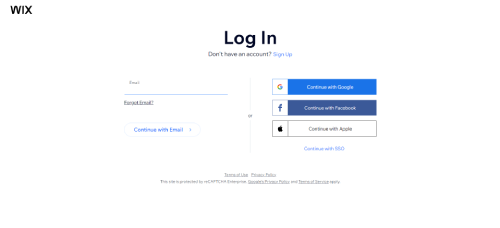
Go to Wix and log in or create a new account. Sign up with your email address or a social account (Google or Facebook). Once logged in, navigate to your dashboard and select "Create New Site" to begin your store setup.
Step 2: Selecting an eCommerce Template
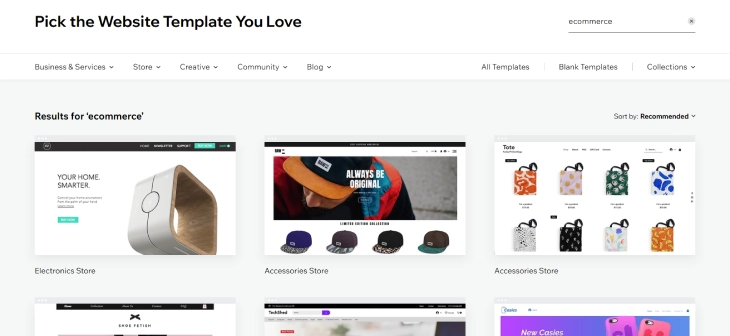
Wix offers a variety of eCommerce templates built for different business types. Pick a template that fits your niche's look and product type: a good template reduces design time and sets a professional tone for your dropshipping store. Filter by "Online Store" in the template gallery to see ecommerce-ready options.
Step 3: Set Up Payment Processing on Wix
Before importing products, configure your payment gateway so you can accept orders from day one. Wix Payments is the native option and accepts credit cards, Apple Pay, and Google Pay with no additional transaction fees on the Business plan. You can also connect PayPal as a secondary payment method for customers who prefer it.
To activate Wix Payments, go to your dashboard, click "Accept Payments," and complete the merchant verification form (requires business name, country, and bank details). Full setup steps are covered in the guide to setting up Wix Payments. Getting payments live before launch ensures no orders are missed when you start driving traffic.
Step 4: Partner with Dropshipping Suppliers
Choose reliable dropshipping suppliers who offer quality products, fast shipping times, and accurate inventory data. Wix ecommerce dropshipping is best served by dedicated apps that connect directly to your store and automate product imports. The three leading options are Spocket, AutoDS, and Dropified.
Spocket connects your Wix store to thousands of US and EU-based suppliers, which means faster shipping times: typically 2–7 days domestically: and fewer customs delays. Products import directly into your Wix product catalog with one click, including images, descriptions, and pricing. Spocket is one of the best dropshipping apps for Wix if your target customers are in North America or Europe.

Dropified automates order fulfillment, inventory tracking, and product information updates. Once an order is placed, Dropified routes it to your supplier and pushes tracking info back to the customer automatically: no manual steps required. It also tracks price changes from suppliers and alerts you when margins are at risk, helping you stay profitable.
AutoDS is another strong option for wix ecommerce dropshipping. It supports importing products from over 25 supplier sources: including AliExpress, Amazon, and Walmart: directly into your Wix store. AutoDS monitors stock levels and supplier prices 24/7 and automatically adjusts your store prices to protect your margins. It also handles order fulfillment end-to-end, including automatic tracking updates to customers.

Step 5: Create an Automated Fulfillment Process
Set up automation so that when a customer places an order, it is immediately routed to your supplier without any manual action from you. Automated fulfillment reduces shipping delays, eliminates human errors, and keeps customers informed with automatic tracking updates: all critical for maintaining positive reviews on a wix dropshipping store.
AutoDS and Dropified both offer full end-to-end fulfillment automation on Wix: order routing, inventory sync, price monitoring, and customer tracking notifications. Configuring these automations correctly from the start means your store can process orders around the clock. For configuring shipping zones and rates within Wix itself, see the guide to setting up Wix shipping: this ensures your store displays the right shipping options to customers at checkout.
Step 6: Market Your Dropshipping Business
Drive traffic to your store using Wix's built-in marketing tools. Wix SEO Wiz guides you through optimizing each product page for search: set unique meta titles, descriptions, and alt text for every product you import. Wix's email marketing tool lets you build a subscriber list and send promotional campaigns directly from your dashboard. A blog is one of the most effective long-term traffic sources for dropshipping stores. Our guide on how to add a blog to Wix covers the full setup in under 30 minutes.
For paid acquisition, connect your store to Google Shopping and Facebook/Instagram through Wix's marketing integrations to run product ads without leaving the platform. Social media channels like TikTok and Instagram are particularly effective for dropshipping products with visual appeal. Start with one or two traffic channels and scale what works before spreading budget thin.
For offline marketing, QR codes are a practical way to connect physical materials like business cards, flyers, and product packaging to your Wix store. A QR code printed on a package insert or shelf card can link directly to a specific product page or review request page. See our guide on how to create a QR code for your Wix website for the full setup.
 If you already have a Shopify store and want to use both platforms together, you can connect Shopify to Wix using Zapier or the Shopify Buy Button.
If you find Wix's native marketing features limiting as your store grows, platforms like Shopify offer an extensive third-party app marketplace for more advanced marketing integrations: though most dropshippers find Wix's built-in suite sufficient for getting started and reaching their first $5k/month in revenue.
Step 7: Optimize Your Dropshipping Business

Use Wix Analytics to track store performance: revenue by product, traffic sources, conversion rates, and abandoned carts. Review these metrics weekly and act on them: pause low-converting products, double down on bestsellers, and A/B test product page headlines and images. Regular optimization compounds: small improvements to conversion rate and average order value directly increase profit without requiring more ad spend.
How to Calculate Profit Margins for Wix Dropshipping
Aim for a minimum 25–40% profit margin on every product to keep your wix dropshipping store sustainable after accounting for all costs. Your margin must cover your Wix plan ($29/mo), app fees (Spocket/AutoDS typically $19–39/mo), advertising costs, and any payment processing fees (Wix Payments charges 2.9% + $0.30 per transaction).
Use this simple formula to check each product before listing it:
- Selling price: What you charge the customer
- Supplier cost: What you pay the supplier (including shipping to customer)
- Platform costs: Wix + app fees allocated per order
- Net margin: (Selling price − Supplier cost − Platform costs) ÷ Selling price × 100
Example: You sell a product for $49. Supplier cost is $18 (including shipping). Platform costs allocated per order: ~$2. Net margin = ($49 − $18 − $2) ÷ $49 = 59%: healthy for dropshipping. Products below 25% margin leave little room for paid advertising or returns.
Strategies for Successful Dropshipping on Wix
A successful wix dropshipping store requires more than just setting up products. Strategic decisions around product selection, pricing, customer trust, and Wix-specific features will determine whether your store converts visitors into repeat buyers.
Choose the Right Products for Wix Dropshipping
Select products with proven demand, manageable competition, and strong margins: ideally items that are hard to find locally and have a clear use case you can market visually. Use tools like Google Trends, AliExpress bestseller lists, and Spocket's trending products section to validate demand before importing. Avoid heavy, fragile, or oversized products that increase supplier shipping costs and damage rates, which compress margins on a wix dropshipping store.
Aim for a niche with 20–50 focused products rather than a general store with hundreds. Niche stores rank better in search engines, build brand recognition faster, and convert at higher rates because visitors immediately understand what the store is about.
Optimize Your Product Pages for Wix SEO
Product pages on a wix dropshipping store must be optimized for both search engines and conversion. Write unique product descriptions: never use the supplier's default copy, which is often duplicated across thousands of stores and will not rank. Each description should open with a clear benefit statement, include relevant keywords naturally, and end with a call to action.
Use high-resolution images (Wix supports up to 25MB per image), add descriptive alt text for SEO, and enable Wix's "Related Products" feature to increase average order value. Fast page load times matter: compress images before uploading and avoid loading too many third-party scripts on product pages.
Build Customer Trust with Reviews on Wix
Customer reviews are one of the strongest conversion drivers for dropshipping stores, where buyers cannot examine products in person. Enable Wix's native product reviews feature and prompt customers to leave a review via automated post-purchase email. Import supplier product reviews through your dropshipping app (AutoDS and Spocket both support this) to populate new product pages before you have organic reviews.
Displaying trust signals: review counts, star ratings, and a clear return policy: significantly reduces purchase hesitation. For a full guide on collecting and displaying reviews, see how to set up Wix reviews.
HTTPS security is another trust signal that affects whether shoppers complete checkout. Wix enables SSL automatically on every store, which shows visitors the padlock icon and encrypts payment data in transit. For a full explanation of how this works and how to verify it is set up correctly on your store, see our guide on how to enable SSL on Wix.
Offer Competitive Prices with Smart Pricing Rules
Use AutoDS's automatic repricing rules to maintain competitive prices without manual monitoring. Set a minimum margin threshold (e.g., 30%) and a maximum price cap, and let the tool adjust dynamically when supplier costs change. Analyze your top five competitors' prices monthly and position yourself at or slightly below the midpoint: you do not need to be the cheapest, but you cannot be significantly more expensive without a clear value reason.
Promotions, bundle deals, and limited-time discounts are effective for clearing slow-moving inventory and driving urgency: Wix's coupon and discount tools make these easy to configure without any code.
Stay Current on Wix Platform Updates and Dropshipping Trends
Wix regularly releases new ecommerce features: updated checkout flows, new payment methods, and additional app integrations. Staying current means you can adopt improvements before competitors do. Follow the Wix blog and the AutoDS/Spocket changelogs to catch new features as they launch.
The dropshipping market itself shifts quickly with consumer trends, ad costs, and supplier availability. Review your product catalog quarterly: retire underperforming products, research new trending items, and refresh product descriptions to stay relevant in search rankings.
Conclusion: How To Start Dropshipping On Wix
Starting a wix dropshipping store is straightforward when you follow the right steps: get on the Business plan ($29/mo), set up Wix Payments, connect a reliable supplier app like Spocket or AutoDS, and build product pages optimized for both search and conversion. The foundation matters: get payments, shipping, and fulfillment automated correctly from the start so your store runs smoothly as orders grow.
Before driving traffic to your store, make sure you have added a privacy policy to your Wix store. Ecommerce sites are legally required to disclose how customer data is collected and used, and payment processors like Stripe and PayPal require a published policy before activating your account.
Use Wix eCommerce as your core platform and lean on its built-in analytics, marketing tools, and app integrations to refine your store over time. With disciplined product selection, healthy profit margins, and a consistent focus on customer trust, a dropshipping with Wix business can generate reliable revenue in a competitive market. If you run into account or billing issues as your store grows, see the full guide on how to contact Wix customer service. Dropshipping sellers who want to present their store concept or product curation to potential suppliers can also build a Wix portfolio site to establish their brand presence online.
* read the rest of the post and open up an offer