

Wix dynamic pages are page templates connected to a CMS collection that automatically generate a unique URL for every item in your database. Instead of building 50 separate product pages or 30 individual team member profiles by hand, you design one layout and let the CMS fill in the content for each record. This single feature can save hours of repetitive work and makes your site far easier to maintain as content grows.
This guide covers how Wix dynamic pages work, walks through creating one from scratch, explains when to use them instead of regular pages, and flags the most common setup mistakes that trip up first-time users.
How Wix Dynamic Pages Work
A Wix dynamic page is a template that reads data from a CMS collection and displays it on screen. Each row in your collection becomes its own live page with its own URL. The page layout stays the same: only the content swapped into text boxes, image elements, and buttons changes based on which collection item the visitor requested.
For example, if you have a "Team Members" collection with 12 rows, Wix generates 12 separate URLs like /team/jane-doe and /team/john-smith. Each URL loads the same page design but shows that person's photo, bio, role, and contact details pulled from their collection record.
This is different from a static page where you manually place every piece of content. With dynamic pages, the CMS is the single source of truth. Change a team member's job title in the collection, and every page displaying that title updates instantly.
Real-World Examples of Wix Dynamic Pages
Dynamic pages work best when multiple items share an identical layout. Here are six practical use cases that show the range of what you can build:
Product Catalog
An online store selling handmade candles creates a "Products" collection with fields for name, price, scent, burn time, image, and description. One dynamic item page displays the product detail for any candle a shopper clicks. A dynamic list page shows the full catalog in a repeater grid with filter dropdowns for scent and price range. Adding a new candle to the store means adding one row to the collection: no page design needed.
Team Directory
A law firm builds a "Staff" collection with fields for name, title, practice area, headshot, bio, and email. The dynamic item page shows each attorney's profile. The list page displays a grid of headshots with names and titles, filterable by practice area. When a new associate joins, one collection entry creates their profile page automatically.
Event Listings
A community center tracks upcoming workshops in an "Events" collection with fields for event name, date, time, location, description, ticket price, and a registration link. The dynamic item page shows full event details with a "Register" button. The list page displays upcoming events sorted by date, with past events filtered out using a dataset date filter.
Real Estate Listings
A small agency creates a "Properties" collection with address, price, bedrooms, bathrooms, square footage, photos, and listing status. Buyers browse a dynamic list page filtered by price range and bedroom count, then click through to the item page for full details and a photo gallery. Sold properties get their status changed in the collection, and a dataset filter hides them from the active listing page.
Restaurant Menu
A restaurant uses a "Menu Items" collection with dish name, description, price, category (appetizer, main, dessert), dietary tags (vegan, gluten-free), and a photo. The dynamic list page groups items by category using filtered repeaters, and the item page shows a full description with ingredients and allergen information.
Online Course Catalog
An education site builds a "Courses" collection with course title, instructor, duration, difficulty level, curriculum outline, and enrollment link. Students browse courses on the list page filtered by difficulty and topic, then view full course details on the item page. New courses go live the moment they are added to the collection.
Dynamic Pages vs Regular Pages: When to Use Each
Not every page on your site should be dynamic. Choosing wrong wastes time and can create SEO problems. Here is a clear decision guide:
Use dynamic pages when:
- You have 5 or more items that share the same page layout (products, team members, blog posts, listings)
- Content will grow over time and you want new items to get their own page automatically
- You need visitors to filter or sort items on a list page
- You want non-technical staff to add content through the CMS without touching the page editor
- You are approaching or past the 100 static page limit on Wix
Use regular (static) pages when:
- The page is unique and has its own layout that no other page shares (homepage, about page, contact page)
- You need full design freedom for that specific page without being constrained to a template
- The content rarely changes and does not need to be managed in a database
- The page is a Wix app page (Wix Stores, Wix Bookings, Wix Events): these cannot be converted to dynamic pages
A common mistake is using dynamic pages for content that will never grow beyond 2-3 items. If you only have 3 services and each one has a completely different layout, static pages are simpler and give you more design control.
How to Create a Wix Dynamic Page Step by Step
This walkthrough covers the full process from creating a CMS collection to publishing a working dynamic page. The example builds a team directory, but the steps apply to any type of content.
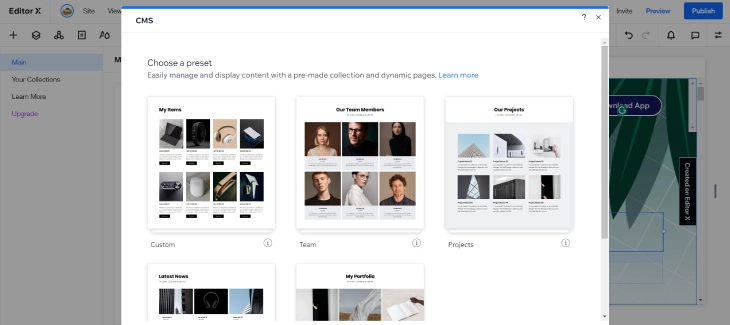
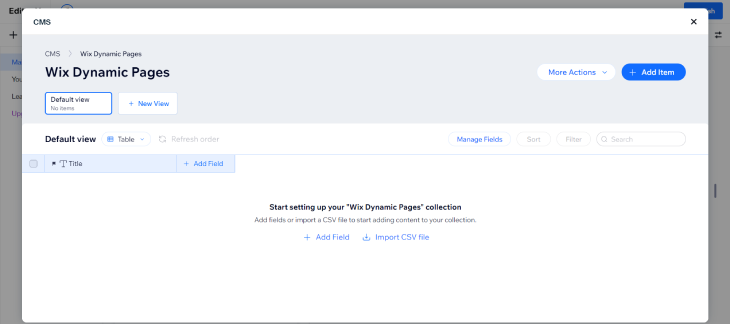
Step 1: Create a CMS Collection
Open the Wix Editor and click the CMS icon on the left sidebar. Click "Create Collection" and name it "Team Members." Choose "Multiple Items" as the collection type since you want many items displayed on dynamic pages.
Step 2: Define Your Fields
Add the fields your content needs. For a team directory, create these fields:
- Name (Text): the person's full name
- Slug (Text): the URL-friendly version of their name (e.g., "jane-doe")
- Role (Text): their job title
- Bio (Rich Text): a paragraph about their background
- Headshot (Image): their profile photo
- Email (Text): their contact email
- Department (Text): used for filtering on the list page
The Slug field is critical. It determines the unique part of each dynamic page URL. Every item must have a unique slug, or Wix will show a 404 error for duplicate entries.
Step 3: Add Collection Items
Enter at least 2-3 items into your collection so you have real data to preview. Fill in every field for each item. Incomplete records will show blank spots on your dynamic page, which makes it harder to spot layout problems during setup.
Step 4: Add the Dynamic Page
Go to the Pages panel, click "Add Page," and select "Dynamic Page." Choose your "Team Members" collection. Wix creates a dynamic item page automatically and links it to the collection through a dataset.
Step 5: Set the URL Pattern
Click the dynamic page's settings (gear icon) and go to the URL tab. By default, Wix uses the collection's primary field. Change it to use the Slug field for clean URLs like /team-members/{slug}. Avoid using fields that might contain spaces or special characters.
Step 6: Design and Connect Elements
Add text elements, an image element, and any buttons to the page. Then connect each element to the dataset by clicking the element, selecting the "Connect to Data" icon (the plug), and mapping it to the right collection field. Map the text element to "Name," the image element to "Headshot," and so on.
Step 7: Create a Dynamic List Page (Optional)
Add a second dynamic page and choose "List Page." This page uses a repeater to display all team members in a grid. Connect the repeater to the same dataset and map elements inside each repeater cell to your collection fields. Add a dropdown connected to the "Department" field so visitors can filter by department.
Step 8: Preview and Publish
Click Preview and cycle through your collection items to confirm every field displays correctly. Check that the URLs are clean and that the list page filters work. Once everything looks right, publish your site. Every item in the collection now has its own live page.
For a deeper look at connecting datasets to page elements, see our guide on how to create a dataset with Wix.
URL Structure and SEO for Dynamic Pages
URL patterns directly affect whether search engines can find and rank your dynamic pages. Wix gives you control over URL structure, meta tags, and indexing behavior for every dynamic page.
URL Pattern Best Practices
Keep URL slugs short, descriptive, and keyword-rich. A product page URL like /products/hand-poured-soy-candle tells both visitors and search engines what the page contains. Avoid patterns that use database IDs like /products/item-47291: these provide no SEO value and look untrustworthy to visitors.
You can build hierarchical URLs using multiple collection fields. For example, /blog/{category}/{slug} creates URLs like /blog/tutorials/getting-started. This signals content structure to Google and helps organize your sitemap.
Dynamic Meta Tags
Wix lets you insert collection field variables into your page's title tag, meta description, and Open Graph tags. Instead of every dynamic page sharing the same generic meta title, each page gets a unique title pulled from the collection. Go to the dynamic page's SEO settings and use curly-brace variables like {Name} - {Role} | Your Company.
Unique meta tags for every dynamic page are a requirement for indexing. Search engines treat pages with identical titles and descriptions as duplicate content, which can prevent them from appearing in results. For more on setting up meta tags, see our guide on how to add meta tags on Wix.
Internal Linking for Dynamic Pages
Dynamic pages can become orphan pages if they are only accessible through the list page repeater. Add internal links from related static pages and blog posts to your most important dynamic pages. For example, if you have a services page, link directly to your top 3-5 team member profiles rather than only linking to the directory list page.
Wix Dynamic Page Datasets Explained
Datasets are the bridge between your CMS collection and the elements on your dynamic page. The dataset mode controls whether the page can read data, write data, or both.
- Read-Only: fetches and displays collection content. Use this on item pages and list pages where visitors only view content (product details, blog posts, team profiles).
- Write-Only: accepts form input and writes new items into the collection. Use this on submission pages where visitors add reviews, create listings, or submit applications.
- Read-Write: displays existing data and allows editing. Use this on member profile pages or admin dashboards where logged-in users update their own records.
You can also set the number of items that load per page (the "Items per load" setting). For a product grid, 12-24 items per load works well. For a blog listing, 6-10 items keeps the page fast. Setting this too high can slow down page load times, especially if your collection includes large images.
Using Repeaters on Dynamic List Pages
A repeater is a layout container that duplicates itself for every item a dataset returns. You design one "cell" with placeholder elements, connect them to collection fields, and Wix fills the repeater with your data at runtime.
Repeaters are essential for any dynamic list page: product grids, team directories, event calendars, blog indexes, or portfolio galleries. You can add filter dropdowns and sort controls connected to the same dataset so visitors can narrow results without reloading the page.
For best results, keep repeater cells lightweight. Avoid loading 10+ images per cell or embedding videos inside repeaters. Each cell multiplied by 20+ items means dozens of media elements loading simultaneously, which hurts page speed.
Performance Considerations
Dynamic pages add a database query step that static pages do not have. While Wix handles this efficiently for most sites, large collections or complex setups can slow things down. Here is what to watch for:
- Collection size. Collections under 1,000 items perform well without any optimization. Above 5,000 items, consider using Wix Velo to implement custom pagination rather than loading all items at once.
- Image optimization. Every image in a collection item loads when its page is viewed. Use Wix's built-in image optimization and keep source images under 500KB. Avoid uploading uncompressed TIFF or BMP files to the CMS.
- Repeater load count. Setting "Items per load" to 50+ on a repeater with image-heavy cells creates a slow first load. Start with 12 items and add a "Load More" button or pagination.
- Reference fields. Connecting a dynamic page to multiple collections through reference fields adds database lookups. If your item page pulls data from 3+ related collections, test the load time on mobile.
- Velo code on page load. Running complex Velo queries inside
$w.onReady()adds to the time before the page displays. Move non-critical data fetches to run after the initial page render.
Wix Dynamic Pages vs WordPress Custom Post Types
WordPress Custom Post Types (CPTs) are WordPress's equivalent of Wix dynamic pages. They let you create structured content (like portfolio items, reviews, or products) with their own templates and archive pages. If you are choosing between platforms, or considering a migration, understanding how the two approaches differ can save you a lot of time.
Feature |
Wix Dynamic Pages |
WordPress CPTs |
| Setup | Visual editor, no code needed | Usually requires a plugin (CPT UI, ACF) or custom PHP |
| URL control | Custom slug field, limited hierarchical options | Full permalink customization including post type prefix |
| Template design | One visual template per collection | Theme templates (single-{cpt}.php) or page builder templates |
| Database | Wix CMS collections (proprietary) | MySQL (portable, self-hosted) |
| Filtering/sorting | Built-in dataset filters, no code | Requires plugin (FacetWP, Relevanssi) or custom WP_Query |
| Performance at scale | Works well under ~5,000 items; Velo needed above that | Scales to millions with proper hosting and caching |
| Hosting | Fully managed by Wix | Self-hosted or managed WordPress host |
| Export | CSV export from CMS | Full SQL/XML export |
| Learning curve | Low: visual interface | Medium: requires understanding of WordPress template hierarchy |
When Wix dynamic pages win: If you want to build and launch quickly without worrying about hosting, security updates, or server configuration, Wix dynamic pages are faster. The visual CMS and built-in datasets handle 90% of use cases without any code. You do not need to install plugins, manage a database server, or learn PHP template files to get structured content pages live.
When WordPress CPTs win: WordPress CPTs are better for sites that need to scale beyond Wix's CMS limits, require full database portability, or need deep integration with custom server-side logic. WordPress also has a much larger ecosystem of plugins for advanced filtering, faceted search, and bulk content management. If your business depends on owning and exporting your data at any time, WordPress gives you that control in a way Wix does not.
Migrating between them: If you outgrow Wix's CMS and want to move to WordPress, export your collection as a CSV and import it using a tool like WP All Import. The URL structure will change, so set up 301 redirects from your old Wix URLs to the new WordPress slugs. The data itself transfers cleanly; the main work is rebuilding the page templates and configuring the CPT to match your old field structure.
Common Dynamic Page Mistakes and How to Fix Them
Most dynamic page problems come from setup errors, not platform bugs. Here are the seven mistakes that cause the most frustration:
1. Duplicate URL Slugs
If two collection items have the same slug value, Wix cannot generate unique URLs for both. One will return a 404 error. Always ensure slugs are unique across every item. Add a validation rule or manually check for duplicates before publishing.
2. Wrong Dataset Mode
Setting a dataset to "Write-Only" on a page that needs to display content means nothing shows up. Visitors see an empty page. Double-check that display pages use "Read-Only" and submission forms use "Write-Only."
3. Collection Permissions Too Restrictive
If your collection's read permission is set to "Admin" instead of "Anyone," visitors will see blank pages or 404 errors on your live site even though everything looks correct in the editor. Go to Collection Settings and set the Read permission to "Anyone" for public-facing content.
4. Sandbox Not Synced
Wix CMS has a sandbox mode that lets you test changes before going live. If you add items in sandbox but forget to sync to the live collection, your published dynamic pages will not show the new items. Always click "Sync" after making sandbox changes.
5. Elements Connected to Both Static Links and Datasets
If a button on your dynamic page has a static link (set through the Link icon) and is also connected to a dataset URL field, the two conflict. The static link usually wins, sending every visitor to the same URL regardless of which collection item they are viewing. Remove the static link and use only the dataset connection.
6. Missing or Broken Images
Images stored in the CMS collection can appear broken if the file was corrupted during upload or if the image field is empty for that item. Set a default fallback image in your page design, and re-upload any corrupted files directly through the CMS.
7. Forgetting to Publish After Adding Pages
Adding a dynamic page in the editor does not make it live. You must publish (or re-publish) your site for the new dynamic pages to appear. If your dynamic pages work in Preview but return 404 on the live site, check whether you published after adding them.
Wix Velo Code Examples for Dynamic Pages
Wix Velo (formerly Corvid) lets you add custom JavaScript to dynamic pages for functionality that goes beyond what the visual editor offers. Here are two common examples of what you can build.
Custom Filtering on a List Page
You can write a Velo script in the dynamic list page's code panel that listens to a dropdown element's change event and applies a dataset filter based on the selected value. When a visitor picks a category from the dropdown, the dataset updates its filter to match that value, instantly narrowing the repeater results without reloading the page. If the visitor selects "All," the filter clears and all items show again.
The key components are: a dropdown element connected to a dataset filter method, and the dataset's setFilter() method that accepts a wixData.filter() query. You can find the full code example in the the Wix developer documentation.
Previous and Next Navigation Buttons
On a dynamic item page, you can add previous/next buttons that let visitors flip through collection items without going back to the list page. The Velo script reads the current dataset's adjacent items using getPreviousItem() and getNextItem(), then sets each button's link to the adjacent item's URL. If no previous or next item exists (first or last item in the collection), the corresponding button is hidden.
This creates a browsing experience similar to an e-commerce product page where shoppers can cycle through items. The full implementation is in the the Wix developer documentation.
Practical Applications
Blogs and News Sites
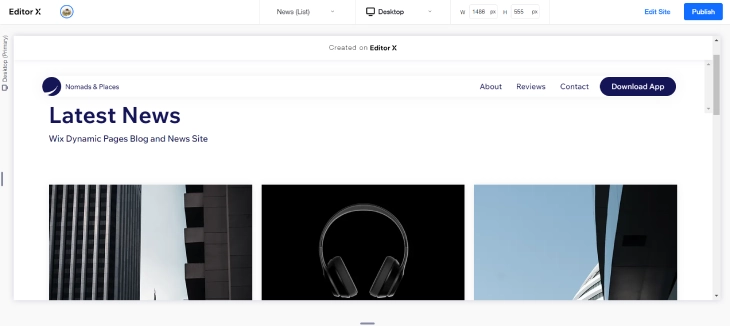
Using dynamic pages for a blog means every new article gets its own SEO-friendly URL as soon as you add it to the CMS collection. The item page layout handles the headline, author, publication date, featured image, and body text: all mapped to collection fields. Editorial staff only touch the Content Manager, never the page design.
A dynamic list page with a repeater displays the article index, and you can add category filters so readers browse by topic. This approach scales to thousands of posts without additional design work.
eCommerce Product Pages
Dynamic pages give every product its own URL driven by a single item page template. Product name, description, price, sizes, and images all come from CMS collection fields. Updating a price or swapping an image means editing one collection record, not hunting through individual pages.
The product list page uses a repeater with filter controls for category, price range, and availability. For a full look at what Wix offers for selling online, see our Wix eCommerce review.
Portfolio and Case Study Sites
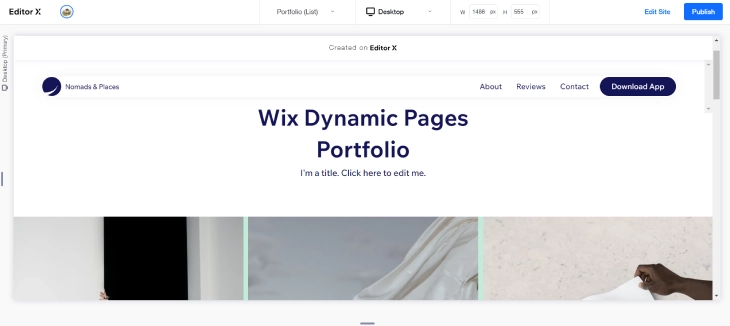
Creative professionals use dynamic pages to build portfolios where each project gets a dedicated page. Project title, client name, category, cover image, and a rich-text description in the CMS collection are all you need. The item page turns each record into a polished project detail page.
Adding new work is as simple as inserting a new row. A dynamic list page with category filters lets visitors browse by project type. For more on getting started with Wix, see our guide on how to use Wix.
User Submission Pages
Dynamic pages can collect visitor data and write it directly into a CMS collection using a Write-Only dataset. This lets visitors submit reviews, create listings, or update profiles without leaving the page. You build the form using input elements (text input, dropdown, file upload), connect each input to a collection field, and set a submit button to trigger the write action. For a full walkthrough of form setup, see our guide on how to use Wix forms.
Wix Dynamic Pages: Pros and Cons
|
Pros |
Cons |
|
|
Summary
Wix dynamic pages are the right tool when you need one layout to serve many content items: products, team members, blog posts, properties, events, or anything else stored in a CMS collection. They save time, keep your design consistent, and scale without extra work. The key is getting the setup right: unique slugs, correct dataset modes, proper collection permissions, and clean URL patterns. For advanced use cases, our Wix Velo review covers how Velo lets you add custom filtering, sorting, and navigation logic with JavaScript. If you want to learn more about building on Wix, our guide on how to design a website with Wix covers the broader editor workflow.
Which Wix Plan Do You Need for Dynamic Pages?
Dynamic pages are available on all Wix plans, including the free tier. You can build a CMS collection, create a dynamic item page, and preview everything in the Wix editor without paying a cent. The catch comes when you need to publish your site and scale your content library.
On the free plan, your site goes live on a Wix subdomain and CMS collections are limited to 50 items per collection. That works for a small team directory or a short portfolio, but it hits a wall fast for anything larger.
The Light plan ($17/month) bumps the collection limit to 1,000 items. It also lets you connect a custom domain and removes Wix ads. It is a reasonable starting point for small catalogs, but if you are running an actively growing product list or event schedule, you will outgrow it.
The Core plan ($29/month) raises the CMS limit to 25,000 items per collection, which is enough for most small and mid-sized sites. It also unlocks the ability to accept payments directly through Wix, which pairs well with dynamic product pages. For most sites building meaningful content libraries, Core is the practical minimum.
The Business plans ($36 and up per month) are built around ecommerce and priority support rather than higher CMS limits specifically. If your dynamic pages serve a store with high transaction volume or you need abandoned cart recovery and subscription products, Business plans add those capabilities on top of what Core already provides.
One important note: Wix Velo, the developer platform that lets you add custom JavaScript and backend code to dynamic pages, requires any paid Premium plan to publish. You can write Velo code and test it in preview mode on the free plan, but it will not run on a live site until you upgrade.
Wix Dynamic Pages Troubleshooting: Common Errors and Fixes
Dynamic pages have more moving parts than static pages, so there are more places where something can go wrong. These are the five errors that come up most often, along with the steps to fix each one.
Dynamic Page Not Showing
If your dynamic page exists in the editor but visitors cannot reach it, the first thing to check is your dataset mode. Open the dataset connected to the page and confirm it is set to Read (or Read and Write if you need forms). A dataset left on Write mode pulls no data, so the page renders blank or throws an error. The second thing to check is the page URL pattern. Go to Pages and Menu, click the dynamic page, and open its settings. The URL slug field must reference a field that exists in your collection, such as /team/{slug}. If that field name does not match an actual collection field, the page cannot generate URLs.
Blank Dynamic Page or Content Not Loading
A page that loads but shows no content almost always has a field mapping problem. In the editor, click each text element, image, or button on the dynamic page and check the connection panel on the right. Every element needs to be explicitly connected to a collection field. If an element says "Not Connected," it will display nothing on the live page even though data exists in the collection. Go through each element and map it to the correct field. Also check that your collection actually contains published items, not just drafts, since draft items are hidden from live pages by default.
Dynamic Page URL Returns a 404
A 404 on a dynamic page URL almost always means the item's slug field contains a character that breaks the URL. Wix generates slugs from the item's title field by default, but if the title contains special characters like &, #, %, or accented letters, the generated slug may not resolve correctly. Open the collection, find the affected item, click the slug field directly, and replace the slug with a clean, lowercase, hyphenated version containing only letters, numbers, and hyphens. Save the item and republish your site.
Dynamic Pages Not Visible in Site Structure
If you create a CMS collection and add a dynamic page but cannot see the individual item pages in your site's page structure or sitemap, you likely have not published the collection itself. In the CMS panel, look for a Publish button or status indicator on the collection. Unpublished collections exist in draft mode and their dynamic pages are not accessible on the live site, even if the page template is set up correctly. Publish the collection, then republish your entire site.
Deleted Collection Items Still Appearing as Live Pages
After you delete an item from a collection, its URL may still return content for a short time due to caching. If the page is still live after several minutes, do a full site republish by clicking Publish in the top-right corner of the Wix editor. This clears the CDN cache and forces Wix to regenerate the sitemap without the deleted item. If the page persists after republishing, check whether the item was truly deleted or just set to Draft, since draft items can sometimes linger at their old URLs until a clean publish cycle completes.
Wix Dynamic Pages vs Wix Blog: Which Should You Use?
Both Wix dynamic pages and the Wix Blog app can publish content at unique URLs, and beginners often wonder which one to pick. They are built for different purposes, and choosing the wrong one creates extra work down the road.
When to Use the Wix Blog
The Wix Blog is the right choice when your content is standard editorial content: articles, news updates, opinion pieces, tutorials, or announcements. It comes with built-in categories, tags, author profiles, scheduled publishing, an RSS feed, and reader subscriptions. The URL structure is clean and SEO-friendly by default. Google tends to crawl blog posts reliably because the sitemap is generated automatically and the page structure is predictable. If you are writing content and want an out-of-the-box publishing workflow, use the Blog app.
When to Use Dynamic Pages
Dynamic pages are the better choice when your content is not articles. If you are publishing products, staff profiles, property listings, events, recipes, case studies, or any content type that has custom fields, dynamic pages give you full control over the data structure and the page design. You define exactly which fields exist, how they are displayed, and how visitors filter or sort them. The Wix Blog does not let you add arbitrary custom fields to posts without workarounds, so anything beyond standard article metadata belongs in a CMS collection with dynamic pages.
The Key SEO Difference
This is worth knowing before you commit to either approach. Wix Blog posts are indexed-friendly by default: the sitemap updates automatically, canonical tags are set correctly, and meta titles and descriptions are easy to configure from the post editor. Dynamic pages require you to set up SEO settings manually for the page template and ensure your collection items have populated title and description fields that feed into those meta tags. Neither approach is inherently better for SEO, but the Blog requires less manual setup to get the basics right. If SEO configuration feels like extra friction you want to avoid, the Blog is the lower-effort path for article content.
* read the rest of the post and open up an offer